The cost of getting it wrong is real. Misconfigured IAM roles cause training jobs to fail silently. Wrong data input modes create bottlenecks that slow or corrupt training runs. Poorly chosen inference endpoint types result in bills that spike without warning. And models that skip post-deployment monitoring quietly degrade until they start affecting business outcomes.
This guide covers SageMaker's core architecture, the prerequisites that must be in place before you start, a step-by-step implementation sequence, and the most common failure points with actionable fixes.
Key Takeaways
- SageMaker runs on three phases — Build, Train, and Deploy — unified by an MLOps layer that connects each stage
- Before any implementation: configure IAM execution roles, S3 buckets, VPC settings, and data access mode
- Implementation sequence: Domain setup → Data layer configuration → Pipeline automation → Deployment and monitoring
- Most training failures trace back to IAM permission gaps or the wrong data input mode
- Skipping Model Monitor after deployment means production drift goes undetected until it damages outcomes
AWS SageMaker Architecture: Core Components Explained
SageMaker is not a single tool. It is a layered platform where each layer can be used independently or together as part of a full ML workflow.
The Three Architectural Layers
Build layer — SageMaker Studio provides the IDE environment. Notebook Instances offer a standalone alternative. Both give data scientists a place to develop and iterate without managing underlying compute directly.
Train layer — Training Jobs run on on-demand EC2 clusters that SageMaker provisions, runs, and terminates when the job completes. There is no persistent training infrastructure to manage. Data is pulled from S3. Model artifacts are written back to S3 when training finishes.
Deploy layer — Four inference options exist: Real-Time Endpoints, Serverless Inference, Asynchronous Inference, and Batch Transform. Each suits different traffic patterns and cost structures, covered in the deployment section below.
The Underlying Compute Model
Understanding the layers above becomes clearer once you see the infrastructure principles driving them:
- Job-scoped compute: Training clusters exist only for the duration of a job. No idle instances accumulate costs between runs.
- Docker containers via ECR: SageMaker runs training and inference inside Docker containers, using prebuilt ECR images or custom images you provide. This keeps environments consistent across every job.
- S3 as the central artifact store: Training inputs, outputs, model artifacts, and checkpoints all route through S3, making it the durable backbone across every layer.
The MLOps Layer
Sitting across all three stages:
- SageMaker Pipelines — DAG-based ML workflow automation for end-to-end retraining pipelines
- Feature Store — Centralized feature management with online (low-latency inference) and offline (training) stores
- Model Registry — Versioned model catalogue for governance and controlled promotion
- Model Monitor — Production drift detection with CloudWatch alerting

Teams building their first SageMaker deployment can skip most of this layer initially — but Pipelines and Model Monitor become necessary the moment you're retraining models on a schedule or serving predictions in production.
Prerequisites and Setup Checklist Before Implementation
Skipping prerequisites is the primary reason SageMaker implementations fail late and cost far more to fix. Get these right before creating a domain.
AWS account requirements:
- Active account with GPU instance quota increases approved (p3, p4d, or g4dn families depending on workload)
- An S3 bucket designated for training data and model artifacts — name it clearly, as bucket naming affects IAM policy matching
- A decision on account architecture: single-account works for experimentation; multi-account (data, ML execution, staging, production) is the right pattern for any enterprise deployment
IAM Roles and Security Configuration
The SageMaker Execution Role is mandatory and must include:
- S3 read/write permissions for your designated buckets
- ECR image pull permissions (if using custom containers)
- CloudWatch Logs write permissions for training and endpoint logging
- EC2 network interface actions if running VPC-attached jobs
Critical: The role's trust policy must list sagemaker.amazonaws.com as a trusted principal. Without this, SageMaker cannot assume the role and jobs fail immediately.
For regulated industries — financial services, healthcare — VPC-only mode is mandatory. Configure all three of the following before creating the domain:
- Route all Studio traffic through designated VPC subnets
- Create interface VPC endpoints for both the SageMaker API and SageMaker Runtime
- Add an S3 gateway endpoint to complete the private network path
AWS Environment and Service Dependencies
Pre-configure these before starting implementation:
| Dependency | Purpose | Common Failure Point |
|---|---|---|
| Amazon ECR repository | Hosts custom training/inference containers | Forgotten until training job pulls a missing image |
| AWS KMS key | Encrypts EFS volumes and S3 model data | Required for regulated environments; added after compliance audit flags it |
| CloudWatch log groups | Captures training and endpoint logs | Missing groups mean zero visibility into failures |
How to Implement AWS SageMaker Architecture Step-by-Step
The sequence matters. IAM and networking gaps discovered mid-pipeline are much harder to fix than gaps caught before domain creation.
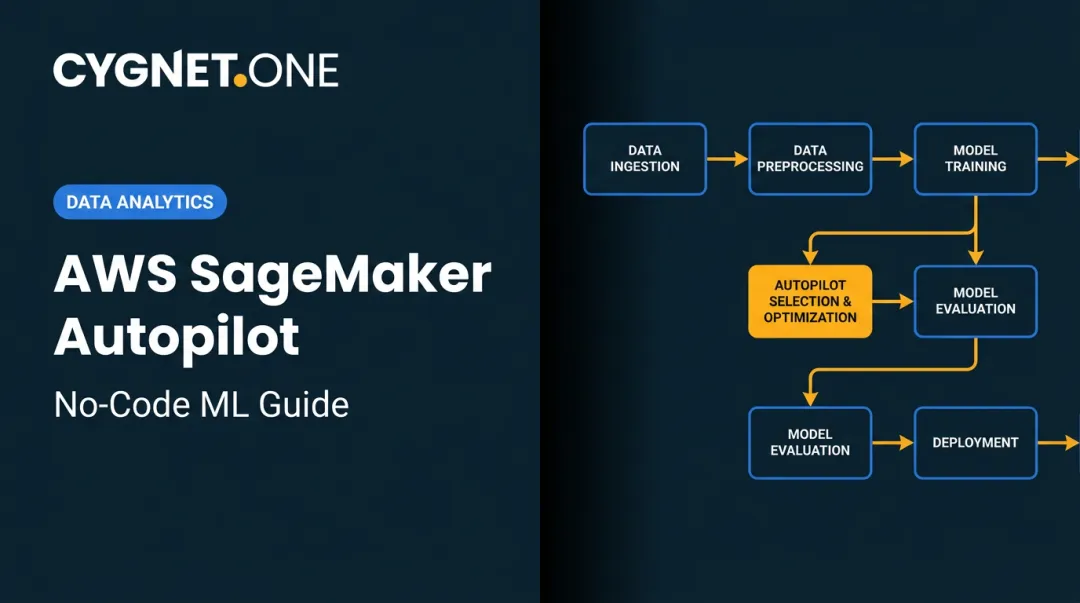
The implementation follows four stages: Domain setup → Data configuration → Pipeline build → Deployment and monitoring
Setting Up the SageMaker Domain and Studio
When creating the domain, key decisions include:
- Authentication mode — IAM authentication for simpler setups; IAM Identity Center (SSO) for teams requiring centralized identity management
- Execution role assignment — Assign the pre-configured execution role with appropriate permissions
- VPC and subnet configuration — For regulated environments, select the VPC-only network access mode
- User profiles — Each user profile gets a dedicated EFS-backed home directory for notebook and artifact isolation
One billing detail that catches teams off guard: JupyterServer apps render the Studio UI and carry no compute charge. KernelGateway apps run kernels on EC2 instances and bill per use. Configure auto-shutdown policies for idle KernelGateway apps during setup — not after the first unexpectedly large bill.
Configuring Data Storage and Access Layers
Choosing the wrong data input mode is a top cause of training job performance problems. The three modes:
| Mode | How It Works | When to Use |
|---|---|---|
| File Mode | Downloads full dataset to training instance before training starts | Small-to-medium datasets where startup latency is acceptable |
| Fast File Mode | Streams from S3 via POSIX interface on demand | Large datasets where startup latency matters; replaces Pipe Mode for most workloads |
| Pipe Mode | Streams via FIFO interface | Legacy option; only when the container explicitly requires it |

For teams running repeated training on the same large dataset, linking an Amazon FSx for Lustre file system to the S3 bucket provides low-latency access after the first lazy-load. This is the recommended pattern for high-throughput training workloads.
Building the ML Training Pipeline
SageMaker Pipelines defines workflows as a directed acyclic graph (DAG) in JSON, built using the Python SDK. A typical pipeline includes:
ProcessingStep— data preparation and validationTrainingStep— model trainingEvaluationStep— metrics computationRegisterModel— catalogue the model in the Model Registry
Triggering the pipeline via EventBridge on code commits enables full CI/CD for model retraining without manual intervention.
Feature Store deserves attention here. Features computed during preprocessing should be written to Feature Store: the online store handles low-latency inference lookups, while the offline store (S3-backed) serves training. Writing features to Feature Store prevents training-serving skew — where training features differ from those served at inference — which is a leading cause of models that validate well but underperform in production.
Deploying Models and Configuring Monitoring
Choose the endpoint type based on actual traffic patterns, not convenience:
| Option | Best For | Cost Pattern |
|---|---|---|
| Real-Time Inference | Persistent low-latency workloads (fraud scoring, recommendations) | Always-on instance cost |
| Serverless Inference | Intermittent or unpredictable traffic | Pay-per-invocation, scales to zero |
| Asynchronous Inference | Large payloads, longer processing times | Queue-based, no persistent instance required |
| Batch Transform | Scheduled bulk scoring from S3 | Job-scoped cost only |

Choosing a Real-Time endpoint for an intermittent use case is one of the most common — and avoidable — cost overruns in SageMaker deployments.
Model Monitor is required for any production endpoint. The setup sequence:
- Enable data capture on the endpoint
- Create a baseline from training data statistics
- Schedule monitoring jobs against the live endpoint
- Route CloudWatch alerts for data drift or model quality degradation
Teams that skip this step end up with models serving stale predictions, with no alert until the business notices the decline.
Common SageMaker Implementation Problems and Fixes
IAM Permission Errors Blocking Training Jobs
Problem: Training job fails immediately after launch with an "Access Denied" error.
Root cause: The execution role lacks S3 permissions for the specific bucket, cannot pull from ECR, or cannot write CloudWatch logs. Overly restrictive bucket policies or a missing trust relationship are the usual culprits. S3 AccessDenied errors can occur even with AmazonSageMakerFullAccess attached if bucket-level policies block access.
Fix:
- Verify the trust policy lists
sagemaker.amazonaws.comas a trusted principal - Audit S3 bucket policies to explicitly allow the execution role's ARN
- Use IAM Policy Simulator to test permissions before relaunching the job
Training Job Runs But Produces Poor Results
Problem: Training completes without errors but model metrics are poor or inconsistent.
Why this happens: Two causes are most common. First, File Mode used for a dataset too large: training starts before the full download completes, causing partial reads. Second, training-serving skew occurs when the feature preprocessing logic used during training differs from what runs at inference time.
Fix: Switch to Fast File Mode for large datasets. Validate that both training and inference use the same feature definitions, ideally enforced through SageMaker Feature Store.
Endpoint Cost Overruns After Deployment
Problem: Monthly AWS bill spikes after deploying an inference endpoint.
Likely cause: A persistent Real-Time endpoint deployed for a low-traffic or intermittent workload. The instance runs 24/7 regardless of request volume.
Fix: Evaluate whether Serverless Inference fits the actual traffic pattern. If Real-Time hosting is genuinely required, implement auto-scaling policies, including scaling to zero during low-traffic windows where the workload tolerates it.

Pro Tips for Implementing SageMaker Architecture Effectively
Use Spot Instances for training jobs. AWS Managed Spot Training can reduce training costs by up to 90% over on-demand instances by using spare EC2 capacity. The trade-off is that jobs can be interrupted. Enable checkpointing to S3 — SageMaker will resume from the last checkpoint rather than restarting from scratch. Do not use Spot for jobs that cannot tolerate interruption without checkpoints configured.
Adopt multi-account architecture from day one for enterprise deployments. Separate AWS accounts for data, ML execution, staging, and production prevent accidental data exposure, simplify cost attribution, and allow tighter IAM scoping per environment. Retrofitting a single-account deployment into a multi-account model is a significant rework effort.
Work with a qualified implementation partner for complex enterprise integrations. For enterprises connecting SageMaker to existing ERP systems, financial data pipelines, or compliance-sensitive workflows, implementation complexity compounds quickly.Cygnet.One brings 25 years of enterprise IT experience, with 250+ completed ERP integrations across SAP, Oracle, and Microsoft Dynamics. Their SOC 2 Type II certification and CMMI Level 5 standing make them a practical fit for enterprises where training data originates from ERP or financial systems and compliance requirements are non-negotiable.
Frequently Asked Questions
What is the architecture of Amazon SageMaker?
SageMaker is structured around three layers: Build (Studio IDE and Notebooks), Train (on-demand EC2 training clusters pulling data from S3), and Deploy (managed inference endpoints). An MLOps layer comprising Pipelines, Feature Store, Model Registry, and Model Monitor connects these stages for consistent, repeatable production workflows.
What is Amazon SageMaker designed for?
SageMaker abstracts the infrastructure complexity of the full ML lifecycle — from data preparation and model training through deployment and monitoring. Data scientists and ML engineers can build and operate production ML systems without directly managing compute, containers, or storage.
What is the difference between AWS EC2 and SageMaker?
EC2 is a raw virtual machine service where you manage all software, scaling, and ML tooling yourself. SageMaker uses EC2 under the hood but automates cluster provisioning, scaling, container management, and model hosting. SageMaker is the managed ML layer built on top of EC2 — that shift in operational responsibility is the core difference.
Can SageMaker connect to on-premises data sources?
Yes. SageMaker supports hybrid data access via AWS Direct Connect, AWS DataSync, and AWS Storage Gateway — making S3 the cloud source of truth while teams continue curating data on-premises before syncing.
How do you manage and control costs when running SageMaker workloads?
Three cost levers cover most scenarios:
- Use Spot Instances for training jobs with checkpointing enabled
- Match endpoint type to traffic patterns (Serverless for intermittent, Real-Time for sustained high-throughput)
- Configure auto-shutdown policies for idle Studio KernelGateway apps to stop billing for unused compute