



































How many applications does your enterprise run? If you are like most, the answer is close to 1,000, and more than 70% of them are not fully integrated, according to the MuleSoft Connectivity Benchmark Report.
That gap shows up everywhere. Sales are working off last week’s numbers. The warehouse hasn’t confirmed the order. Finance is waiting on a reconciliation that requires someone to manually pull data from three different systems.
The platform isn’t the problem. The connections between platforms are.
This is not a software problem. It is an architecture problem, and enterprise application integration (EAI) is how you fix it.
This guide covers what EAI actually is, how it works, the six architecture patterns enterprises use today, where it drives real outcomes across industries, and how to pick the right approach for your environment. Organizations like Cygnet.One is helping enterprises treat integration as the operational foundation for everything that comes next, including AI, not as a one-time IT project they can check off and move on from.
What is Enterprise Application Integration?
Enterprise application integration (EAI) is the process of connecting an organization’s software systems so they can share data and coordinate workflows automatically without manual intervention.
It uses middleware, APIs, integration platforms, and enterprise service buses to link ERP, CRM, SCM, HR, and finance systems into a unified operational backbone. The integration layer handles data transformation, message routing, and workflow orchestration across all connected systems.
Unlike basic data integration, which moves records between databases, EAI connects entire applications, synchronizes business logic across them, and automates workflows that span multiple systems.
The result is an organization where systems act on shared, real-time data instead of operating in disconnected silos that generate duplicate records and require manual reconciliation.
Why Enterprises Need Application Integration
Three forces are making integration urgent for most large organizations today.
Application sprawl is the first. Every new SaaS platform, cloud workload, or acquired business adds another disconnected system to the environment. Cloud migration and hybrid infrastructure compound the problem by adding more connection points that do not exist natively. If you are seeing data silos forming across your business units, integration gaps are usually the root cause.
AI and automation initiatives stall at fragmented data. Models trained on incomplete records produce unreliable outputs. Workflows that span three systems cannot be automated if those systems do not communicate. Ninety-five percent of IT leaders identify integration as a core barrier to AI adoption, and integration gaps consistently appear at the top of enterprise AI adoption challenges. The enterprises moving fastest on AI built their integration foundation first.
Regulatory compliance adds a third layer. Banking, healthcare, and manufacturing each operate under frameworks that require traceable, consistent data across all business systems. When systems operate in isolation, compliance reporting requires manual aggregation that is both slow and error-prone.
Legacy systems create the fourth constraint. Core platforms, including mainframes, on-premise ERPs, and older CRM tools, were not designed to communicate with modern cloud applications. Without an integration layer, they remain isolated regardless of how capable the environment around them becomes.
The most common data integration challenges, including inconsistent data formats, security requirements at every connection point, scaling complexity, and vendor lock-in with proprietary tools, are real constraints. They are solvable with the right architecture, which the types section below covers in detail.
How Enterprise Application Integration Works
Integration platforms follow a consistent four-step process regardless of the architecture pattern in use. Here is how each step works in practice. The scenario running through all four steps is a customer placing an order on an e-commerce platform.
Step 1: Ingest
The order data enters the integration layer from the e-commerce platform via API. The routing logic identifies which downstream systems need this data and sends it to the inventory system, the warehouse management system, the finance application, and the CRM.
Step 2: Transform
The integration layer converts the order data into the format each target system expects. The product SKU maps to the warehouse’s internal item code. The customer email maps to the CRM’s contact ID. The payment amount converts to the format the finance system requires. No system changes how it stores data.
Step 3: Orchestrate
The integration layer triggers a coordinated workflow across all four systems. Inventory decrements, a pick-and-pack task is created in the warehouse system, an invoice is generated in finance, and the CRM updates the customer’s order history. All of this happens automatically, without anyone copying data between screens or exporting files between systems.
Step 4: Monitor
The integration layer tracks every data exchange in real time. If the warehouse system is temporarily unavailable, the message queues and retries are automatically. Every step logs for compliance, and alerts fire if any integration fails or exceeds response thresholds.
This sequence, Ingest, Transform, Orchestrate, Monitor, applies whether the integration connects two applications or two hundred. The architecture pattern determines how the integration layer is structured. The process stays consistent.
Types of Enterprise Application Integration
The six patterns below cover the full range of enterprise integration approaches in use today. No single pattern is the right choice for every environment.
The best architecture depends on the number of systems to connect, the cloud versus on-premise balance in the current stack, the engineering team’s maturity, and how the integration environment needs to scale over time.
Most large enterprises end up running a hybrid, using one primary pattern and complementing it with others for specific scenarios.
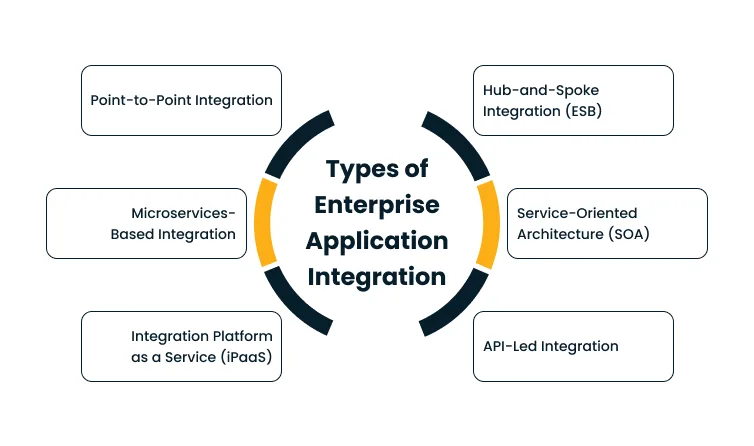
Point-to-point integration
This creates direct connections between two specific applications using custom code or scripts to move data from a source to a target. It is the fastest path when the integration scope is small, typically two or three systems with simple, infrequent data flows. The challenge is that connections grow exponentially as the environment expands.
Ten applications require 45 unique connections, and twenty require 190. Without a central layer managing the flow, maintenance becomes unmanageable at scale, and there is no shared visibility layer without building one separately for every connection.
Hub-and-spoke model (ESB)
The hub-and-spoke model addresses this by introducing a central broker, typically an Enterprise Service Bus (ESB), that sits between all applications and handles routing, transformation, and orchestration.
Every application connects to the hub once, and when data moves between systems, the hub converts the format and routes the message to the correct target. Adding a new application means connecting it to the hub, not to every existing system individually, which makes this well-suited for mid-to-large enterprises that need centralized control over complex, multi-system data flows.
The risk is that the hub becomes a single point of failure and can create performance bottlenecks under heavy traffic if not sized correctly from the start.
Service-Oriented Architecture (SOA)
The service-oriented architecture (SOA) takes a different approach by exposing business functions as reusable services with standard interfaces, so applications consume published services instead of calling each other directly. Any application needing a capability, such as customer lookup or payment processing, calls the relevant service through a standard interface and receives a result.
This works well for large enterprises with complex business processes and strong governance requirements, particularly in regulated industries like banking and insurance. The difficulty is that SOA requires a strong upfront service contract design.
Poorly defined service boundaries recreate the same tight coupling that SOA was built to eliminate, and the architecture demands sustained discipline across teams to operate well over time.
API-led integration
This organizes connectivity into three explicit layers. System APIs connect directly to backend systems like ERP, databases, and legacy platforms. Process APIs orchestrate business logic across multiple system APIs. Experience APIs serve the right data to the right consumer, whether a mobile application, a partner portal, or a customer dashboard.
Each layer is managed and versioned independently, so changes at one layer do not break consumers at another. This approach suits modern enterprises with a mix of cloud and on-premise systems, and also fits SaaS companies and ISVs that need standardized, multi-tenant connectivity across many customer environments.
Without strong governance and versioning discipline from the start, however, API sprawl becomes its own form of complexity, with teams building overlapping APIs under no shared standards.
iPaaS (Integration Platform as a Service)
iPaaS is a cloud-hosted platform that provides pre-built connectors, data transformation tools, and workflow automation for connecting applications without building custom middleware from scratch.
Teams configure integrations using visual designers and managed infrastructure, and the platform handles hosting, scaling, error management, built-in monitoring, and automatic retry logic for failed messages.
It delivers fast time to value for hybrid environments mixing SaaS, cloud, and on-premise applications, and works well for SaaS and ISV environments that need scalable, multi-tenant integrations across many customer systems. The trade-off is that licensing costs scale with transaction volume and connector count, deep customization may still require code, and vendor lock-in is real once integrations embed deeply into platform-specific logic.
Microservices-based integration
Microservices-based integration decomposes applications into small, independent services, each with its own database, its own API, and independent deployment. Services communicate via APIs and event streams, with tools like Apache Kafka handling event-driven messaging at scale. There is no central broker.
Coordination happens through choreography, where services react to events autonomously or through a lightweight orchestrator for complex multi-step workflows. For more on how this works in practice, designing event-driven architectures to replace legacy batch processing covers the key architectural decisions involved. This pattern suits cloud-native environments and organizations with mature DevOps practices, but the operational overhead is significant.
Running it well requires advanced observability tooling, distributed tracing, and strong deployment automation, and debugging a distributed system is considerably more complex than debugging a monolithic one.
The comparison below provides a quick reference across all six patterns. Most large enterprises land on a hybrid approach, with API-led connectivity or iPaaS at the core and other patterns applied selectively for specific use cases.
| Integration Type | How It Works | Best For | Scalability | Complexity | Key Risk |
| Point-to-Point | Direct connection between two systems | 2-3 systems, simple flows | Low | Low | Exponential connection growth |
| Hub-and-Spoke (ESB) | Central broker routes all messages | Mid-to-large enterprises, centralized control | Medium | Medium | Single point of failure |
| SOA | Reusable services with standard interfaces | Complex, regulated enterprises | High | High | Poor service design recreates coupling |
| API-Led Integration | Three-layer API architecture | Cloud/on-premise hybrid, API economy | High | Medium-High | API sprawl without governance |
| iPaaS | Cloud platform with pre-built connectors | SaaS-heavy, hybrid environments | High | Low-Medium | Vendor lock-in, scaling costs |
| Microservices-Based | Independent services via APIs and events | Cloud-native, DevOps-mature organizations | Very High | High | Requires advanced tooling and observability |
Benefits of Enterprise Application Integration
When integration works, its effects show up in specific, measurable ways across operations.
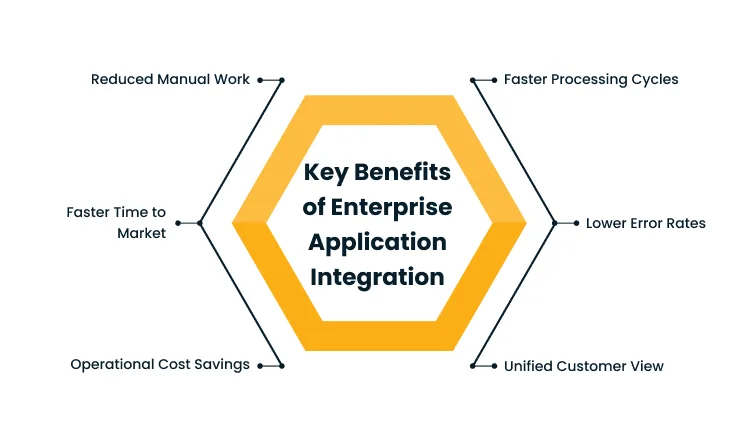
Fewer manual steps in every workflow. Cross-system processes that previously required exporting a file, reformatting it, and uploading it somewhere else run automatically. Teams stop spending hours on reconciliation and focus on work that requires judgment.
Faster processing cycles. Order-to-fulfillment, hire-to-onboard, and claim-to-resolution workflows that used to take days to complete in hours. The bottleneck shifts from system latency to actual business decisions.
Lower error rates on data that crosses systems. Every manual transfer carries the risk of mistyped IDs, mismatched formats, and missed updates. System-to-system exchange removes these failure points entirely.
One consistent customer view across teams. Sales, support, and billing work from the same record, the same order history, and the same account status. They stop making decisions based on different versions of the same data.
Lower operational costs from the retirement of redundancies. Fewer manual workarounds, less duplicate data storage, and lower overhead from maintaining dozens of point-to-point connections reduce operating costs in ways that accumulate over time.
Faster time to connect new systems and partners. In a well-architected integration environment, adding a new application does not require rebuilding existing integrations. New systems plug in through standardized connectors or APIs, compressing weeks of work into days.
Enterprise Application Integration Use Cases Across Industries
EAI solves different problems depending on the industry. The four scenarios below reflect the most common integration challenges across sectors where system connectivity directly affects business outcomes. In each case, the integration layer is the operational mechanism that makes the business function reliably at scale.
1. BFSI: Unified Customer Data and Compliance Workflows
Banks and insurance companies run core banking systems, CRM platforms, risk management tools, and compliance systems that do not share data natively. Customer data exists in fragments across these systems, and compliance reporting requires manual aggregation that creates delays and introduces reconciliation errors.
EAI connects these systems to deliver a unified customer view, automate KYC and AML workflows, and generate consistent regulatory reports directly from integrated, real-time data.
The outcome is faster compliance cycles, reduced operational risk, and an onboarding process that no longer requires manual cross-system lookups at every step.
2. Retail and E-Commerce: Order, Inventory, and CRM Sync
Disconnected e-commerce platforms, inventory management systems, and CRM tools lead to overselling, delayed fulfillment, and customer service teams that cannot see the full order status without checking three separate systems.
EAI syncs order data, inventory levels, and customer records in real time across all channels, including the online storefront, point of sale, warehouse, and CRM.
The result is accurate inventory counts, faster order processing, and customer service teams who can resolve issues on the first call with complete information in front of them.
3. Healthcare: Patient Data Interoperability
Patient data is scattered across EHR systems, lab platforms, billing software, and departmental applications. Care teams frequently work from incomplete records, and administrative systems cannot reconcile data without manual effort at every handoff.
EAI enables interoperable data exchange across clinical and administrative systems while maintaining HIPAA compliance and audit logging at every integration point.
Complete patient records become available at the point of care, fewer duplicate diagnostic tests are ordered, and billing workflows reconcile automatically without manual intervention.
4. Manufacturing: ERP, SCM, and IoT Integration
Manufacturing operations depend on ERP, supply chain management, and IoT sensor data that exist in disconnected silos. Production teams make decisions on yesterday’s numbers, and supply chain disruptions surface slowly, often after damage is already done.
EAI connects production, procurement, logistics, and quality systems so IoT data from the factory floor feeds directly into ERP and SCM in real time. Enterprises in this space are also modernizing how those feeds flow, as covered in turning legacy batch workloads into real-time pipelines.
The outcome is reduced unplanned downtime, optimized inventory across the supply chain, and demand forecasts built on live operational data rather than weekly batch exports.
How to Choose the Right Enterprise Application Integration Approach
The right integration approach depends on your specific environment, not on which pattern has the most analyst coverage. The decision path below works through the most common inflection points, covering what systems you have and what you need from them, whether to build, buy, or partner, and how to design for security and governance before the first integration goes live.
Start with Your Systems and Business Goals
Begin with an inventory of how many applications need to connect, what the cloud versus on-premise split looks like, and where the current failure points are, meaning where data breaks, duplicates, or goes stale. Mapping this before choosing a pattern prevents over-engineering simple integrations and under-engineering complex ones.
Define what success looks like in business terms, whether that means faster order processing, real-time inventory visibility, or automated compliance reporting. Business outcomes drive architecture decisions more reliably than technical preferences alone. Once the outcomes are clear, match requirements to the patterns in the types section above. Most large enterprises land on a hybrid, with a primary pattern supported by others for specific use cases.
Decide: Build, Buy, or Partner
Build means writing custom integration code. It gives maximum control and zero vendor dependency, but it creates a maintenance burden that grows with every system change. This path works when a strong internal engineering team exists, and the requirements are specific enough that no platform handles them out of the box.
Buy means licensing an iPaaS or middleware platform. It delivers faster deployment and pre-built connectors. The trade-offs are licensing costs that scale with usage and real vendor lock-in risk as integrations embed deeper into platform-specific features.
Partner means working with an integration services provider who designs the architecture, implements the solution, and supports it long term. This path works best for complex, multi-system environments where internal capacity is limited and the cost of an architecture error, in rework, downtime, or compliance exposure, is high.
Plan for Security and Governance from Day One
Integration opens new data pathways, which creates new attack surfaces. Every connection between systems is a potential entry point if not secured from the start. Security and governance are far easier to design in than to retrofit into a live integration environment.
A working integration architecture should:
- Encrypt data in transit and at rest across all integration paths
- Authenticate and authorize all endpoints, not just user-facing applications
- Build audit logging into every integration for compliance and incident response
- Define a governance model covering who can create, modify, and monitor integrations
Providers like Cygnet.One supports this lifecycle through technical due diligence, integration architecture design, and ongoing governance for complex enterprise environments, including regulated industries where compliance requirements add design constraints that must be built into the integration layer from day one.
Conclusion
Enterprise application integration is the operational foundation that everything else in digital transformation runs on. AI programs, real-time analytics, and intelligent automation all depend on data that flows consistently and accurately across systems. Without integration, those initiatives compete against the same data problem at every stage.
The organizations that treat integration as a continuous capability rather than a point-in-time project get compounding returns. Each system added to the integration environment becomes a source of real-time data for every other connected system. Each automated workflow reduces the manual overhead that would otherwise scale with volume.
The architecture decision matters, but the discipline of maintaining and evolving the integration environment over time matters more. Systems change, applications are replaced, and business requirements shift. Integration architecture designed for adaptability keeps pace with those changes rather than becoming the constraint that slows them down.
Understanding where integration challenges start is as important as knowing how to solve them. The most common friction points, from inconsistent data formats to API complexity and legacy system constraints, often determine which architecture approach will work in practice.
If your organization is navigating these barriers, the architecture decisions you make now will determine how fast everything else moves. Talk to Cygnet.One to work through your integration challenges with a team that has done this across industries and at scale.
FAQs
Enterprise application integration is the process of connecting the business applications an organization already uses, such as ERP, CRM, HR, and finance systems, so they share data and trigger workflows automatically without manual steps. It is the layer that makes software tools that were not originally designed to communicate with each other work together as a connected system.
EAI is the broad discipline of connecting enterprise applications. iPaaS (Integration Platform as a Service) is one specific approach to implementing EAI using a cloud-hosted platform with pre-built connectors and managed infrastructure. iPaaS is a tool for doing EAI, not a separate or competing concept.
EAI is the overall practice of connecting enterprise applications so they share data and automate workflows. SOA (Service-Oriented Architecture) is one specific architectural approach to implementing EAI, where business functions are exposed as reusable services with standard interfaces. SOA is a method within EAI, not a replacement for it.
AI models and automation workflows depend on clean, connected, real-time data. EAI provides this foundation by breaking down data silos, standardizing data formats, and keeping data flowing continuously across systems. Without integration, AI initiatives stall because models train on incomplete or stale data, and automation cannot span disconnected systems. Read more on how integration gaps affect enterprise AI adoption.
Yes, but it requires deliberate planning. Integration layers connect to legacy systems through APIs, database connectors, or custom adapters that wrap the legacy platform with a modern interface. The goal is to make legacy systems interoperable with the rest of the environment without rewriting their core logic. Modernizing legacy integrations using EventBridge and Step Functions covers one practical approach to this.
Costs depend on the number of systems involved, integration complexity, the architecture pattern chosen, and whether you build, buy a platform, or work with a provider. A two-system iPaaS integration costs very differently from a multi-system enterprise transformation that includes legacy modernization, custom connectors, and governance design. Scope drives the number.
Simple integrations between two or three systems typically take four to eight weeks. Mid-scale projects spanning multiple departments usually run three to six months. Large enterprise transformations involving legacy systems, multiple integration patterns, and governance frameworks typically run six to twelve months, delivered in phases to manage risk and deliver value incrementally rather than in a single cutover.
Author


Abhishek Nandan
AVP, Marketing
Abhishek Nandan is the AVP of Services Marketing at Cygnet.One, where he drives global marketing strategy and execution. With nearly a decade of experience across growth hacking, digital, and performance marketing, he has built high-impact teams, delivered measurable pipeline growth, and strengthened partner ecosystems. Abhishek is known for his data-driven approach, deep expertise in marketing automation, and passion for mentoring the next generation of marketers.