




































DevOps teams are under pressure to ship faster, fix issues sooner, and keep applications stable through frequent releases. That becomes hard to do when testing still happens at the end of the delivery cycle or relies too heavily on manual validation.
Continuous testing in DevOps solves this by running automated tests across the entire CI/CD pipeline. Instead of waiting for a final QA phase, teams validate code at every stage, from commit through deployment and into production monitoring.
But for enterprises, continuous testing is not just about adding more automation. It requires a clear testing strategy, well-defined pipeline quality gates, the right toolchain, reliable test data, shared ownership, and a commitment to continuous improvement.
This blog covers how to implement continuous testing in your DevOps CI/CD pipeline, choose the right tools, follow proven best practices, and avoid the most common challenges teams run into along the way.
Why Continuous Testing Is Essential for a Reliable DevOps QA Pipeline
A DevOps QA pipeline is only as reliable as its ability to keep testing in sync with development. When testing happens too late in the cycle, defects become harder and more expensive to fix, releases slow down, and production risks increase.
Continuous testing fixes this by embedding quality checks into every stage of the software delivery lifecycle. Automated tests run whenever code is committed, integrated, built, deployed, or monitored in production.
According to a 2023 Gartner Peer Community Survey on Automated Software Testing, 60% of IT and software engineering leaders said improving product quality was among their top reasons for automating testing, while 58% cited faster deployment speed as a key driver.
Here is what that looks like in practice when continuous testing is working well across a DevOps pipeline:
- Faster feedback for developers and QA teams. Developers learn about failures within minutes of a commit, not days later in a staging environment. This keeps debugging fast and context fresh.
- Early defect detection before issues reach production. Catching a bug at the integration stage costs a fraction of what it takes to fix the same bug after release. Continuous testing moves that detection upstream.
- Reduced manual regression effort. Automated regression suites replace hours of repetitive manual testing every sprint, freeing QA teams to focus on exploratory and high-value test scenarios.
- Shorter and more predictable release cycles. When tests run automatically at every stage, teams spend less time in release stabilization. Releases become routine instead of risky.
- Stronger release confidence through automated validation. Quality gates backed by automated test results give teams and stakeholders clear, objective evidence that a release is ready to go live.
- Better collaboration across development, QA, and operations. Shared test results and dashboards give every team the same view of quality, which reduces finger-pointing and aligns priorities.
- Greater visibility into test results and release readiness. Leadership and product teams can see pipeline health and release status without asking for manual reports or waiting for QA sign-off.
- Lower risk of customer-facing defects. Continuous validation across the pipeline significantly reduces the number of issues that slip through to production and affect end users.
These benefits compound over time, but they do not happen by default. Getting there requires deliberate changes to how testing is structured, triggered, and measured inside the pipeline.
How to Implement Continuous Testing in Your DevOps CI/CD Pipeline
Implementing continuous testing takes a structured approach. Teams need to understand their current QA maturity, decide what to automate, map tests to the right pipeline stages, integrate them into CI/CD workflows, and track performance over time.
The 2023 Gartner Peer Community Survey found that only 40% of organizations currently automate testing continuously throughout their development cycle. The rest still run automated tests at set milestones or fixed intervals.
Here’s how to implement continuous testing in your DevOps CI/CD Pipeline. The goal is not to run every test at every stage. The goal is to run the right tests at the right time, so teams can move faster without losing control over quality.
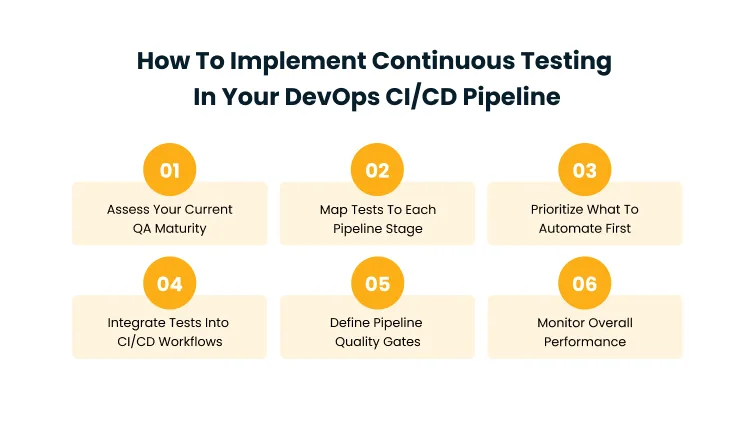
Step 1: Assess Your Current QA Maturity
Start by understanding how testing actually works today. Review what is manual, what is automated, where delays happen, and which defects commonly escape into staging or production.
Key areas to assess:
- Current test automation coverage and what percentage of tests are still manual
- Manual regression effort per sprint or release cycle
- Defect leakage rates into staging and production
- Test execution time and how it affects pipeline speed
- CI/CD integration maturity and whether tests trigger automatically
- Test data availability and consistency across environments
- Environmental stability and configuration control
- Reporting and dashboard visibility for QA and release status
- Team ownership clarity across Dev, QA, and Ops
This assessment helps you identify whether your priority should be automation, pipeline integration, test data management, environment reliability, or better quality governance. Without it, teams often automate the wrong things first and end up with a testing setup that looks good on paper but does not actually catch the defects that matter.
Step 2: Map Tests to Each Pipeline Stage
Continuous testing works best when each test type has a clear place in the CI/CD pipeline. Fast tests should run early. Heavier tests should run later or in parallel.
| Pipeline Stage | Recommended Tests | Purpose |
| Code Commit | Unit tests, linting, static analysis | Catch basic issues early |
| Build | Unit tests, dependency checks, code quality checks | Validate build readiness |
| Integration | API tests, integration tests, contract tests | Check service interactions |
| Pre-Deployment | Regression tests, security scans, performance checks | Reduce release risk |
| Deployment | Smoke tests, configuration checks | Confirm deployment success |
| Post-Deployment | Synthetic monitoring, production checks | Validate real-world behavior |
This structure prevents overloaded pipelines and ensures quality checks are placed where they create the most value. Running everything at the commit stage slows down developers. Running nothing until pre-deployment creates blind spots. The key is matching the right test type to the right trigger point.
Step 3: Prioritize What to Automate First
Trying to automate everything at once usually fails. Start with tests that are repeatable, stable, high-risk, and business-critical.
Good candidates for early automation include:
- Smoke tests and regression tests that run before every release
- API tests that validate service integrations
- Unit tests for core business logic
- Critical customer journeys like login, checkout, or onboarding
- High-risk transaction flows involving payments or sensitive data
- Frequently repeated validation tasks that consume QA time every sprint
Avoid automating unstable scenarios too early. Exploratory testing, usability validation, and complex edge-case analysis may still need human judgment. The point of prioritization is to get the highest return from automation quickly, then expand coverage over time as your framework matures.
Step 4: Integrate Tests into CI/CD Workflows
Once priority tests are automated, integrate them into your CI/CD workflows so they run automatically as code moves through the pipeline.
- Run unit tests on every commit to catch issues at the earliest point
- Trigger API tests after every build to validate service contracts
- Execute regression tests before deployment to protect against breaking changes
- Run smoke tests after deployment to confirm the release is functional
- Send alerts when critical tests fail so teams can respond immediately
- Block releases when quality gates are not met to prevent risky deployments
This creates a fast feedback loop. Developers and QA teams can fix issues while the change is still fresh, instead of waiting for a late-stage testing cycle where reproducing and debugging the problem takes significantly longer.
Step 5: Define Pipeline Quality Gates
Quality gates are the decision points that determine whether code is ready to move forward. They make release decisions more objective and reduce the risk of ignoring failed tests.
Define quality gates based on:
- Test pass rate and whether critical test suites have cleared
- Code coverage thresholds for new and changed code
- Critical defect limits that block deployment when exceeded
- Security vulnerability severity from automated scans
- Performance benchmarks for response time and throughput
- Compliance checks required by regulatory or internal standards
- Rollback conditions that trigger automatic reversion after deployment
For example, a failed login workflow, payment test, or critical security scan should block deployment. A low-priority UI issue may create a ticket without stopping the release. The distinction between blocking and non-blocking failures is what keeps quality gates useful without turning them into release bottlenecks.
Step 6: Monitor Testing Metrics and Pipeline Performance
Continuous testing should improve over time. Track testing and pipeline metrics to understand whether your process is becoming faster, more stable, and more effective.
Useful metrics to track include:
- Test execution time to identify slow tests that bottleneck the pipeline
- Build failure rate to understand how often broken builds disrupt delivery
- Flaky test rate to track unreliable tests that erode confidence in results
- Automated test coverage to measure how much of the application is validated automatically
- Defect leakage to monitor how many bugs still reach staging or production
- Pipeline duration to assess overall delivery speed from commit to deploy
- Deployment frequency and change failure rate to evaluate release health over time
Use these insights to remove outdated tests, fix unstable tests, improve coverage, and optimize pipeline speed.
Process and metrics give teams the structure to improve, but the tools underneath determine how fast and reliably that structure actually runs. A well-designed testing process paired with the wrong toolchain will still feel slow and fragile.
Choosing the Right Tools for Automated Continuous Testing
The right continuous testing tool stack depends on your application architecture, CI/CD setup, release frequency, team skills, and compliance requirements. The goal is not to use more tools. The goal is to connect the right tools into a reliable testing workflow.
| Tool Category | Purpose | Examples |
| CI/CD Platforms | Trigger and manage automated test workflows | Jenkins, GitHub Actions, GitLab CI/CD, Azure DevOps |
| Test Automation Tools | Automate UI, functional, and regression tests | Selenium, Cypress, Playwright, Appium |
| API Testing Tools | Validate APIs and service integrations | Postman, REST Assured, Karate |
| Performance Testing Tools | Test load, speed, and scalability | JMeter, k6, Gatling |
| Security Testing Tools | Identify vulnerabilities and risky dependencies | SonarQube, Snyk, OWASP ZAP |
| Test Management Tools | Manage test cases, execution, and reporting | TestRail, Zephyr, qTest |
| Monitoring Tools | Validate production behavior after release | Datadog, New Relic, Grafana |
When selecting tools, focus on the factors that directly affect your team’s ability to test reliably and ship with confidence:
- CI/CD compatibility. A tool that does not plug into your existing pipeline creates more integration work than value. Check for native support with your CI/CD platform before evaluating features.
- Ease of integration. Tools that require heavy custom scripting to connect to your pipeline slow teams down instead of accelerating delivery.
- Reporting quality. Clear, centralized test reporting helps teams act on failures quickly. If results are scattered across tools, issues get missed.
- Test maintainability. As your application grows, test scripts need to be easy to update. Tools with modular design and reusable components reduce long-term maintenance overhead.
- Team adoption readiness. A powerful tool that your team cannot use effectively is a wasted investment. Consider the learning curve and available documentation before committing.
According to the 2023 Forrester Wave for Continuous Automation Testing Platforms, 78% of high-performing organizations have adopted agile and DevOps practices, compared to 54% of enterprises overall.
Tool selection plays a significant role in that gap, because testing tools that fit the pipeline enable teams to move faster, while tools that do not integrate well create friction and slow adoption.
The right tools give your team the capability. What turns that capability into consistent, long-term results is how teams organize their testing work day to day.
Best Practices to Strengthen Your Continuous Testing Strategy
A strong continuous testing strategy helps teams test faster, reduce risk, and maintain quality across frequent releases. But getting there takes more than just automation. It also requires clear ownership, smart prioritization, reliable test suites, and shared visibility into results. These best practices keep your testing approach stable, scalable, and aligned with DevOps goals.
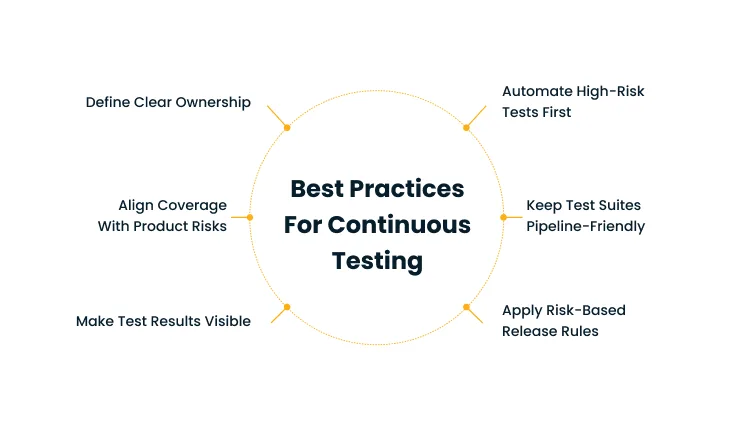
Define Clear Ownership Across Dev, QA, and Operations
Continuous testing should not be limited to QA alone. Developers, testers, DevOps engineers, security teams, and operations teams all need to understand their role in maintaining quality.
Define ownership for writing and maintaining tests, reviewing test failures, managing environments, fixing flaky tests, monitoring production signals, updating quality gates, and reporting release readiness. Clear ownership prevents failed tests from being ignored and keeps quality responsibility shared across the entire delivery team.
Automate High-Risk and Repetitive Test Cases First
Start with tests that deliver the most value. High-risk workflows, repetitive regression scenarios, and business-critical features should be automated before low-impact cases.
Focus first on login and authentication flows, payment or transaction workflows, API integrations, core user journeys, smoke tests, regression tests, and compliance-critical checks. This helps teams reduce manual effort quickly while protecting the most important parts of the application.
Keep Test Suites Fast, Stable, and Pipeline-Friendly
Continuous testing only works when test suites are reliable and fast enough for the pipeline. Slow or flaky tests reduce trust and create unnecessary blockers.
Run fast tests early. Run heavier tests later or in parallel. Remove duplicate tests. Fix flaky tests quickly. Use stable test data. Avoid unnecessary end-to-end tests. Review long-running tests regularly. The goal is to create fast feedback without overloading the CI/CD pipeline.
Apply Risk-Based Rules to Release Decisions
Not every failed test should block a release. Release decisions should be based on business risk, defect severity, and user impact. Block deployment for failed critical workflows.
Stop releasing for high-severity security issues. Require approval for high-risk changes. Create tickets for low-risk defects. Trigger rollback when production smoke tests fail. Risk-based rules help teams protect quality without slowing every release unnecessarily.
Make Test Results Visible Across Teams
Continuous testing creates value only when teams can act on the results. Test outcomes should be visible to developers, QA, DevOps, product teams, and leadership.
Dashboards should show failed tests, build health, test coverage, defect trends, pipeline status, quality gate results, release readiness, and production validation results. Shared visibility improves accountability and helps teams resolve issues faster.
Keep Test Coverage Aligned with Product and Release Risks
Test coverage should evolve as the application changes. A test suite that worked six months ago may not reflect today’s product risks.
Review coverage regularly to add tests for new features, remove outdated tests, improve critical workflow coverage, add tests for production defects, update tests after architecture changes, reduce unnecessary duplication, and align tests with business-critical areas. This keeps your continuous testing strategy relevant and useful over time.
Even teams that follow these practices will run into friction. The difference between teams that stall and teams that keep improving is whether they anticipate common failure points and have a plan for each one.
Common Continuous Testing Challenges and How to Solve Them
Continuous testing can fail when teams focus only on automation and ignore process, data, environments, and ownership. The most common challenges are practical, and they can be solved with the right quality engineering approach.
- Flaky tests often happen because of unstable selectors, timing issues, inconsistent test data, or changing environments. Track flaky tests separately, quarantine unstable tests, fix root causes, and improve test design.
- Slow pipeline execution becomes a problem when too many long-running tests run together or when tests run sequentially instead of in parallel. Use parallel testing, test prioritization, and stage-based execution to keep feedback fast.
- Poor test data quality makes results unreliable. Incomplete, outdated, or inconsistent test data can cause tests to fail for reasons that have nothing to do with the actual code. Use synthetic data, masked data, reset scripts, and controlled datasets to improve test consistency.
- Unstable test environments caused by environment drift, shared dependencies, and poor configuration control can break automated tests that pass locally but fail in the pipeline. Use containers, infrastructure as code, and environment monitoring to improve reliability.
- Toolchain fragmentation happens when CI/CD, test automation, reporting, and defect tracking tools work in silos. Integrate tools and centralize reporting so teams can see test results and release readiness in one place.
- Low team adoption is common when testing is treated as a QA-only responsibility. Define shared ownership across development, QA, operations, and security teams to build a culture where quality is everyone’s job.
- High maintenance effort increases when test scripts become difficult to maintain as the application changes frequently. Use modular test design, reusable components, and regular test suite reviews to keep maintenance manageable.
The best way to avoid these problems is to treat continuous testing as a quality engineering practice, not just a test automation project. Organizations that combine strong quality engineering disciplines with the right automation strategy tend to see better long-term results than those that focus on tooling alone.
Solving these challenges internally is possible, but it often takes longer than expected when teams are also balancing feature delivery and production support.
According to the 2023 Forrester Continuous Automation and Testing Services Landscape, over 69% of organizations are still on a transformation journey, trying to effectively leverage agile, DevOps, and continuous delivery. Working with a quality engineering partner like Cygnet.One helps enterprises close that gap by building continuous testing into their pipeline from strategy through execution.
How Cygnet.One Helps Enterprises Adopt Continuous Testing in DevOps
Cygnet.One helps enterprises move from manual, fragmented, or late-stage testing to a structured, DevOps-aligned quality engineering model. Whether a team is just starting with test automation or looking to mature an existing pipeline, Cygnet.One brings the strategy, frameworks, and execution support needed to make continuous testing work at scale.
For teams implementing continuous testing, Cygnet.One supports:
- QA maturity assessment to identify gaps in current testing processes and define a clear starting point
- Continuous testing strategy design that aligns automation goals with pipeline architecture and release cadence
- Test automation roadmap and framework development covering tool selection, scripting standards, and CI/CD integration
- Azure DevOps and toolchain integration to connect testing into existing delivery workflows
- Regression suite automation to replace manual regression cycles with reliable, repeatable test runs
- Quality gate implementation to enforce pass/fail criteria at each pipeline stage
- Performance and security testing to validate load handling and vulnerability exposure before every release
- Reporting dashboards and quality visibility so teams, leadership, and stakeholders can see release readiness in real time
- Ongoing optimization of test coverage, execution time, and pipeline efficiency as the application evolves
Cygnet.One’s quality engineering practice is backed by a CMMI Level 5 appraisal for both Development and Service models, which means their testing processes follow standardized, measurable, and continuously improving practices.
Their proprietary platform, TestingWhiz, is an AI-powered, low-code testing tool that integrates directly with Jenkins, GitHub Actions, Azure DevOps, and other CI/CD platforms, providing real-time test feedback inside build workflows.
Whether you build continuous testing capabilities in-house or work with a partner, the fundamentals remain the same: start with a clear assessment, automate what matters most, and improve continuously based on real pipeline data.
Conclusion
Continuous testing in DevOps helps teams release faster without compromising quality. By embedding automated tests, quality gates, and feedback loops into the CI/CD pipeline, teams can detect defects earlier, reduce manual effort, and improve release confidence.
The most effective approach starts with a QA maturity assessment, followed by pipeline-stage test mapping, automation prioritization, CI/CD integration, quality gate setup, and continuous performance monitoring.
For enterprises looking to modernize QA, Cygnet.One helps design and implement continuous testing strategies that align with DevOps workflows, automation maturity, and release goals.
Book a demo with Cygnet.One to explore how continuous testing can strengthen your DevOps QA pipeline.
FAQs About Continuous Testing in DevOps
Continuous testing in DevOps is the practice of running automated tests throughout the CI/CD pipeline to validate code changes early and often. Instead of treating testing as a final gate before release, it embeds validation at every stage, from code commit through production monitoring. This helps teams detect defects faster, reduce release risk, and improve overall software quality
Test automation is the use of tools to run tests automatically. Continuous testing is broader. It includes automation, but also covers CI/CD integration, quality gates, reporting, feedback loops, and continuous improvement across the DevOps lifecycle. You can have automated tests without continuous testing, but you cannot have continuous testing without automation.
Continuous testing typically includes unit tests, API tests, integration tests, regression tests, smoke tests, performance tests, security tests, and post-deployment validation checks. The specific mix depends on your application architecture, risk profile, release cadence, and the pipeline stages where each test type adds the most value.
Teams should start by automating high-risk, repetitive, and business-critical tests. Smoke tests, regression tests, API tests, and frequently used customer workflows are usually the best starting points because they deliver the most value quickly and reduce manual effort where it matters most.
Continuous testing improves DevOps by providing faster feedback on code changes, reducing late-stage defects, improving release confidence, and helping development, QA, and operations teams work from shared quality insights. It also enables more frequent and reliable deployments by catching issues before they reach production.
Author


Abhishek Nandan
AVP, Marketing
Abhishek Nandan is the AVP of Services Marketing at Cygnet.One, where he drives global marketing strategy and execution. With nearly a decade of experience across growth hacking, digital, and performance marketing, he has built high-impact teams, delivered measurable pipeline growth, and strengthened partner ecosystems. Abhishek is known for his data-driven approach, deep expertise in marketing automation, and passion for mentoring the next generation of marketers.