



































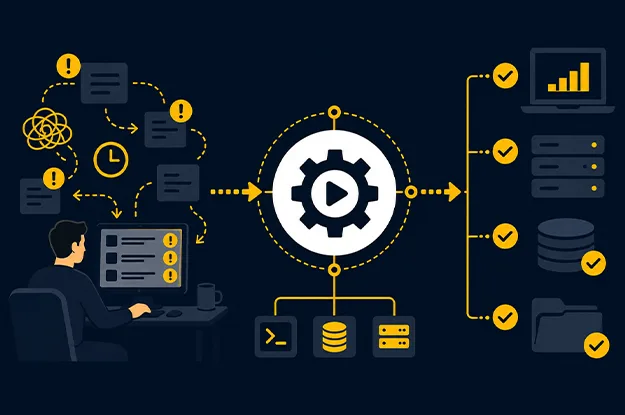
A support process becomes expensive long before anyone calls it inefficient. The warning sign is usually quieter: the same engineer is paged for the same fault, the same checks are repeated from memory, and recovery still depends on who happens to be available at 2 a.m.
That is the operating problem IT runbook automation is meant to address, especially when enterprises want to reduce IT downtime by making known recovery actions repeatable and faster. It converts known support procedures into controlled, executable workflows, so routine recovery work does not depend on a particular person remembering the right sequence. The objective is broader than scripting. Good IT process automation captures decision points, prerequisites, evidence, ownership, and escalation rules in a form that can be executed consistently, similar to how enterprise managed IT services structure support operations.
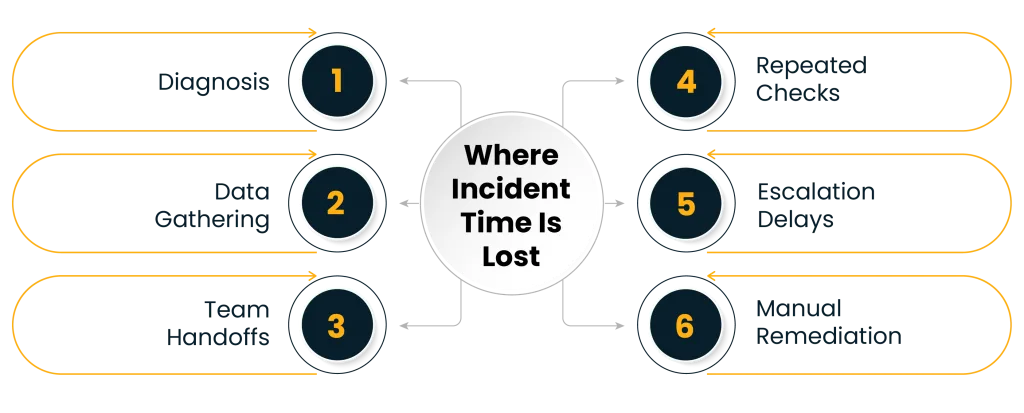
A 2025 Meta engineering paper described an internal investigation platform used by more than 300 teams and reported an average 20% reduction in mean time to resolve incidents after automating investigation playbooks. The useful lesson is where time is lost: diagnosis, context gathering, handoffs, and repeated checks.
What Is IT Runbook Automation?
A runbook is an operational procedure for handling a known task or condition. It might describe how to restart a service, validate disk pressure, rotate a credential, recover a failed job, clear a queue, or collect diagnostics before escalation.
IT runbook automation turns some or all of that procedure into an executable workflow. The workflow may run automatically after a trigger, start when an operator selects an action, or pause at specific steps until an authorized person approves continuation.
That distinction matters. Automation maturity is not measured by how few humans remain in the process. It is measured by how clearly the process distinguishes machine-safe actions from decisions that still require judgment.
A useful runbook contains a trigger, validation checks, bounded actions, decision gates, and evidence capture. This is where automated IT runbooks differ from loose collections of scripts. A script performs an action. A runbook carries operational intent around that action.
AWS Systems Manager, for example, supports automation documents that can pause for designated approvers before continuing. Azure Automation supports runbooks triggered through mechanisms such as webhooks and also provides policy controls over where jobs are executed. These are governance features, not cosmetic additions. They show why IT process automation must be designed as an operating control system rather than a shortcut around support staff.
Which IT Support Workflows Should Be Automated First?
The best candidates are rarely the most complex incidents. Start with work that is frequent, deterministic, measurable, and reversible.
Review recent tickets and ask four questions. Was the same action repeated? Did responders follow roughly the same diagnostic path? Could the task be validated before execution? Could the action be stopped or reversed safely? If the answer is yes to most of these questions, the workflow is a good fit for support process automation.
| Workflow | Good first candidate? | Why |
| Service health checks and restart | Yes | Clear trigger, known validation steps, measurable recovery |
| Disk-space cleanup | Often | Predictable thresholds and bounded actions |
| Certificate expiry response | Often | Date-driven trigger with clear ownership |
| User access correction | Sometimes | Works when identity policy and approval rules are explicit |
| Database failover | Later | Higher business risk and more dependency checks |
| Unknown application failure | No | Diagnosis is still open-ended |
One pattern deserves special attention: repetitive investigation. Teams often automate the final remediation while leaving early diagnosis manual. A workflow can gather CPU, memory, queue depth, deployment history, service status, and recent changes, then attach the findings to the incident. Even when remediation stays manual, the responder starts with a prepared diagnostic picture.
This is also where incident response runbooks become more useful. They should reduce the amount of thinking spent on routine information gathering so human attention stays available for uncertainty.
How to Map Triggers, Owners, Escalations, and Approvals
A weak automation design usually starts with a task: “restart the service automatically.” A stronger design starts with the decision chain around the task.
For each candidate workflow, map five fields before writing automation logic.
1. Trigger
Define the exact condition that starts the workflow. Avoid broad signals such as “service unhealthy.” Specify the telemetry, threshold, duration, event source, or ticket state that qualifies.
Triggers should also include suppression logic. If a service has just been deployed, restarted, or placed in maintenance, the same signal may mean something different.
2. Preconditions
The workflow should prove that the action is appropriate. A restart might require confirmation that traffic has shifted, a dependent transaction is not running, or a recent deployment has completed.
This is one of the most important controls in IT process automation because it prevents an accurate script from taking the wrong action at the wrong time.
3. Owner
Every automated workflow needs a named operational owner. Ownership covers logic changes, credential dependencies, testing, audit review, and retirement. Without it, automated IT runbooks become frozen versions of old operating assumptions.
4. Escalation logic
Automation needs a defined exit path. The runbook should know when to stop retrying, when to raise severity, what diagnostic evidence to attach, and which team receives the case.
Good escalation logic is specific. “Escalate if failed” is too vague. “Escalate after two unsuccessful remediation attempts, attach the last 15 minutes of service logs, and route to the application owner” is operationally useful.
5. Approval boundary
Some actions should remain operator initiated. Others may run automatically only inside a defined maintenance window or after a low-risk validation. High-impact actions may require approval before execution.
This is where a managed IT automation strategy earns credibility. The goal is controlled autonomy. Teams should be able to state which actions can run without approval, why they are safe, and which conditions force human review.
Why IT Auto-Remediation Workflows Fail in Production
Most automation failures are not coding failures. They are context failures.
The runbook works exactly as written, but the environment has changed. A service has a new dependency. A credential has expired. A threshold that once indicated failure now reflects normal peak behavior. A team renamed a queue. The workflow remains technically valid while operationally wrong.
That risk is why IT runbook automation needs lifecycle management.
Three controls matter most. Version each workflow with a clear change history, test status, owner, and review date. Test failure paths such as API timeouts, missing dependencies, credential errors, and absent recovery signals. Make IT auto-remediation workflows observable by recording execution status, retries, approvals, changes made, and final outcome.
Azure’s current guidance around Hybrid Runbook Workers is a good reminder that execution location and runtime dependencies matter. Microsoft explicitly advises testing runbooks on the machine hosting the worker because modules and network access can differ from the cloud execution environment.
How Runbook Automation Improves Recovery Consistency
The obvious benefit is speed, but consistency is often more valuable.
Manual recovery creates variation. One engineer checks dependencies before restarting. Another restarts first. A third collects logs but forgets to attach them to the incident. Experienced responders compensate through memory, while newer staff depend on documentation that may not match current practice.
IT runbook automation removes part of that variation by making required checks executable, supported by managed IT services that standardize monitoring, escalation, recovery, and operational workflows. The same preconditions run. The same evidence is captured. The same escalation rule applies. That consistency can improve post-incident analysis because the team has a cleaner record of what happened.
It also changes where support knowledge lives. Expert practice becomes part of the operating workflow, while experienced staff spend more time on exceptions, decision logic, and recurring faults.
For a mature managed IT automation strategy, this distinction matters. The target is not ticket deflection at any cost. The target is fewer avoidable handoffs, less variation in known procedures, and faster access to expert attention when the situation falls outside the runbook.
What Should Enterprises Measure After Automation?
A runbook program needs its own operating metrics. Ticket volume alone tells very little.
Track measures that show whether automation is reducing dependency on manual effort:
- Percentage of eligible incidents where a runbook was executed
- Percentage completed without manual intervention
- Median time from trigger to first diagnostic output
- Escalation rate after automated execution
- Rollback or failed-action rate
- Number of runbooks that have passed review within the required period
- Responder minutes saved on repeatable tasks
The best metric may be “manual touches per known incident.” If a recurring incident still needs six operator actions after automation, the process is only partly automated.
This also keeps support process automation tied to operational outcomes. A workflow that runs frequently but still creates rework, false actions, or unclear escalations should not be counted as a success.
Where IT Process Automation Should Stop
The practical boundary for automation is uncertainty.
If the workflow can validate the condition, predict the effect of the action, confirm success, and stop safely when results differ from expectation, automation is usually appropriate. If diagnosis depends on ambiguous business context, changing customer impact, or incomplete telemetry, human review should remain in the path.
That is why incident response runbooks should be written as decision systems rather than long checklists. Each branch should answer a question: what evidence allows the workflow to proceed, and what evidence requires escalation?
The same principle applies to IT process automation across service requests, infrastructure operations, identity tasks, patching, backups, and routine maintenance. A sound IT process automation program automates certainty and routes uncertainty to people with enough context to decide well.
Reducing Manual Support Dependency Without Losing Control
The strongest case for IT runbook automation is not that machines can execute support tasks faster. It is that enterprises can make known operational knowledge repeatable, reviewable, and less dependent on individual memory.
Start with recurring work. Automate diagnostics before risky remediation. Map triggers, owners, preconditions, escalation paths, and approvals before building the workflow. Measure manual touches and failed automation, not just execution counts.
IT process automation reduces recovery variation while preserving clear control boundaries. That is the point where automation becomes part of dependable IT operations rather than another layer of scripts the support team has to maintain.
Author


Yogita Jain
Content Lead
Yogita Jain leads with storytelling and Insightful content that connects with the audiences. She’s the voice behind the brand’s digital presence, translating complex tech like cloud modernization and enterprise AI into narratives that spark interest and drive action. With a diverse of experience across IT and digital transformation, Yogita blends strategic thinking with editorial craft, shaping content that’s sharp, relevant, and grounded in real business outcomes. At Cygnet, she’s not just building content pipelines; she’s building conversations that matter to clients, partners, and decision-makers alike.