



































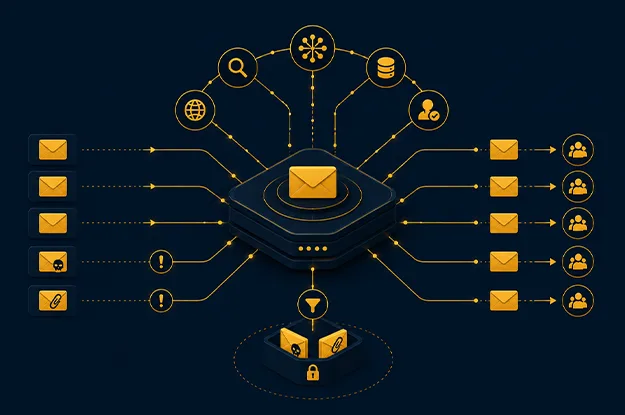
Phishing no longer announces itself. It arrives as a vendor note, a prompt, a QR code, a salary document, a payment reminder, or a reply in a thread that already feels familiar. The message may look clean. The danger sits in the request.
That is why email threat intelligence has become a serious requirement for enterprise security teams. It gives context to the sender, domain, link, attachment, recipient, timing, and action requested. A filter sees an email. Intelligence asks whether the request makes sense.
- APWG reported more than one million phishing attacks in the first quarter of 2025, its highest quarterly volume since late 2023.
- Verizon’s 2025 DBIR analyzed 22,052 incidents and 12,195 confirmed breaches, with human involvement still tied to many breach paths.
- The FBI’s 2025 IC3 reporting showed losses crossing $20 billion, with business email compromise among the major loss categories.
These numbers explain why inbox security can no longer sit apart from identity, endpoint, and response.
Why phishing keeps passing old email checks
Traditional controls were built around known bad signs. A malicious hash. A suspicious domain. A poor logo. A risky attachment. Those checks still matter, but attackers now avoid obvious markers.
Modern phishing often carries no malware. It may send the user to a legitimate file-sharing page first. It may use a compromised mailbox, so the sender’s reputation looks safe. It may use polished language written with generative AI. It may push the user toward OAuth consent, token theft, or a fake support workflow instead of a simple password form.
This is where phishing detection tools need to inspect more than content, and where phishing detection tools must connect email signals to user behavior. They need to read message origin, authentication results, domain age, link redirects, attachment behavior, mailbox history, user role, and post-click activity.
Good email security intelligence turns one message into a security event. Weak filtering treats the same message as an isolated object.
The threat landscape now runs on context
The best phishing attacks borrow trust from normal business routines. Employees approve invoices, sign documents, scan QR codes, reset passwords, and answer senior leaders under pressure. Attackers use those habits.
The shift is easy to miss: phishing is less about visual trickery and more about timing. A plain email can be dangerous if it lands when the user is primed to act.
| Phishing pattern | Why it works | What teams should inspect |
| QR-code phishing | The link moves to a mobile device | Image analysis, destination checks, mobile flow |
| Vendor impersonation | It copies procurement language | Supplier domain history, payment-change context |
| Compromised mailbox abuse | The sender may be real | Mailbox baseline, recipient graph, link novelty |
| Token theft | MFA may appear satisfied | Session behavior, consent grants, risky sign-ins |
| AI-written spear phishing | The message sounds natural | Intent, relationship context, unusual request |
This is where detection needs both technical and business signals. A new sender, a fresh domain, a first-time payment request, and a link redirect together say more than any one signal.
How Enterprise Phishing Detection Really Works
Enterprise phishing detection is rarely a single yes-or-no decision. It is a layered reading of sender identity, message intent, link behavior, attachment risk, user history, and what happens after someone clicks.
At the message layer, tools check sender authentication, header anomalies, spoofing patterns, URLs, attachments, and language cues. At the identity layer, they compare the sender-recipient relationship with normal communication. At the endpoint layer, they look for file, process, and browser behavior after the click.
The best phishing detection tools do more than allow or block. They assign confidence, preserve evidence, and trigger the right workflow. A link may be rewritten. A file may be opened in isolation. A suspicious email may be removed from a small group of inboxes without disturbing everyone.
This is also where email threat intelligence earns budget. It can connect ten similar messages across ten inboxes and treat them as one campaign. Without that view, analysts waste time investigating the same attack in pieces.

Detection signals that deserve more attention
A mature program cannot depend only on reputation feeds. Attackers can register clean domains, use trusted platforms, and change content after delivery. The better question is: does this behavior fit this user, sender, and request?
Security teams should prioritize:
- Domain age, registrar behavior, and lookalike patterns
- Header inconsistencies inside reply chains
- New sender-recipient relationships
- Urgency tied to money, access, or credentials
- Link redirects that change after delivery
- QR code destinations
- Login attempts after email interaction
- Consent grants after a click
This is where email security intelligence gives analysts a reason trail. It reduces guesswork and helps teams explain why a message was risky.
Intelligence is what turns blocking into response
A blocked message helps. A contained campaign helps more.
Email threat intelligence platforms collect and enrich signals from mail flow, user reports, sandbox results, domain telemetry, endpoint alerts, identity events, and external feeds. The feed alone has limited value. Correlation is where email security intelligence changes response quality.
For example, one employee reports a harmless-looking document email. The platform detonates the link, finds a credential page, searches for similar messages, removes them, identifies who clicked, and sends exposed accounts into containment. That is the workflow enterprise teams need from email threat intelligence platforms.
VIPRE’s approach fits this problem because fragmented tools create gaps. Email defense, endpoint protection, user risk, and response workflows need shared context. A team may block the email but miss the device activity that follows if those signals stay apart.
Where phishing detection tools fit in the security stack
Buying more tools does not fix unclear ownership. Each layer needs a defined job.
| Security layer | Primary job | Risk when isolated |
| Secure email gateway | Stop known malicious mail before delivery | Misses post-delivery changes |
| API inbox protection | Find threats already delivered | Needs fast removal rights |
| Endpoint protection | Watch device behavior | May miss original email context |
| Identity security | Detect risky logins and token abuse | Needs click and sender context |
| Awareness training | Reduce risky action | Cannot carry prevention alone |
| Incident response | Contain exposed accounts and devices | Slower without campaign evidence |
Strong phishing detection tools should feed identity, endpoint, and response systems through managed IT services, because phishing detection tools lose value when their findings stay trapped in the inbox. If a user clicks a risky link, identity controls should know. If an endpoint behaves strangely after an email event, the mail system should search for related messages. This is what enterprise email security teams need: connected detection, not another inbox-only checkpoint.
Prevention cannot rely on the user alone
Training helps, but it cannot be the main control. Careful employees can still miss a well-timed request, especially when it appears in a trusted thread or uses a real login page.
Prevention should combine DMARC enforcement, URL rewriting, attachment isolation, stronger authentication, user-report workflows, and role-based rules for finance, HR, executives, and IT administrators. These groups face different lures, so they need different treatment.
Then measure what happens. How many phishing emails have reached inboxes? How many users reported them? How fast were related messages removed? Who clicked? Did identity controls catch the follow-up login? Did endpoint alerts connect back to the email?
This is where email security intelligence becomes useful for leadership. It shows what is being stopped, what still reaches users, and where response needs tighter coordination.
Detection must read business intent
The hardest cases often look ordinary, which is why advanced phishing attack detection methods need Enterprise AI solutions to identify intent, anomalies, and post-click risk. A payroll update, supplier bank change, legal notice, shared spreadsheet, or message from a compromised executive account may look routine until the request is examined closely.
Advanced phishing attack detection methods should inspect intent. What is the user being asked to do? Share credentials? Approve payment? Grant app access? Download a file? Move a conversation off-channel? Is the sender allowed to make that request? Has this pattern appeared before?
This is where buyers should challenge vendors. Do not ask only whether a tool uses AI. Ask what evidence it gives the analyst. Ask how it handles post-delivery threats. Ask whether it traces one report across mailboxes, endpoints, and identities. Ask whether it explains its verdict.
A black-box score is not enough. Analysts need proof they can act on, and email security intelligence should provide that proof.
What Secure Email Systems Need to Protect
Enterprise email security has a hard job: stop risky messages without slowing down routine work. A strong system should know the difference between a harmless newsletter, a vendor payment request, a suspicious QR code, and a link that turns malicious after delivery.
For buyers evaluating secure email systems enterprise teams can rely on, the requirement is practical: protect busy people while preserving normal business flow. A routine newsletter should pass quietly. A first-time vendor asking for a bank change should trigger scrutiny. A QR code sent to finance should be inspected, even if there is no attachment. A link that turns malicious after delivery should be pulled back from every mailbox.
This is why email threat intelligence should be judged by action, not dashboard volume. More alerts do not equal better protection. Better protection means faster verdicts, cleaner evidence, fewer repeated investigations, and tighter containment after a click.
Outcomes CISOs should care about
The board does not need a list of blocked URLs. It needs to know whether phishing risk is being reduced in business terms.
The outcomes that matter are direct, and email security intelligence should improve each one:
- Less dwell time after a malicious email lands
- Faster removal of related messages across mailboxes
- Clear visibility into who clicked and what happened next
- Fewer false positives interrupting work
- Better evidence for incident response
- Stronger protection for high-risk roles
- Cleaner connection between email, endpoint, and identity
The purpose of email threat intelligence is practical: help teams make fewer guesses under pressure.
Why the Inbox Now Defines Security Readiness
Advanced phishing hides inside normal work. It borrows trust from brands, colleagues, vendors, and familiar workflows. Old filters struggle because they look for bad content.
Modern attacks often hide inside believable context, which is why enterprises need stronger cloud-native security practices across users, endpoints, and applications.
Enterprises need phishing detection tools that understand sender behavior, message intent, link movement, user risk, and post-click activity. They need email security intelligence that connects a single report to the wider campaign. They need security systems that help teams contain incidents, not just label messages.
For me, the standard is simple: protect the inbox, watch the user journey, connect email with endpoint and identity, and make every verdict explainable. That is the standard modern email defense now has to meet.
Author


Yogita Jain
Content Lead
Yogita Jain leads with storytelling and Insightful content that connects with the audiences. She’s the voice behind the brand’s digital presence, translating complex tech like cloud modernization and enterprise AI into narratives that spark interest and drive action. With a diverse of experience across IT and digital transformation, Yogita blends strategic thinking with editorial craft, shaping content that’s sharp, relevant, and grounded in real business outcomes. At Cygnet, she’s not just building content pipelines; she’s building conversations that matter to clients, partners, and decision-makers alike.