




































Cloud teams often automate the first workflow that hurts, then repeat the pattern across provisioning, deployment, monitoring, and cost controls. Over time, the result is not a cleaner operating model. It is a scattered automation layer that depends on scripts, disconnected tools, manual approvals, and team-specific workarounds.
The problem persists because cloud environments change faster than traditional operations models can govern. Infrastructure is API-driven, workloads scale dynamically, and every team wants faster delivery without waiting on central operations. Without a clear cloud automation strategy, speed increases, but consistency, auditability, and cost control often fall behind.
IBM’s 2024 article, citing a Forrester Research survey, found that the use of automation in IT resilience processes was expected to nearly double within two years, while 70% of IT leaders were expanding hybrid multicloud capabilities. For cloud teams, this makes automation strategy critical because resilience, governance, and operational control become harder to manage as environments spread across multiple platforms.
This blog explains how to build a cloud automation strategy that reduces manual operations, improves governance, and supports scalable efficiency in the cloud. You will learn what to automate, how to structure the roadmap, and how to measure whether automation is actually improving cloud operations.
What Does A Cloud Automation Strategy Actually Mean?
A cloud automation strategy is a structured plan for deciding which cloud operations should be automated, in what order, through which tools, and under what governance model. It is not the same as buying automation tools or writing a few scripts for provisioning.
The strategy defines how automation should reduce manual effort across cloud provisioning, configuration, deployment, monitoring, remediation, scaling, and cost control. It also defines who owns automated workflows, how exceptions are handled, and how outcomes are measured.
A mature cloud automation strategy usually answers four questions:
- Which cloud operations create the most manual effort today?
- Which workflows can be automated safely and repeatedly?
- Which tools and templates should standardize delivery?
- Which controls keep automation secure, compliant, and observable?
Without this structure, automation often becomes scattered across teams. One team may use Terraform, another may depend on scripts, while another may rely on manual approvals. Over time, the automation layer becomes difficult to maintain and audit.
Why Is Cloud Automation Different From General IT Automation?
Cloud automation works with an API-driven infrastructure that changes constantly. Resources can be created, scaled, stopped, replaced, or removed within minutes, which makes cloud environments more dynamic than traditional IT environments.
General IT automation often supports fixed infrastructure, predictable maintenance windows, and stable configuration baselines. Cloud automation has to manage infrastructure that may be temporary, distributed, and tied directly to application release cycles.
This is why cloud automation needs stronger state management, drift detection, access control, and policy enforcement. The automation strategy must account for infrastructure that changes continuously instead of assuming a static operating model.
What Problems Does A Cloud Automation Strategy Solve?
A cloud automation strategy reduces manual work that repeatedly slows cloud teams down. Common problem areas include provisioning tickets, inconsistent environments, manual deployment approvals, delayed incident response, and configuration drift.
The strategy converts these recurring tasks into governed workflows. This helps engineering teams spend less time on routine operations and more time on higher-value cloud architecture, reliability, and delivery work.
It also reduces operational risk. Manual actions are difficult to repeat consistently, especially across multiple teams, accounts, and environments. Automation improves consistency, but only when it is designed with ownership, governance, and observability from the start.
Which Cloud Operations Are Best Suited For Automation?
The best cloud operations to automate are frequent, repeatable, measurable, and low-risk when properly governed. These are the tasks where manual effort creates the highest operational drag.
High-value automation candidates include:
- Cloud resource provisioning and deprovisioning
- Environment configuration
- CI/CD pipeline execution
- Infrastructure-as-Code deployments
- Compliance policy checks
- Resource tagging enforcement
- Backup and patching workflows
- Auto-scaling responses
- Incident response triggers
- Cost control actions, such as idle resource shutdown
Teams should avoid automating unclear or unstable workflows too early. If a process is poorly defined, automation can scale the confusion instead of solving it.
What Should A Cloud Automation Framework Include?
A cloud automation framework is the operating architecture that connects automation tools into a reliable system. It should not function as a loose stack of separate tools that still require manual coordination between steps.
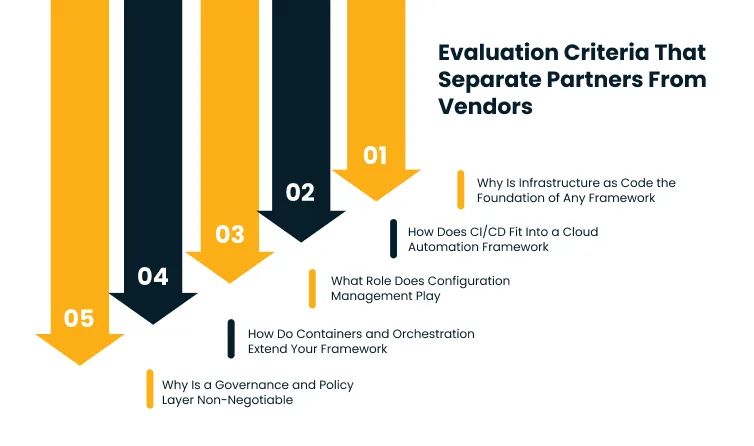
A mature framework connects five core layers: Infrastructure-as-Code, CI/CD, configuration management, container orchestration, and governance. Each layer handles a different part of cloud operations, and gaps in one layer usually push manual work into another.
Cygnet.One’s cloud strategy and design service helps define these framework layers, governance rules, and operating standards before automation scales across teams.
The framework should also support monitoring, auditability, and exception handling. Automation becomes enterprise-ready only when teams can see what happened, why it happened, who approved it, and how to recover if something fails.
Why Is Infrastructure-As-Code The Foundation Of Any Framework?
Infrastructure-as-Code gives cloud teams a repeatable way to provision and manage infrastructure using version-controlled configurations. Tools such as Terraform, CloudFormation, and CDK make infrastructure easier to review, test, approve, and roll back.
IaC reduces the risk of environment drift because infrastructure changes are defined in code rather than applied manually. This gives operations teams a clearer record of how each environment was created and modified.
It also supports stronger collaboration between engineering, operations, and security teams. Infrastructure changes can move through the same review discipline as application code, which improves control without slowing delivery.
How Does CI/CD Fit Into A Cloud Automation Framework?
CI/CD connects cloud automation to the software delivery lifecycle. It automates build, test, security validation, deployment, and rollback workflows so application and infrastructure changes move through controlled pipelines.
Continuous testing in DevOps pipelines strengthens this model by validating code, infrastructure, and release quality before changes move into production.
Without CI/CD, even IaC-based environments still depend on manual approvals and handoffs. These handoffs reintroduce delay and inconsistency, especially when teams deploy across development, staging, and production environments.
A strong CI/CD model also improves release confidence. Automated tests, deployment gates, and rollback triggers help teams release faster without relying on informal checks or last-minute manual reviews.
What Role Does Configuration Management Play?
Configuration management keeps cloud workloads aligned with approved operating standards after they are provisioned. Tools such as Ansible, Puppet, and Chef help enforce consistent system states across servers, applications, and environments.
Provisioning creates infrastructure, but configuration management helps keep that infrastructure stable. This matters because cloud environments change through patches, updates, scaling events, and operational fixes.
Without configuration management, teams may provision correctly at the start but lose consistency over time. This creates drift that can affect security, performance, and reliability.
How Do Containers And Orchestration Extend Your Framework?
Containers standardize application environments, so services behave consistently across development, testing, and production. This reduces differences between environments and makes deployments easier to repeat.
Orchestration platforms such as Kubernetes automate scheduling, scaling, recovery, and workload placement. They reduce the need for manual intervention when services need more capacity or when workloads fail.
This layer becomes important when cloud automation moves beyond infrastructure provisioning. It helps teams manage runtime behavior, not only environment creation.
Why Is A Governance And Policy Layer Non-Negotiable?
Governance keeps automation from turning into faster cloud sprawl. Policy-as-code, access controls, approval workflows, tagging rules, and compliance checks define what automated systems are allowed to create and change.
Tools such as AWS Config, Open Policy Agent, Service Control Policies, and cloud-native policy engines help enforce rules automatically. These controls reduce the need for manual audits after resources have already been created.
Governance should be part of the automation framework from the beginning. If it is added later, teams often spend more time cleaning up untagged resources, misconfigured access, and compliance gaps than they saved through automation.
Where Do Enterprises Go Wrong With Cloud Automation?
Cloud automation fails most often when teams automate individual tasks without building a connected strategy. The immediate gains look useful, but the long-term result is often tool sprawl, script debt, security gaps, and workflows that only a few specialists understand.
The issue is rarely the automation tool itself. The deeper problem is poor sequencing. Teams pick tools before defining ownership, standards, governance, observability, and success metrics.
Gartner predicted in 2025 that more than 50% of organizations would not get expected results from multicloud implementations by 2029 because connecting across providers remains difficult. For cloud automation, that risk becomes higher when each team builds its own workflows without shared standards.
Why Does Automating Without A Strategy Backfire?
Automation without a strategy often solves one immediate problem while creating long-term maintenance overhead. A script may reduce one manual task, but if it is not reusable, documented, governed, or observable, it becomes another system that needs support.
This becomes harder at enterprise scale. One workflow may work for one team, but fail when other teams need different environments, policies, or approval paths.
A strategy prevents this by defining automation domains clearly. It separates what should be standardized, what can vary by team, and what requires approval before execution.
How Does Tool Sprawl Undermine Cloud Automation?
Tool sprawl happens when different teams adopt separate automation tools for similar problems. One team may use Terraform, another may use CloudFormation, while another uses scripts and manual approvals.
This creates inconsistent operating models. Troubleshooting becomes slower because failures can sit across multiple tools, owners, and configurations.
A strong cloud automation strategy does not require one tool for everything. It does require a clear tool ownership model, integration standards, and governance rules that prevent disconnected automation from spreading across the environment.
Why Do Governance Gaps Create Security And Compliance Risk?
Automated provisioning without governance can create risky resources faster than manual processes. Teams may create untagged resources, over-permissioned identities, exposed services, or non-compliant configurations without review.
The problem is not automation speed. The problem is uncontrolled automation speed.
Policy-as-code, identity governance, tagging enforcement, and automated compliance checks help keep speed and control aligned. They ensure automation adheres to approved standards rather than bypassing them.
What Happens When Observability Is Missing?
Automation needs visibility. If teams cannot monitor automated workflows, they cannot easily detect failed deployments, broken scripts, resource drift, or policy violations.
Cloud-native observability gives teams the telemetry needed to track automated workflows, distributed services, and operational signals as cloud environments scale.
Manual processes are visible because a person is actively involved. Automated systems can fail silently when no monitoring or alerting is connected to the workflow.
Observability should cover pipeline health, provisioning status, configuration drift, policy failures, and remediation actions. This helps teams understand whether automation is actually improving operations or creating hidden risk.
How Do Skills Gaps Stall Cloud Automation Initiatives?
Automation often starts with a small group of cloud specialists. The initiative stalls when those specialists move on, and the wider team cannot maintain or extend the workflows.
This creates a dependency problem. Teams may bypass automation when they do not understand how it works, which brings manual work back into the operating model.
A sustainable strategy includes documentation, reusable modules, clear ownership, training, and support models. Automation should become a shared operating capability, not a specialist-owned black box.
How Do You Build A Cloud Automation Roadmap?
A cloud automation roadmap sequences automation work so that each phase delivers measurable value before the next phase begins. This keeps automation practical and prevents teams from trying to transform every workflow at once.
The strongest roadmaps follow a phased model: assess, prioritize, pilot, scale, and optimize. Each phase should have a decision gate tied to measurable outcomes.
The goal is to prove automation value in smaller domains before scaling across business units, platforms, or environments. This gives leaders confidence that the automation model works under real operational conditions.
Cygnet.One’s cloud strategy and design service helps enterprises turn this roadmap into a governed automation plan with clear priorities, ownership, and measurable outcomes.
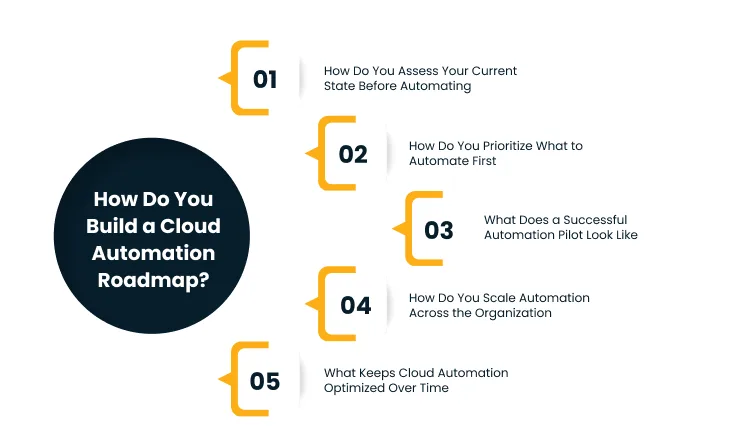
How Do You Assess Your Current State Before Automating?
A current-state assessment identifies where manual work creates the most cost, delay, and risk. Teams should map provisioning requests, deployment steps, configuration changes, incident response actions, and compliance checks.
The assessment should measure frequency, effort, error rate, ownership, and business impact. This gives teams a practical basis for deciding what to automate first.
Without this assessment, automation priorities are usually based on opinion. That often leads teams to automate visible tasks while ignoring the workflows that create the highest operational drag.
How Do You Prioritize What To Automate First?
Prioritization should balance operational value and automation feasibility. A process is a good candidate when it happens frequently, follows a repeatable pattern, and produces measurable outcomes.
High-priority areas often include provisioning, environment setup, CI/CD execution, tagging enforcement, scaling responses, and routine remediation.
Teams should avoid starting with unstable workflows. If a process changes every time it runs, the first step is standardization, not automation.
What Does A Successful Automation Pilot Look Like?
A successful pilot automates one high-value workflow end to end. It should include the workflow logic, approvals, observability, failure handling, and success metrics.
The pilot should not be judged only by whether the automation runs. It should be judged by whether it reduces manual effort, improves consistency, and creates a pattern that other teams can reuse.
A strong pilot also creates documentation and reusable components. This makes the next phase easier to scale across more workflows or teams.
How Do You Scale Automation Across The Organization?
Scaling automation requires standard patterns, reusable modules, and platform ownership. Teams should consume approved automation templates rather than build separate workflows from scratch.
Gartner predicted in 2024 that by 2026, 80% of large software engineering organizations would establish platform engineering teams, up from 45% in 2022. This supports the shift toward reusable platforms that reduce tool complexity and help teams consume automation consistently.
Platform engineering becomes important at this stage. Internal platforms, golden paths, shared modules, and self-service catalogs make automation easier to adopt without weakening governance.
What Keeps Cloud Automation Optimized Over Time?
Cloud automation needs ongoing review because cloud environments change continuously. New services, workload patterns, security rules, and cost priorities can make older automation workflows less useful.
Optimization should include workflow audits, drift checks, cost reviews, module updates, and performance measurement. Teams should retire workflows that no longer match current operations.
This keeps automation aligned with the environment it supports. Without ongoing optimization, automated workflows can become outdated and create the same inefficiency they were meant to remove.
How Do You Measure Cloud Automation Success?
Cloud automation success should be measured through operational, financial, and business outcomes. Faster workflows matter only when they reduce risk, cost, effort, or delivery friction.
A strong measurement model tracks how automation changes day-to-day operations. It should also show whether cloud teams are spending less time on routine work and more time on higher-value engineering.
The most useful metrics connect automation performance to business value. This prevents teams from celebrating technical activity that does not materially improve cloud operations.
Which Operational KPIs Show Automation Is Working?
Operational KPIs show whether automation improves speed, reliability, and consistency. These metrics help teams understand whether workflows are performing better than the manual processes they replaced.
Useful KPIs include:
- Provisioning lead time
- Deployment frequency
- Mean time to recovery
- Change failure rate
- Automation success rate
- Configuration drift incidents
- Policy compliance pass rate
- Manual approval reduction
These metrics should be tracked over time. One successful automation run does not prove long-term operational improvement.
How Do You Track Cloud Cost Impact From Automation?
Cloud automation can reduce costs by improving resource utilization and eliminating waste. Cost impact should be measured through infrastructure cost per workload, idle resource reduction, rightsizing actions, and avoided manual effort.
Smarter cloud cost optimization helps teams connect these automation actions to measurable savings, better resource utilization, and stronger cost governance.
Teams should also track time saved from routine operations. Engineering hours moved from provisioning tickets or manual remediation into architecture, product, or reliability work are part of the business case.
Cost automation should include tagging enforcement, automated shutdown schedules, budget alerts, and resource cleanup. These controls help prevent waste from accumulating between review cycles.
What Business Outcomes Should Cloud Automation Deliver?
Cloud automation should improve more than technical execution. It should reduce time-to-market, lower operational risk, improve compliance readiness, and make cloud operations easier to scale.
Business leaders should look for outcomes such as faster environment delivery, fewer deployment errors, lower incident rates, improved audit readiness, and better cost predictability.
These outcomes help justify continued automation investment. They also show where the next phase of automation should focus.
How Cygnet.One Supports Cloud Automation Strategy?
Cygnet.One’s Cloud Engineering practice approaches cloud automation as a strategy problem before a technology problem. The focus starts with a current-state operations assessment to identify where manual cloud work creates the most cost, delay, and operational risk.
Cygnet.One’s ORBIT framework structures cloud engagements across five phases: Optimize, Run, Build, Integrate, and Transform. This helps enterprises move from assessment to pilot to scale without creating disconnected automation workflows.
As an AWS Advanced Tier Partner, Cygnet.One brings experience with AWS-native automation services such as AWS Config, CodePipeline, Systems Manager, and Control Tower, along with Terraform and Kubernetes for hybrid and multi-cloud environments.
The outcome is not just faster cloud operations. It is a documented, governable automation architecture that enterprise teams can operate, extend, and audit over time.
Conclusion
Cloud automation creates value only when it is governed as an operating model, not scattered across scripts, tools, and team-specific workflows.
At this stage, the next step is not to automate more. It is to decide what should be automated first, which workflows need governance, and how automation outcomes will be measured across provisioning, deployment, security, cost control, and remediation.
This is where cloud strategy and design become relevant. A structured strategy helps define the automation roadmap, ownership model, governance controls, and platform foundations needed to reduce manual operations without creating new layers of complexity.
The goal is to move from isolated automation wins to a cloud operating model that improves consistency, efficiency, and control over time. Book a demo with Cygnet.One to build a cloud automation strategy aligned with your workloads, governance needs, and operational efficiency goals.
FAQs
Cloud automation executes individual cloud tasks, while cloud orchestration coordinates multiple automated tasks into a connected workflow. For example, automation may provision a server, while orchestration can provision infrastructure, apply policies, run tests, update monitoring, and trigger approvals across the full deployment process.
The first workflows to automate should be frequent, repeatable, measurable, and high-impact. Common starting points include cloud provisioning, environment setup, CI/CD execution, tagging enforcement, backup workflows, idle resource shutdown, and routine remediation, because these areas usually create the most manual effort and operational delay.
Cloud automation implementation usually takes a few weeks for a focused workflow and several months for enterprise-wide automation. The timeline depends on process maturity, tool readiness, governance requirements, integration complexity, and whether teams are automating isolated tasks or building a reusable automation operating model.
Cloud automation ROI is calculated by comparing reduced manual effort, faster provisioning, fewer deployment errors, lower incident response time, and cost savings against implementation and maintenance costs. Enterprises should also measure business impact through release speed, compliance readiness, cloud efficiency, and engineering time redirected to higher-value work.
Cloud automation creates problems when unclear, unstable, or poorly governed workflows are automated too early. It can increase risk if teams automate inconsistent processes, bypass approval controls, create tool sprawl, or deploy workflows that lack monitoring, ownership, documentation, and rollback mechanisms.
Cloud automation in hybrid or multi-cloud environments standardizes provisioning, deployment, governance, monitoring, and cost controls across different platforms. Since each cloud has different services and APIs, enterprises need common policies, reusable templates, integrated workflows, and centralized visibility to avoid fragmented automation.
Author


Abhishek Nandan
AVP, Marketing
Abhishek Nandan is the AVP of Services Marketing at Cygnet.One, where he drives global marketing strategy and execution. With nearly a decade of experience across growth hacking, digital, and performance marketing, he has built high-impact teams, delivered measurable pipeline growth, and strengthened partner ecosystems. Abhishek is known for his data-driven approach, deep expertise in marketing automation, and passion for mentoring the next generation of marketers.