



































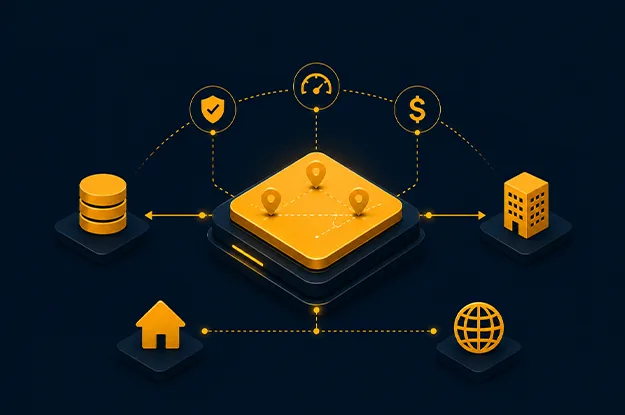
The real cloud decision starts after migration planning, when architecture teams stop asking which platform is modern and start asking which location can defend the workload.
That question has become sharper in 2026. Enterprises are dealing with AI data flows, regional privacy rules, rising cost scrutiny, latency-sensitive digital channels, legacy systems that still carry revenue, and security teams that no longer accept “cloud first” as an answer. A good workload placement strategy is business control.
This is why enterprise cloud architecture needs placement as a formal decision discipline, not a late-stage hosting choice, especially when teams are building a cloud strategy roadmap. The wrong choice can create expensive data movement, weak recovery paths, audit gaps, and poor user experience, which is why enterprises need to plan around cloud migration challenges early. The right choice gives each application a clear operating home, with clear reasons for staying there.
The practical question for architecture teams is simple: where should cloud workloads run when public cloud, private cloud, hybrid models, and edge locations can all be valid answers? The answer depends on evidence, not on ideology.
What Cloud Workload Placement Means
Cloud workload placement defines where an application, service, dataset, integration, or processing function should run across the available infrastructure estate. It may run in a public cloud region, a private cloud, a colocation facility, a factory edge node, a retail branch, or across several locations.
A workload placement strategy should define the placement logic before migration planning turns into platform selection through aws cloud consulting services. Without that logic, teams make isolated choices. One application moves for cost. Another stays for compliance. A third lands near a data source. Soon, the estate looks distributed, but nobody can explain the pattern.
In mature enterprise cloud architecture, placement is not handled as a one-time migration decision. It becomes part of architecture review, security assessment, cost planning, resilience design, and application lifecycle management.
A useful placement discussion starts with five questions:
| Question | What it reveals |
| What data does the workload handle? | Privacy, residency, sovereignty, and audit exposure |
| Who or what consumes it? | Latency, access, and availability needs |
| What does failure cost? | Recovery design and redundancy needs |
| What does it talk to? | Integration, data gravity, and network cost |
| How often does demand change? | Capacity planning and commercial fit |
These questions keep workload placement strategy grounded in operating reality.
Evaluate Business, Compliance, Latency, Cost, and Performance Needs
The mistake many enterprises make is treating placement as a technical matrix first. It should begin with business consequence.
A claims engine, a fraud scoring model, a product catalog, and a factory control application can all be “business critical,” yet they need different homes. One may need regional data control. One may need burst capacity. One may need sub-second response near devices. One may be tightly coupled to a mainframe that is not moving soon.
A strong workload placement strategy looks at decision factors in layers.
| Factor | Placement signal | Common risk if ignored |
| Business criticality | Revenue impact, user impact, process dependency | Over-engineered low-risk systems or under-protected critical systems |
| Compliance | Data class, residency, retention, audit trail | Rework after legal or audit review |
| Latency | User location, device proximity, transaction time | Poor experience or unsafe operational delay |
| Cost | Compute pattern, storage growth, data transfer | Attractive hosting cost with hidden run cost |
| Performance | IOPS, throughput, acceleration, dependency timing | Unstable service after migration |
| Resilience | RTO, RPO, regional failure tolerance | Recovery design that exists only on paper |
| Operations | Skills, monitoring, automation, support model | Platform sprawl and unclear ownership |
Regulated workload placement needs early review because compliance rarely works as a simple yes-or-no rule. A system may be allowed in public cloud, but only with the right region, encryption posture, access control, logging, retention, key management, and third-party risk evidence. The placement decision must capture those conditions.
Cost also needs discipline. The cheapest runtime is not always the cheapest operating model. Data transfer, duplicated tooling, specialist support, idle reserved capacity, and licensing terms can change the answer. A workload placement decision framework should compare the full operating cost, not only the monthly hosting line.
Compare Public Cloud, Private Cloud, Hybrid, and Edge Options
The comparison of public cloud vs private cloud vs edge should stay tied to workload behavior, not platform preference. Each option has a natural fit.
Public cloud works well when the workload benefits from managed services, regional reach, elastic demand, analytics platforms, AI services, or faster provisioning. It often fits digital applications, data platforms, API backends, testing environments, and uneven demand.
Private cloud remains relevant where control, predictable capacity, legacy coupling, licensing limits, or strict isolation matter. Some enterprises keep core systems there because relocation risk is higher than the benefit.
Hybrid cloud workload placement often becomes the practical answer when one application landscape has different data, latency, and integration needs. It allows different components to run in the environments that best fit their role. For example, a customer portal may run in public cloud while transaction records remain near an existing core system. Enterprise cloud architecture must be intentional, or hybrid becomes a collection of exceptions.
Edge is different. It is not just a smaller cloud. Edge placement is useful when decisions must happen near users, devices, stores, plants, vehicles, or equipment. Safety systems, computer vision, industrial telemetry, local authorization, and branch operations often need local processing because delay or weak connectivity changes the outcome.
| Option | Best fit | Watch closely |
| Public cloud | Managed services, analytics, variable demand, global access | Data movement, cost controls, shared responsibility gaps |
| Private cloud | Stable demand, legacy coupling, isolation, known capacity | Hardware refresh, automation debt, service catalog limits |
| Hybrid | Mixed estates, phased modernization, data gravity, regional needs | Network design, duplicate controls, ownership splits |
| Edge | Low latency, local resilience, device-heavy processes | Patch management, physical security, remote observability |
The public cloud vs private cloud vs edge discussion improves when each option is treated as a tool with boundaries.
Build Workload Classification Criteria Before You Decide
Classification is where placement becomes repeatable. Without it, architecture review depends on who attends the meeting.
The classification model should be simple enough for application owners to use, but strict enough to support enterprise cloud architecture governance. Start with workload attributes, not platform names.
Recommended criteria include:
- Data sensitivity: public, internal, confidential, regulated, restricted.
- Residency requirements: no restriction, country-level, region-level, facility-level.
- Latency tolerance: human interaction, near-real-time process, machine-speed decision.
- Integration gravity: cloud-native, mixed, core-system dependent, device dependent.
- Change pattern: stable, seasonal, event-driven, unpredictable.
- Failure impact: low, moderate, high, severe.
- Portability needs: low, moderate, high.
- Operational maturity: automated, partially automated, manual, undocumented.
Workload portability should be planned carefully because portability has a cost of its own. It helps with negotiation power, exit planning, disaster recovery, and regulatory change. It can also become expensive when teams chase theoretical mobility. Containers, infrastructure as code, API contracts, and decoupled data patterns can improve workload portability, but they do not remove dependency realities.
A classification discussion often exposes uncomfortable facts. Some “cloud-ready” applications still rely on fixed IP rules, outdated authentication, fragile batch windows, or undocumented file transfers. That does not block placement. It changes the migration path.
Create a Practical Placement Decision Model
A workload placement decision framework should produce a defensible answer. It should not pretend to calculate truth from a spreadsheet.
Use a decision model with three stages.
Stage 1: Eliminate Unsafe Choices
Remove any target environment that cannot meet mandatory requirements. These include legal residency, required certifications, minimum recovery needs, encryption controls, unsupported latency targets, or hard licensing restrictions.
If a workload processes restricted health, financial, tax, or identity data, regulated workload placement should be reviewed before any cost comparison. Otherwise, teams may spend weeks designing an option that will later fail risk review.
Stage 2: Compare Viable Choices
Once unsafe options are removed, compare the remaining candidates against weighted criteria.
| Criterion | Example weight | Why it matters |
| Compliance fit | 25% | Prevents late-stage rejection |
| Latency and experience | 20% | Protects user and process outcomes |
| Integration cost | 15% | Captures data gravity and dependency friction |
| Run cost | 15% | Shows steady-state economics |
| Resilience | 15% | Aligns placement with recovery targets |
| Operating readiness | 10% | Tests whether teams can support the choice |
Weights should change by the workload family. A trading system may weigh latency higher. A reporting archive may weigh costs and retention higher. A plant-floor control system may weigh local resilience higher.
Stage 3: Record the Decision
The final output should be a placement record, not a slide. It should state the chosen location, rejected options, assumptions, controls, run cost, dependency map, review date, and reassessment triggers.
This record answers the question the business will ask later: why does this run here?
Review Governance and Lifecycle Management After Placement
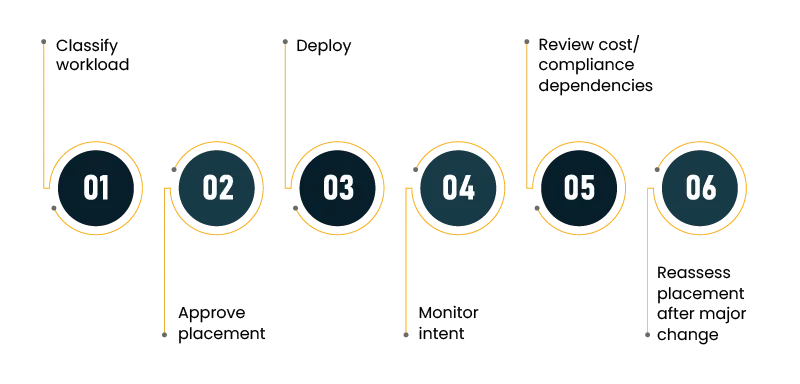
Cloud workload placement does not end when the workload goes live. Conditions change. Costs drift. Regulations shift. Vendors change service terms. Usage changes. Data that was once internal may become regulated after a new feature is added.
Governance should define how placement decisions are reviewed. The review does not need to be heavy. It needs to be consistent.
Good governance includes:
- A placement standard owned by enterprise cloud architecture, security, infrastructure, and finance.
- Mandatory classification before migration funding.
- Architecture review for high-risk and regulated systems.
- Cost review after production stabilization.
- Dependency review after major releases.
- Exception expiry dates, so temporary decisions do not become permanent.
Enterprise cloud architecture also needs monitoring that reflects placement intent. A workload placed at edge for latency should report latency from the site, not only from central dashboards. A workload placed in public cloud for elastic demand should show whether capacity patterns justify that choice. A workload placed in a private cloud for isolation should prove that the isolation works through access records and segmentation evidence.
This is where many cloud workload placement programs become weak after go-live. They approve the decision, then stop measuring whether the decision remains valid.
Common Mistakes in Workload Placement Strategy
The most common mistake is copying a reference architecture without checking the enterprise context. Reference patterns are useful, but they do not know your licenses, data contracts, network routes, or audit history.
Another mistake is letting one factor dominate. Compliance can block options, but it should not automatically force private hosting. Cost can guide decisions, but it should not override latency or resilience. Performance testing can reveal fit, but it should not ignore operational burden.
The third mistake is treating hybrid as a safe compromise. Hybrid can be the right answer, but it must be designed. Poor hybrid design creates duplicate logging, unclear incident routing, inconsistent identity policies, and expensive data movement. Hybrid cloud workload placement needs one operating model, with shared rules for identity, logging, incident response, cost review, and change control.
The fourth mistake is delaying classification. When teams classify late, they discover constraints after the target design is already in place. That creates frustration because the right decision feels like rework.
Conclusion: Placement Is an Operating Discipline
Cloud workload placement is where cloud strategy becomes real. It decides how business risk, user experience, cost, compliance, and engineering effort show up in architecture.
A good workload placement strategy does not ask teams to choose between public cloud, private cloud, hybrid, and edge in abstract terms. It asks them to prove which environment best fits the workload’s data, latency, dependency, recovery, cost, and operating needs.
For modern enterprise cloud architecture, the goal is to place workloads where risk, cost, compliance, and user experience can be defended with evidence. Each workload should have the least avoidable risk and the clearest business reason for running where it does.
When leaders ask where cloud workloads should run, the answer should not depend on habit, vendor preference, or a migration deadline. It should come from a placement model that the business, architects, security teams, finance, and operations can all defend.
Author


Yogita Jain
Content Lead
Yogita Jain leads with storytelling and Insightful content that connects with the audiences. She’s the voice behind the brand’s digital presence, translating complex tech like cloud modernization and enterprise AI into narratives that spark interest and drive action. With a diverse of experience across IT and digital transformation, Yogita blends strategic thinking with editorial craft, shaping content that’s sharp, relevant, and grounded in real business outcomes. At Cygnet, she’s not just building content pipelines; she’s building conversations that matter to clients, partners, and decision-makers alike.