




































If your integration strategy still runs on point-to-point scripts, aging middleware, and disconnected SaaS workflows, the question is not whether you need an enterprise integration platform. The question is which one fits your architecture.
According to the 2025 IBM CEO Study, conducted with 2,000 senior executives across 33 countries and 24 industries, half acknowledged that the pace of recent technology investments has left their organizations with disconnected, piecemeal systems.
That fragmentation shows up as delayed reporting, blocked automation, manual data reconciliation, and integration debt that compounds with every new SaaS tool added to the stack.
This guide covers what platform types exist, how they compare, which features matter in an enterprise environment, which tools fit which use cases, and how to match the right platform to your architecture.
For enterprises where integration connects to cloud modernization, legacy re-architecture, or AI readiness, this decision belongs in a broader architecture conversation. Providers like Cygnet.One’s Digital Engineering practice approach integrates as part of a larger engagement covering API-led connectivity, cloud integration, and event-driven solutions alongside application modernization and hyperautomation.
What Is an Enterprise Integration Platform and How Does It Work?
An enterprise integration platform is software that connects applications, data sources, and workflows into a unified operational layer. It uses APIs, middleware, messaging, and orchestration to move and transform data across on-premise, cloud, and hybrid environments.
Enterprise-grade platforms support complex multi-cloud architectures, high transaction volumes, and governed access. Unlike self-service tools such as Zapier or Make, which handle simple app-to-app connections, enterprise platforms are built for environments where reliability, compliance, and scale are non-negotiable.
iPaaS is now the more widely used term. Its core capabilities include application integration, data integration, API management, event-driven messaging, workflow orchestration, governance, and real-time monitoring. Together, these capabilities form the operational foundation for connected, automated, and compliant enterprise systems.
In practice, all integration platforms follow the same core cycle. Data is ingested from source systems and routed based on content rules or event triggers, with async queuing handling volume spikes. It is then transformed between formats such as JSON, XML, CSV, and EDI, with schema validation and data quality checks applied in transit.
Orchestration logic manages the execution across systems using conditional branching, retries, and compensating transactions, with OAuth and RBAC enforced at every handoff. Finally, real-time dashboards, audit trails, SLA tracking, and automated alerting give operations teams continuous visibility into every active flow.
Types of Enterprise Integration Platforms
Most large organizations end up using a combination of Enterprise Integration Platforms. The decision depends on your integration landscape, how much of your environment sits on-premise versus in the cloud, how mature your IT organization is, and how far along your modernization roadmap you are. Understanding the differences between the four main types is the starting point for making that decision well.
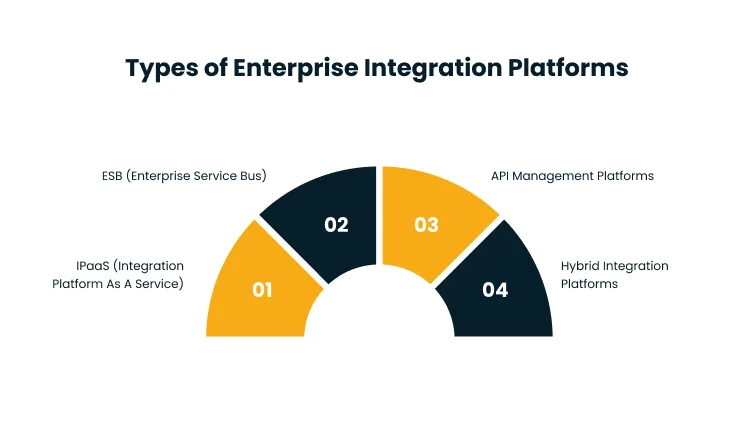
iPaaS (Integration Platform as a Service)
iPaaS platforms are cloud-hosted with pre-built connectors, visual workflow builders, and fully managed infrastructure. Teams do not need to provision or maintain servers, which shortens deployment timelines significantly. This makes iPaaS the right fit for hybrid environments, SaaS-heavy stacks, and teams that need fast deployment without deep engineering investment.
The risks at scale are real, though. Licensing costs grow with transaction volume, customization has limits, and proprietary connector libraries create vendor lock-in that becomes expensive to undo. Key platforms in this space include Boomi, MuleSoft Anypoint, Workato, and Informatica IDMC.
ESB (Enterprise Service Bus)
Enterprise Service Bus is a centralized middleware layer that handles message routing, transformation, and orchestration between systems. It was the dominant enterprise integration architecture before cloud-first strategies became standard, and it remains well-suited for large on-premise-heavy environments in BFSI and manufacturing, where transaction reliability and legacy protocol support are critical.
ESB presents real challenges in cloud-first or hybrid strategies. A central bus becomes a single point of failure, performance bottlenecks emerge under high load, and scaling across distributed cloud environments requires significant re-architecture. IBM WebMethods, TIBCO, and Oracle SOA Suite are the main platforms here.
API Management Platforms
API Management Platforms focus on creating, securing, publishing, and monitoring APIs as managed products. They give organizations controlled, visible access to services across internal teams and external partners. This is the right choice for API-first architectures, partner ecosystems, and SaaS or ISV environments that need governed connectivity. What API management alone cannot do is transformation, orchestration, or legacy system connectivity.
It requires pairing with iPaaS or middleware to cover the full integration stack. Key platforms include Apigee (Google Cloud), Azure API Management, Kong, and AWS API Gateway.
Hybrid Integration Platforms
Hybrid Integration Platforms combine iPaaS, API management, event-driven messaging, and data integration into a single control plane. They are designed for organizations that have outgrown single-purpose tools and need unified governance across cloud, on-premise, and SaaS simultaneously.
This is the most capable option for large enterprises with active cloud modernization or AI workstreams, but it carries the highest implementation complexity and cost. A mature IT organization and often a services partner are necessary to get the architecture right before committing to a platform. IBM webMethods Hybrid Integration, MuleSoft Anypoint (full suite), Azure Integration Services, and Boomi (enterprise tier) lead in this category.
What to Evaluate When Comparing Enterprise Integration Platforms
These criteria apply regardless of platform type. Use them to pressure-test any vendor shortlist against your actual environment. A platform with 400 pre-built connectors but weak governance is the wrong fit for a regulated industry.
A platform with strong orchestration but no visual builder slows down business teams that need to own workflows without writing code. The right evaluation starts with your environment, not the feature catalog.
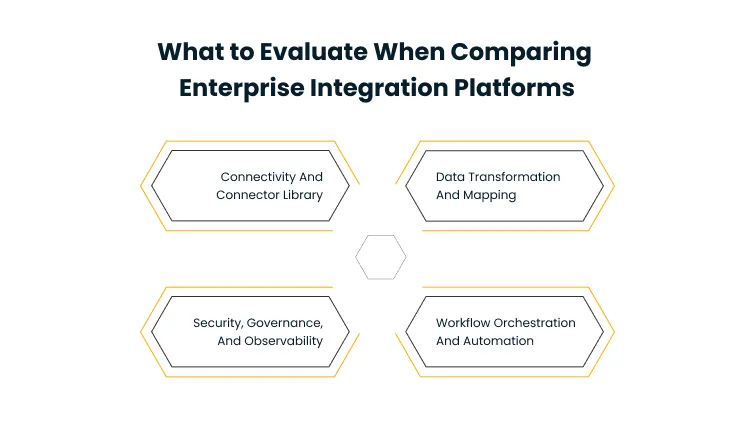
Connectivity and Connector Library
The connector library is where most integration projects encounter their first real constraint. The number of pre-built connectors that cover your specific systems matters, including ERP, CRM, HRIS, cloud applications, and databases.
What matters equally is whether the platform supports both cloud and on-premise connectivity from a single control plane, whether it allows you to build custom connectors when pre-built options do not cover a critical system, and whether the library is actively growing to account for new SaaS tools entering your stack.
Data Transformation and Mapping
Format conversion between JSON, XML, CSV, and EDI is a baseline expectation. The differentiator is whether transformations require custom development for each system pairing or whether a visual mapping tool lets business analysts configure and modify them independently of developers.
Runtime handling of schema changes and data quality issues matters as much as the initial mapping. Integrations built on fragile schema assumptions break at the worst possible time.
Workflow Orchestration and Automation
Multi-step workflows that span multiple systems and business functions need conditional logic, branching, error handling, and automatic retries built into the orchestration layer. A visual workflow builder that is accessible to both IT and business users.
It determines whether the platform stays responsive to operational changes or becomes a bottleneck waiting on engineering capacity. The gap between platforms on this criterion is significant, and it is one of the first things to test in any proof of concept.
Security, Governance, and Observability
Enterprise-grade authentication covering OAuth 2.0, SAML, API keys, and JWT is a non-negotiable baseline. Role-based access control for integration creation, modification, and deployment needs to be built into the platform, not bolted on through a third-party tool.
Centralized governance policy enforcement, compliance support for SOC 2, HIPAA, GDPR, and PCI-DSS, and real-time monitoring with automated alerting and SLA tracking need to be present from day one. Enterprises that retrofit governance after deployment consistently spend more and achieve less than those that design for it at the start.
Leading Enterprise Integration Platforms by Use Case
The right platform depends on what you are solving for. The table below maps leading tools to the use cases they fit best. This is not a ranking. Two enterprises in the same industry on the same platform can get very different results depending on the implementation strategy and architecture behind it.
Verify current pricing and feature availability directly with each vendor before finalizing a shortlist.
| Platform | Strongest Fit | Architecture Style | Key Consideration |
| MuleSoft Anypoint | API-led connectivity, large API portfolios | API-first, three-tier | High capability, licensing costs scale quickly at enterprise volume |
| Boomi | Low-code, fast hybrid deployment | Cloud-native iPaaS | Broad connectivity is less suited for developer-heavy architectures needing deep customization |
| Azure Integration Services | Microsoft-centric enterprises | Azure-native (Logic Apps, API Management, Service Bus, Event Grid) | Deep Microsoft stack integration, less flexible outside Azure |
| IBM webMethods | Legacy-heavy, hybrid, B2B | Hybrid (API management, event streaming, messaging, EDI) | Enterprise-grade depth and reliability, heavier to implement and maintain |
| Workato | Business-led automation | Cloud-native iPaaS, recipe-based | Strong workflow automation, lighter on deep data integration and complex transformations |
| Informatica IDMC | Data integration, data quality, MDM | AI-powered data management platform | Best for data-centric needs, less suited for app-to-app orchestration at scale |
Common Mistakes When Choosing an Enterprise Integration Platform
Most integration platform decisions go wrong before any code is written. The following patterns consistently produce expensive course corrections.
- Choosing based on feature lists instead of architecture fit. A platform that wins a demo may not match the systems, protocols, and data volumes in your environment.
- Underestimating governance and compliance requirements from day one. Adding security controls and audit capabilities after deployment costs more than designing them in from the start.
- Ignoring the total cost of ownership. Platform licensing is the starting point. Transaction pricing, connector fees, custom development, and ongoing maintenance often double or triple the initial estimate.
- Treating integration as a one-time project. Integration is an ongoing operational discipline. Systems change, SaaS tools get replaced, and new compliance requirements emerge with every regulatory cycle.
- Not planning for legacy system connectivity. Many enterprises discover too late that their shortlisted platform lacks the adapters or protocol support needed for on-premise or mainframe systems.
- Selecting a platform without evaluating the vendor’s long-term roadmap. AI capabilities, new connector releases, and hybrid support gaps matter as much as current features when you are making a multi-year commitment.
- Making the platform decision in isolation. Integration is the foundation for cloud modernization, data engineering, and AI readiness. A platform chosen without those workstreams in view typically needs to be revisited when they accelerate.
How to Choose the Right Enterprise Integration Platform
The right choice comes from working outward from your environment, not inward from a vendor shortlist. Enterprises that choose well follow a consistent sequence: understand what they have, define what they need the platform to do, and then match the platform type to their architecture before evaluating specific tools.
Start With Your Integration Landscape
Before evaluating platforms, map what you are working with. Separate your on-premise systems from cloud and SaaS, identify where data breaks or duplicates across systems, and catalogue which integrations are still running manually.
Define success in business terms, whether that is faster order processing, real-time inventory visibility, automated compliance reporting, or reduced manual reconciliation. These outcomes determine which platform capabilities are non-negotiable versus useful to have.
Match Platform Type to Your Architecture
Environments that run mostly on cloud and SaaS are well served by iPaaS, where fast deployment and managed infrastructure match the operational model. On-premise-heavy environments with legacy systems need an ESB or hybrid integration platform where protocol depth and centralized governance take priority over speed.
Organizations building API-first architectures with external partner access need API management as a core layer, but paired with iPaaS or middleware for transformation and orchestration. Multi-cloud environments running a mix of legacy, cloud, and SaaS systems typically require a hybrid platform that combines all three.
Most large enterprises end up here, and the question becomes how to combine them without creating a new layer of complexity.
Build, Buy, or Partner
Building custom integration code gives maximum control but creates the highest long-term maintenance burden. It fits teams with strong internal engineering capacity and requirements that no platform covers. Licensing a platform accelerates time to value, but costs scale with usage, and vendor lock-in is real.
It works best when the platform matches your architecture without heavy customization. Partnering with an integration services provider handles assessment, architecture design, implementation, and long-term governance under a single engagement.
This approach fits complex environments or situations where integration is part of a larger transformation and the platform decision needs to account for cloud, data, and AI workstreams simultaneously.
When Should You Work With an Enterprise Integration Partner?
Platform selection is one decision. Architecture design, implementation, governance, and long-term optimization are the work that determines whether the platform delivers value. Several signals consistently indicate that an integration partner changes the outcome.
The first is internal bandwidth. If your team lacks the capacity to design, implement, and govern a multi-system integration environment while maintaining existing operations, the implementation quality suffers regardless of which platform is chosen. The second is environmental complexity.
Environments that span legacy systems, modern APIs, cloud applications, and data platforms all need to work together under a single governance model. That is an architecture problem before it is a platform problem. The third is tied to transformation initiatives.
According to the 2024 IGlobal AI Adoption Index, 22% of IT professionals cited AI projects that are too difficult to integrate and scale as a top barrier to adoption. When integration sits on the critical path for cloud modernization, hyperautomation, or AI readiness, the platform decision needs to be made with that full picture in view.
Cygnet.One’s enterprise integration practice is built around this engagement model. Every engagement starts with a full environment assessment, an integration roadmap, and a data flow strategy before any platform recommendation is made. The delivery scope covers API-led connectivity, cloud integration, event-driven solutions, connectors, API Hub, and middleware under a single engagement.
This sits within Cygnet.One’s broader Digital Engineering practice, which also covers application modernization, hyperautomation, and technical due diligence, so integration architecture decisions are made with full visibility into cloud, data, and AI workstreams simultaneously.
Engagements are structured through the COSMOS framework (Co-Ideate, Co-Create, Co-Innovate, Co-Evolve), which moves from assessment through long-term optimization in a governed sequence. Delivery runs at CMMI Level 5 process maturity.
Cygnet.One works across BFSI, manufacturing, retail, healthcare, and ISV environments, with a primary focus on mid-to-large enterprises. Connected, governed integration workflows have produced up to 40% operational cost reduction for clients across these industries.
Conclusion
Integration is the prerequisite for everything that comes next. AI adoption, real-time analytics, connected customer experiences, and end-to-end automation all depend on a data layer that moves reliably and governs access at every handoff. The platform choice matters, but the architecture and implementation strategy behind it matter more.
Enterprises that treat integration as a project to complete rather than a capability to build consistently find themselves revisiting the decision when the next transformation initiative begins. The ones that get it right approach integration as a long-term architectural foundation, designed with cloud, data, and AI workstreams already in view.
The right platform for your environment depends on your integration landscape, architecture maturity, and whether you need a platform, a partner, or both. That decision is worth making carefully and with the right input from the start.
Cygnet.One’s Digital Engineering practice covers the full integration engagement: environment assessment, integration roadmap, API-led connectivity, cloud integration, event-driven architecture, and long-term governance, connected to your broader cloud and AI strategy. Book a demo to discuss what a structured integration engagement looks like for your environment.
FAQs
Annual platform costs for mid-scale deployments typically range from $50K to $500K+. Total cost of ownership is higher once implementation, custom connector development, and ongoing maintenance are included. Licensing models vary by transaction volume, connector count, and tier, so two enterprises on the same platform can pay very different amounts depending on how their environment is configured.
Yes, but migration requires remapping data flows, rebuilding connectors, and revalidating security policies. The more vendor-locked your integrations, the harder the migration. Expect 3 to 9 months, depending on scope, with a parallel running period to validate that the new platform handles every flow correctly before cutover.
Environments with fewer than 30 integrations can often manage with existing IT staff on a low-code iPaaS. Larger environments with strict compliance requirements and hundreds of active integrations typically need a dedicated team or a managed services partner who can handle design, monitoring, and ongoing changes without disrupting day-to-day operations.
Most enterprise integration platforms support both. Real-time processing uses APIs and event-driven messaging for live data exchange. Batch processing runs on a schedule for large-volume transfers. Many enterprises run both simultaneously across different integration flows, with the platform managing them through separate pipeline configurations that can be monitored from a single dashboard.
Middleware handles message routing, transformation, and communication between applications. An enterprise integration platform is broader, combining middleware with API management, orchestration, pre-built connectors, governance, and monitoring. Middleware is one functional layer within the larger platform, not a standalone replacement for it.
Through cloud-agnostic connectors, API gateways, and unified control planes that centralize governance across AWS, Azure, GCP, and on-premise systems. Evaluate whether the platform offers equal connectivity depth across all your cloud environments. Some platforms have stronger native support for one provider and require additional configuration to match that depth on others.
For most integrations, yes. Pre-built connectors and workflow builders handle the majority of use cases without custom code. Highly specific or performance-critical integrations may still require development. Most enterprises use the platform for 80 to 90% of integrations and rely on custom development only for edge cases that fall outside standard connector capabilities.
Author


Abhishek Nandan
AVP, Marketing
Abhishek Nandan is the AVP of Services Marketing at Cygnet.One, where he drives global marketing strategy and execution. With nearly a decade of experience across growth hacking, digital, and performance marketing, he has built high-impact teams, delivered measurable pipeline growth, and strengthened partner ecosystems. Abhishek is known for his data-driven approach, deep expertise in marketing automation, and passion for mentoring the next generation of marketers.