

































Most enterprises don’t notice when their reporting environment hits its ceiling, but they notice the cost of working around it. Dashboards built for one division or product line start to wobble once data volumes grow, systems multiply, and leadership needs cross-functional visibility that no single export can provide.
That gap is what enterprise data analytics solutions are built to close. They replace fragmented reporting with unified data architecture, governed analytics layers, and decision support that scales with the business.
The category spans software platforms, service-led partners, and combined approaches. The right fit depends on data maturity, existing infrastructure, and how much internal capability you have to deploy what you buy.
This guide compares 6 leading enterprise data analytics solutions, explains what separates each approach, and gives you a decision framework, whether the goal is modernizing legacy BI, migrating to the cloud, or building toward AI readiness.
What are enterprise data analytics solutions?
Enterprise data analytics solutions are platforms or service-led implementations that help organizations collect, unify, analyze, and operationalize data across departments and decision workflows. They combine data engineering, cloud infrastructure, BI layers, and governance into one environment built for scale, integration complexity, and cross-functional reliability.
What that looks like in practice:
- Connect ERPs, CRMs, warehouses, and operational databases into a single governed view
- Apply role-based access and standardized metric definitions across business units
- Support interactive dashboards, predictive analytics, and AI-driven insights
- Stay reliable as data volumes and user counts grow
How enterprise analytics differs from traditional BI
Traditional BI was built for a narrower problem; structured reports from a single warehouse, consumed by analysts who already knew what to ask. Enterprise analytics stretches that scope: real-time alongside historical data, mixed cloud and on-premise sources, AI-assisted pattern detection, and row/column-level governance from one platform.
| Dimension | Traditional BI | Enterprise Analytics |
| Data sources | Single warehouse, mostly structured | Cloud + on-premise, structured + unstructured |
| Update cadence | Batch reporting | Real-time + historical |
| User base | Central analyst team | Multi-role across business units |
| Governance | Limited, report-level | Row/column-level access controls |
| AI integration | Minimal | Embedded pattern detection + insights |
In fact, according to Gartner’s 2024 D&A AI survey, 61% of organizations are evolving their data and analytics operating model because of AI, reflecting that analytics modernization and AI adoption have effectively become the same initiative.
Who should use enterprise data analytics solutions?
Enterprise data analytics solutions are built for organizations where data complexity has outpaced the tools currently in place. That threshold is about the number of systems generating data, the number of functions that need to act on it, and how fast decisions have to happen.
Three situations consistently signal you’ve crossed it:
- You’re working around siloed data. Finance runs from one platform, sales from another, operations from a third. When leadership wants a unified view, the answer depends on whose export was most recent and whether the metric definitions even align.
Enterprise analytics solutions create a single governed data layer where records from multiple sources are ingested, cleaned, and made consistent, so the same KPI doesn’t mean three different things across departments.
- Executive dashboards have stopped feeling reliable. Leaders across finance, operations, sales, and IT need numbers they can act on without checking the timestamp twice.
Manual exports, spreadsheet pipelines, and infrequent batch jobs erode confidence under time pressure. Enterprise platforms deliver real-time updates, role-based access, and standardized metric definitions that prevent different teams from calculating the same thing differently.
- You’re modernizing cloud, BI, or AI alongside analytics. Analytics environments built on legacy architecture can’t scale to support AI-driven insights or cloud-native pipelines without significant re-engineering.
Organizations in active modernization cycles benefit from platforms that integrate with cloud environments, support modern data engineering frameworks, and include the governance infrastructure AI readiness requires.
If two of those three sound familiar, you’re past the point where a standalone reporting tool will hold up.
Best enterprise data analytics solutions
The enterprise analytics market spans distinct categories, and each one serves a different buyer. Some solutions are primarily BI and visualization platforms aimed at organizations that want better dashboards and self-service reporting.
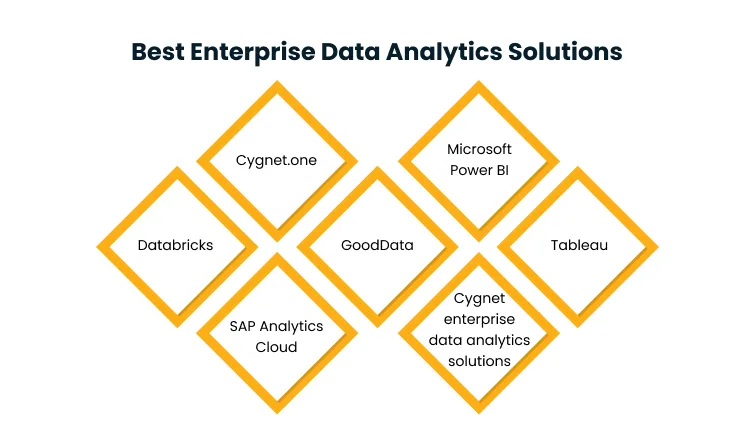
Others are heavier data engineering and AI environments that need technical depth to unlock their full value. A few deliver the most value when paired with an implementation partner, particularly for enterprises managing legacy systems or broader transformation goals.
In fact, according to Gartner’s 2025 CIO survey, over 80% of CIOs plan to increase their business intelligence and data analytics investments in 2025, which makes the category a strategic decision rather than a tooling one.
Cygnet.One
Cygnet.One is a services-led analytics partner that helps enterprises design, modernize, and implement analytics ecosystems aligned with business outcomes. Its value lies in combining data engineering, cloud modernization, dashboard development, and AI enablement inside a single cohesive engagement.
For enterprises that need transformation more than they need a tool, that breadth is the relevant comparison point.
Key features:
- End-to-end analytics transformation: Cygnet.One’s Data Analytics & AI practice covers the full journey from ETL pipeline design and cloud data infrastructure through to executive dashboards, KPI tracking, and predictive forecasting — unifying structured and unstructured data across systems for real-time visibility.
- Cloud-native analytics modernization: Cygnet.One re-engineers legacy data environments on scalable cloud infrastructure, aligning the analytics layer with where the rest of the business is already heading.
- AWS and data platform expertise: AWS-certified delivery teams ground Cygnet.One’s analytics engagements in the cloud infrastructure enterprises actually use for migration and AI workloads.
- AI-driven analytics enablement: Cygnet.One builds the data foundation machine learning needs and embeds predictive and prescriptive analytics directly into reporting workflows.
- Industry-specific enterprise delivery: With 500+ completed engagements across BFSI, manufacturing, retail, and healthcare, implementations reflect domain-specific data structures and regulatory requirements.
- Implementation and strategic continuity: The partner model covers architecture design, system integration, dashboard development, and long-term evolution well past initial deployment.
Pros:
- Connects data engineering, cloud, and analytics in a single transformation engagement
- Strong fit for complex environments with legacy systems or active modernization
- Brings cloud, AI, and analytics under one delivery model
Cons:
- Organizations looking only for lightweight self-serve dashboarding may prefer a standalone platform
Best for: Mid-to-large enterprises that need tailored analytics, modernization support, cloud alignment, and implementation expertise more than a standalone tool.
Databricks
Databricks is a cloud-native data and AI platform built for large-scale data engineering, analytics, and machine learning. It’s widely used by enterprises that need a unified environment for processing huge volumes of data alongside technical data science teams.
Key features:
- Lakehouse architecture: Combines data lake flexibility with data warehouse structure in a single environment, removing the need to manage both systems separately
- Large-scale data processing: Distributed processing supports complex ingestion pipelines and high-volume analytics workloads that strain traditional database infrastructure
- Advanced analytics and AI: Unified workspace for data science, model development, and deployment alongside standard analytics workflows
- Multi-cloud deployment: Runs on AWS, Azure, and Google Cloud for enterprises with multi-cloud strategies
- Collaborative technical workspace: Engineers, analysts, and data scientists share one environment, reducing duplication across workflows
- Modern data pipeline support: Built-in orchestration and monitoring for enterprise-scale data workflows
Pros:
- Strong at scale, AI readiness, and technical flexibility
- Unified environment for engineering and data science teams
Cons:
- Steep learning curve for non-technical users
- Requires a capable technical team to govern effectively
Best for: Enterprises with complex data estates, large-scale data engineering needs, and active or planned AI programs.
SAP Analytics Cloud
SAP Analytics Cloud is an enterprise analytics and planning platform that combines BI, dashboards, reporting, and forecasting in a single environment. It’s most relevant for enterprises already running SAP business applications, where its integration depth gives a meaningful edge.
Key features:
- Unified analytics and planning: Move from historical reporting to forward-looking planning without switching environments, reducing friction between finance, operations, and strategy
- SAP ecosystem integration: Connects directly to SAP application data without the extraction and transformation overhead other BI tools require
- Interactive dashboards: Visual dashboards support performance exploration across executive and operational contexts
- Augmented analytics: AI-assisted insights help users surface trends and anomalies faster, cutting manual effort in exploratory analysis
- Enterprise reporting: Native support for formal reporting across functions, including variance analysis common in finance environments
- Cloud-based access: Business users access analytics without depending on on-premise infrastructure
Pros:
- Strong planning capabilities and native SAP alignment
- Effective for finance-led reporting in SAP environments
Cons:
- Integration advantages most pronounced within SAP-heavy environments
- Less competitive for buyers not already on SAP infrastructure
Best for: Large organizations using SAP systems that want analytics, dashboards, planning, and reporting in one integrated environment.
GoodData
GoodData is an analytics platform focused on cloud BI, embedded analytics, and scalable reporting. It’s frequently evaluated by organizations that want to deliver analytics to internal users or embed dashboards directly into customer-facing products.
Key features:
- Embedded analytics: Core strength is embedding dashboards and reporting inside external products or internal applications, useful well beyond traditional enterprise reporting
- Cloud-native architecture: Scales without the overhead of traditional on-premise analytics stacks
- Reusable semantic layer: Standardizes metric definitions and business logic across reports and teams, cutting inconsistency across deployments
- Interactive dashboards and reporting: Business users explore analytics through visual interfaces without needing technical knowledge of the underlying data
- API-first extensibility: Technical teams can customize and integrate the platform deeply into product ecosystems
- Multi-tenant support: Useful for SaaS businesses delivering analytics across multiple business units or client segments from a single deployment
Pros:
- Strong embedded analytics and API extensibility
- Flexible multi-tenant architecture
Cons:
- Lower brand familiarity in some enterprise buying cycles
- Technical involvement required for complex implementations
Best for: SaaS companies, enterprise software vendors, and organizations delivering embedded analytics or scalable reporting across multiple audiences.
Microsoft Power BI
Microsoft Power BI is a widely adopted BI and analytics platform known for dashboarding, reporting, and deep Microsoft ecosystem integration. For enterprises already committed to Microsoft infrastructure, it’s often the most natural starting point for scalable BI.
Key features:
- User-friendly dashboards: Accessible to business teams with varying technical backgrounds, supporting adoption without heavy training investment
- Microsoft ecosystem integration: Deep compatibility with Excel, Azure, Microsoft Fabric, and Teams
- Enterprise reporting: Supports both ad hoc dashboards and structured operational reporting across the organization
- Self-service BI: Business users explore and update reports without depending on IT for every change
- Broad visualization library: A wide range of chart types supports the communication of analytics across roles
- Scalable deployment: Can start at the departmental level and expand enterprise-wide once proper governance is applied
Pros:
- Strong usability and adoption across Microsoft-aligned enterprises
- Cost-effective starting point for BI programs
Cons:
- Governance complexity rises at scale without a structured implementation plan
- Less suited to engineering-heavy advanced analytics use cases
Best for: Enterprises wanting broad BI adoption, executive dashboards, and scalable reporting with strong Microsoft alignment.
Tableau
Tableau is a leading analytics and visualization platform known for rich dashboards, data exploration, and visual storytelling. It’s a frequent choice for organizations that prioritize business-facing analytics with strong exploratory capability.
Key features:
- Advanced data visualization: Among the strongest in the market for rich, interactive views of business performance that go beyond standard chart types
- Self-service exploration: Analysts and business users drill into trends and surface patterns without waiting on pre-built reports
- Broad data connectivity: Connects to a wide range of data sources across mixed environments, bringing different datasets into a unified analytical view
- Dashboard interactivity: Filters, parameters, and drill-down capabilities allow navigation from summary to granular detail without rebuilding reports
- Large user community: Mature ecosystem and widespread familiarity make finding expertise easier for enterprises managing adoption programs
- Governed analytics at scale: When supported by proper data architecture, it serves as a standard enterprise analytics platform
Pros:
- Powerful visual analytics and self-service exploration
- Broad familiarity and a mature ecosystem
Cons:
- Licensing costs can be high at enterprise scale
- Governance challenges emerge without a centralized data strategy
Best for: Organizations prioritizing visual analytics, executive storytelling, and self-service exploration across business teams.
Cygnet.One enterprise data analytics solutions
Cygnet.One’s enterprise analytics capability is built around four practice areas, each one chosen for the part of the analytics stack that most often determines whether a deployment delivers value or stalls.
- Data integration and warehousing: ETL/ELT pipelines, cloud data lakes, real-time processing, and compliance governance built to handle messy enterprise data environments
- Descriptive and diagnostic analytics: Dashboards, KPI tracking, and self-service reporting calibrated to the actual decisions your teams make
- Predictive and prescriptive analytics: Demand forecasting, scenario modeling, and the data foundation machine learning workloads need
- BI and visualization: Platforms matched to your existing stack and the user base that has to live with them every day
The pattern most enterprises miss is that strong analytics outcomes are usually a function of how well the data engineering, governance, and visualization layers work together, which is where a partner with end-to-end coverage compounds in value.
Enterprise data analytics solutions comparison table
The comparison below skips headline features and focuses on the criteria that actually move enterprise buying decisions: category fit, deployment model, embedded capability, reporting depth, and how easy it is to get hands-on before committing.
| Solution | Category | Best for | Deployment model | Embedded analytics | Enterprise reporting | Free plan/trial |
| Cygnet.One | Services-led partner | Transformation + modernization | Cloud/hybrid | Limited | High | Discovery call |
| Databricks | Data + AI platform | Engineering-heavy analytics | Multi-cloud | Moderate | Moderate | Trial available |
| SAP Analytics Cloud | BI + planning | SAP-ecosystem enterprises | Cloud (SaaS) | Limited | High | Trial available |
| GoodData | Cloud BI + embedded | SaaS vendors + embedded use cases | Cloud | Very high | Moderate | Free tier |
| Microsoft Power BI | BI + dashboarding | Microsoft-aligned enterprises | Cloud/hybrid | Moderate | High | Free tier |
| Tableau | BI + visualization | Visual analytics + exploration | Cloud / on-prem | Moderate | Moderate | Trial available |
A side-by-side view shows where each platform earns its place. The harder question is which one earns yours, and that comes down to your environment more than any feature score.
How to choose the right enterprise data analytics solution
Picking the right enterprise analytics solution is more than a feature comparison. It depends on data maturity, existing infrastructure, and whether you need a platform, a partner, or both. Rushing the evaluation tends to produce expensive mismatches between what gets bought and what your team can actually run.
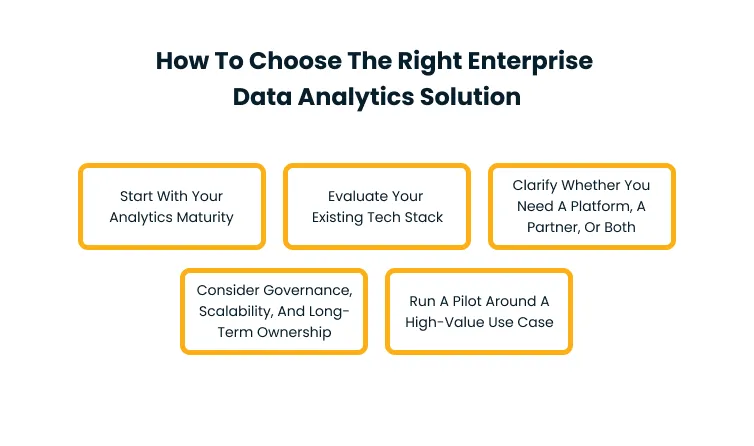
Step 1: Start with your analytics maturity
Not every enterprise needs the same type of solution. Identify what analytics needs to solve in your environment, assess whether reporting failures stem from tool limits or underlying data issues, and clarify the goal, whether it is better reporting, deeper analysis, AI readiness, or a combination. Each point corresponds to a different category.
Step 2: Evaluate your existing tech stack
Current infrastructure should drive platform selection more than marketing materials. SAP-heavy enterprises get the smoothest fit from SAP Analytics Cloud. Microsoft shops benefit from Power BI’s Azure and Fabric depth. Cloud-native AWS workloads pair well with Databricks or a services-led partner. Integration friction tends to show up after purchase, well past the demo.
Step 3: Clarify whether you need a platform, a partner, or both
Some enterprises have an internal team to deploy and govern complex analytics software. Others need a partner to design the architecture, integrate sources, build pipelines, and manage the environment over time. A practical separator: if the gap is in visualization, start with a BI platform. If it’s in data architecture and governance, a partner-led engagement holds up longer.
Step 4: Consider governance, scalability, and long-term ownership
Initial implementation is only one slice of the total cost. As data volumes, users, and reporting needs grow, the platform has to stay manageable without constant re-engineering. The pieces of long-term ownership worth checking up front:
- Access controls are applied consistently across user roles
- Metric definitions are enforced from a central layer
- A vendor product roadmap that aligns with where your stack is heading
Step 5: Run a pilot around a high-value use case
Testing a solution against a generic enterprise need produces inconclusive results. Pilot around a specific use case, such as executive financial dashboards, supply chain visibility, or customer revenue analytics, using actual production data sources and the user roles a full deployment would require. A pilot run on cleaned data with technical users alone won’t predict real-world performance.
Even with the right framework, some environments need more than what a platform can deliver on its own.
When an implementation partner makes more sense than a standalone tool
Most enterprise analytics failures don’t trace back to the wrong platform pick. In fact, according to Gartner’s 2024 digital initiatives survey, only 48% of digital initiatives meet or exceed their business outcome targets; a number that reflects how often implementation gaps decide whether a technology investment delivers.
What usually explains the gap is everything downstream of the demo: the data architecture under the platform, the integration work that connects source systems, and the governance model that keeps reporting reliable.
Signs your enterprise needs more than software
You’re likely past the point where a platform alone solves the problem when:
- Legacy systems require significant data engineering before analytics tooling can connect to them cleanly
- Data is siloed across business units with incompatible definitions of shared metrics
- A cloud migration is underway and the analytics environment has to evolve with it
- Compliance imposes data governance rules the organization can’t currently enforce
- Multiple business units with different reporting structures need to be unified under one analytics layer
These are architecture and integration problems. Solving them through platform selection alone leaves the underlying issues intact.
What a strategic analytics partner helps with
A strong analytics partner contributes across the full scope of what makes analytics sustainable, well past the visualization layer. The contribution typically spans six areas:
- Data architecture design that accounts for current source systems and future scalability
- Data pipeline engineering and integration across cloud and on-premise environments
- KPI alignment across business units so reporting definitions stay consistent
- Dashboard and report development calibrated to the specific decisions being made
- Governance and access control frameworks built into the platform from the start
- AI readiness and cloud modernization are aligned with the analytics investment
When a partner covers this full scope, it sharply reduces the risk that a capable platform fails because the underlying data environment couldn’t support it.
Where Cygnet.One fits in
Cygnet.One operates as an analytics partner for enterprises that need the full scope of what makes analytics sustainable. Engagements typically begin with an assessment of your current data environment, move into architecture and integration design, and extend through dashboard development, governance setup, and ongoing support as the analytics environment evolves.
Instead of delivering a platform and stepping away, Cygnet.One builds the data engineering, cloud, and analytics layers together. Cygnet.One’s Insights Driven Business Transformation practice connects disparate data sources, redesigns reporting workflows, and builds scalable infrastructure across AWS, Snowflake, and Azure, typically delivering measurable results within 6 to 12 months.
That matters most for enterprises managing modernization alongside analytics goals, where both initiatives need to move in step rather than independently.
Conclusion
Enterprise analytics investments underperform most often when the data architecture, integration plan, and governance model aren’t built to hold up the platform underneath them. Tools that look capable in a demo expose their limits fast once they meet the complexity of a real enterprise environment.
That’s where Cygnet.One typically gets pulled in. Engagements start with an assessment of your existing analytics stack and data environment, followed by an architecture roadmap, then phased implementation covering data engineering, cloud alignment, dashboards, and governance, scoped around your actual data conditions instead of a generic deployment blueprint.
If your organization is managing siloed data, an active modernization program, or reporting that no longer reflects operational reality, book a demo with Cygnet.One today and map out what an analytics transformation built around your environment would look like.
FAQs
Business intelligence focuses on structured reports and dashboards built from historical data, typically produced by a central analytics team. Enterprise analytics is broader; it adds data integration, real-time visibility, predictive modeling, AI-driven insights, and governance frameworks operating across multiple business units and systems at once. The distinction is scope and scale.
The right choice depends on existing infrastructure, internal capability, and reporting needs. SAP Analytics Cloud suits SAP-heavy environments. Power BI is strong for Microsoft-aligned enterprises. Tableau works well where visual analytics matter most. Databricks fits engineering and AI-heavy programs. For transformation alongside analytics, a services-led partner like Cygnet.One adds implementation depth.
Pricing varies by licensing model, user count, data volume, cloud infrastructure, implementation complexity, and support scope. Platform-only deployments range widely. Full enterprise implementations covering data engineering, integration, governance, and ongoing support carry significantly higher total costs. A scoped assessment before platform selection produces a far more accurate cost picture than list pricing alone.
Most enterprise analytics platforms ship with connectors for common legacy systems, but integration success depends on the data engineering and architecture work behind those connections. Legacy environments often need significant pipeline development to produce reliable, clean data that the analytics layer can work from. Platform selection alone doesn’t solve legacy integration.
Some enterprises have an internal team to deploy and govern a platform effectively. Others need a partner to handle architecture, integration, and governance before the analytics layer can function well. The deciding factor is usually the state of the underlying data environment; fragmented or poorly governed data favors a partner-led engagement.
The most important factors are integration depth with existing systems, governance and access controls, scalability as data volumes grow, dashboard and reporting flexibility, AI and advanced analytics support, deployment compatibility with current infrastructure, and the quality of vendor or partner support available for implementation and ongoing operations.
Author


Abhishek Nandan
AVP, Marketing
Abhishek Nandan is the AVP of Services Marketing at Cygnet.One, where he drives global marketing strategy and execution. With nearly a decade of experience across growth hacking, digital, and performance marketing, he has built high-impact teams, delivered measurable pipeline growth, and strengthened partner ecosystems. Abhishek is known for his data-driven approach, deep expertise in marketing automation, and passion for mentoring the next generation of marketers.