




































Organizations move data every day: between systems, platforms, and environments as part of data migration initiatives. But when that movement happens at an enterprise scale, the failure rate is striking.
Gartner reports that 83% of data migration projects either fail outright or exceed their budget and timeline.
However, data migration failures are not random. They follow patterns, stem from specific causes, and in most cases, are entirely preventable. This blog breaks down those patterns — from the types of failures to the frameworks that stop them.
Why Do Data Migration Failures Happen at Scale?
Small migrations fail quietly. Enterprise migrations fail loudly.
At low data volumes, a single mapping error corrupts a handful of records. At the terabyte scale, that same error corrupts millions. By the time it surfaces, the pipeline has already moved on. The issue is not just volume. It is the combination of volume, system interdependencies, and transformation complexity all running simultaneously.
Three factors make scale the turning point:
- Volume
More records mean more chances for errors to multiply before detection.
- Velocity
Faster pipelines leave less time for in-flight validation to catch problems.
- Complexity
More source systems mean more transformation rules and more places for conflicts to appear.
When they converge, data migration failures start being the expected outcome of a poorly prepared project.
What Are the Different Types of Data Migration Failures?
Data Loss
Data loss shows up as:
- Missing records
- Partial transfers
- Corrupted datasets
It is often invisible until a downstream report runs short, or a user flags a missing transaction.
Schema Mismatches
A field named “customer_id” in the source does not automatically map to “client_id” in the target. Data type conflicts, a string field loading into an integer column, cause records to fail on load. Null values in required fields produce the same result.
Performance Failures
Slow batch jobs, pipeline congestion, and API throttling are all signs that the pipeline was not designed for the volume it is handling. These failures extend migration windows far beyond planned cutover times.
System Compatibility Failures
Legacy systems store data in formats that modern platforms cannot read directly. Encoding mismatches, unsupported file formats, and broken integration protocols all fall here.
| Failure Type | Root Cause | Business Impact |
| Data Loss | Extraction gaps, pipeline breaks | Reporting errors, missing records |
| Schema Mismatch | Mapping errors, type conflicts | Load failures, corrupt data |
| Performance Failure | Under-engineered pipelines | Downtime, missed cutover |
| Compatibility Failure | Legacy format conflicts | Full integration breakdown |
These individual failure types become significantly harder to manage as data volume grows.
What Risks Increase in Large-Scale Data Migration Projects?
Large-scale data migration does not just increase the number of records — it increases the number of systems, teams, and dependencies involved. Each additional layer introduces new failure points.
System Interdependencies
Enterprise systems share data. A CRM, a billing platform, and a data warehouse may all pull from the same source tables. A failed migration domain breaks reporting across every downstream system.
Throughput Limitations
Network bandwidth has a ceiling. When pipelines push data at maximum capacity without parallel processing, transformation layers bottleneck and queue backlogs form. Records drop when there is no overflow handling built in.
Governance Gaps
Enterprise data migration risks compound when no single team has full visibility. Multiple teams handling different data domains simultaneously — without unified governance — apply conflicting transformation rules and create inconsistencies that are difficult to trace.
The scale equation is straightforward:
- More systems = more failure points
- More data = higher validation complexity
- More teams = higher coordination risk
These risks do not stay theoretical. They directly produce data inconsistency and downtime during execution.
How Do Data Inconsistency and Downtime Impact Migration Outcomes?
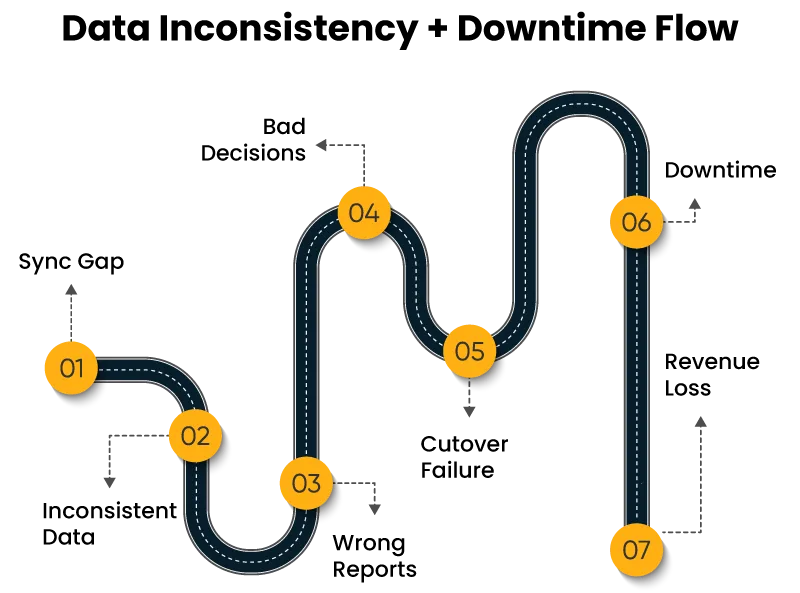
Data Inconsistency
Inconsistency builds when source and target systems fall out of sync during the migration window. Records created in the source after extraction runs do not appear in the target. Batch timing gaps leave entire segments unaccounted for. Retry logic without deduplication loads the same record twice.
Downtime
Cutover is the highest-risk moment. When the target system is not fully validated before the source goes offline, the failure is immediate. Rollback without a pre-tested procedure takes longer than planned, extending downtime further.
Business Consequences
| Issue | Technical Cause | Business Effect |
| Data Inconsistency | Sync gaps, retry errors | Reporting failures, bad decisions |
| Downtime | Cutover failure, rollback delay | Revenue loss, SLA breach |
| Duplicate Records | Uncontrolled retry logic | Transaction conflicts, audit risk |
Every one of these outcomes’ traces back to identifiable root causes — which means they can be addressed before migration begins.
What Are the Root Causes Behind Common Data Migration Errors in Enterprise Projects?
The most common data migration errors enterprise teams make are not technical surprises. They are skipped steps.
Poor Data Profiling
Teams that skip pre-migration audits discover null rates, duplicate records, and encoding mismatches mid-pipeline. Fixing them means stopping and restarting.
Weak Validation Logic
Without checksum validation, there is no confirmation that every extracted record was actually loaded. Without field-level reconciliation, transformation errors stay hidden until users report them in production.
Pipeline Design Flaws
Pipelines without retry mechanisms fail silently. A network interruption drops a batch; the pipeline moves forward, and the gap goes unnoticed. Fault tolerance is not optional at enterprise scale.
Inadequate Testing
Test datasets covering 1–2% of production volume do not expose the performance failures that appear at full load. Production simulation — a full pipeline run against a complete data copy in staging — is the only test that reliably catches volume-related failures.
Governance Gaps
Missing audit trails leave no record of what transformation rules ran and when. Data lineage gaps make it impossible to trace a discrepancy back to its source after migration completes.
Most of these failures are detectable before the first record moves. That is exactly what prevention frameworks are built to do.
What Data Migration Risk Mitigation Strategies Actually Work?
Data migration risk mitigation strategies that work share one characteristic — they are built into the plan before migration starts, not added after problems appear.
Data Preparation
- Profile first: Audit every source system for null rates, duplicates, and integrity violations before extraction begins.
- Deduplicate: Resolve duplicate records in the source before they enter the pipeline.
- Standardize: Apply consistent formatting rules so transformation logic has clean input.
Validation Framework
- Pre-migration: Confirm source data meets quality thresholds before any movement begins.
- In-flight: Monitor record counts and error rates as the pipeline runs.
- Post-migration: Compare source and target at the field level to confirm transformation accuracy.
Migration Architecture
- Parallel runs keep the source system live while the target receives data, allowing direct comparison before cutover.
- Phased migration moves one data domain at a time, limiting how much can go wrong simultaneously.
- Incremental loading transfers data in defined batches, making failures easier to isolate and fix.
Monitoring and Rollback
Real-time dashboards show error rates and record counts during the migration window. Automated rollback triggers define specific thresholds, error rate above 2%, record count variance above 0.5%, at which the pipeline stops automatically, and the source system is restored.
| Stage | Control Mechanism | Outcome |
| Pre-Migration | Data profiling, deduplication | Clean input data |
| In-Flight | Checksum validation, monitoring | Early failure detection |
| Post-Migration | Field-level reconciliation | Confirmed accuracy |
| Cutover | Automated rollback triggers | Controlled recovery |
Frameworks like these become far more reliable when teams have studied what happened when they were not in place.
What Do Real Enterprise Migration Failures Actually Teach Us?
Reviewing enterprise data migration case studies confirms that the root causes identified above are what took down real production systems.
TSB Bank, 2018: TSB migrated customer data from Lloyds Banking Group’s infrastructure to its own platform. Approximately 1.9 million customers were locked out for several weeks. In fact, the problems persisted for around eight months without a concrete solution.
The post-incident review identified two primary causes — insufficient parallel running time and no tested rollback plan for critical banking tables. The bank reported a pre-tax loss of £330 million, directly attributed to the event.
This case has three gaps:
- No pre-migration data profiling
- No checkpoint-based rollback system
- No independent validation team
These are precisely the common data migration errors enterprise organizations keep repeating — and such cases confirm the consequences are not quickly reversible.
How Should Enterprises Handle Data Migration Today?
Large-scale data migration in the complexity of modern enterprise environments requires a structured, phased approach backed by documented methodology.
A reliable process runs in five stages:
- Assessment
- Extraction
- Cleansing
- Migration
- Validation
Each stage has a defined entry and exit criteria. No stage begins until the previous one is confirmed complete.
Enterprise data migration risks at this scale require teams with direct experience handling comparable complexity. Internal teams managing a one-time migration event rarely have the depth of tooling, automation, and governance frameworks that specialized teams maintain across multiple projects.
Organizations planning complex migrations can evaluate Cygnet.One’s data migration and modernization services — a structured option covering assessment through post-migration validation, with automation and governance built into the process.
How Can You Prevent Data Migration Failures Before They Start?
Data migration failures at scale are predictable. The failure types are documented. The root causes are known. The prevention frameworks are tested and available.
Four actions separate migrations that succeed from those that do not:
- Plan in detail — profile source data and map every dependency before extraction begins.
- Validate continuously — run checks at every stage.
- Monitor in real time — keep dashboards active during the migration window.
- Use structured frameworks — follow a documented methodology with defined entry and exit criteria at each stage.
The preparation gap is what causes data migration failures. It is entirely within a team’s control to close it before the project starts.
FAQs
It depends on data volume and how clean your source data is. Most enterprise migrations run anywhere from 3 months to over a year when done properly.
Skipping data profiling before migration starts. Teams move bad data into a new system and discover the problems only after go-live.
Sometimes. If versioned backups were taken at migration checkpoints, recovery is possible. Without those backups, recovery becomes a time-consuming process with no guaranteed outcome.
Not always. But for migrations involving multiple systems, large data volumes, or strict compliance requirements, internal teams often lack the tooling and experience to handle edge cases reliably.
Record counts matching between source and target is a start. Field-level reconciliation — comparing actual values, not just totals — is what confirms a migration genuinely succeeded.
Author


Yogita Jain
Content Lead
Yogita Jain leads with storytelling and Insightful content that connects with the audiences. She’s the voice behind the brand’s digital presence, translating complex tech like cloud modernization and enterprise AI into narratives that spark interest and drive action. With a diverse of experience across IT and digital transformation, Yogita blends strategic thinking with editorial craft, shaping content that’s sharp, relevant, and grounded in real business outcomes. At Cygnet, she’s not just building content pipelines; she’s building conversations that matter to clients, partners, and decision-makers alike.