



































Most cloud migration projects are predominantly due to incorrect planning assumptions, like incomplete dependency maps, a migration strategy was chosen for convenience rather than fit, and success metrics were never defined before the first workload moved.
By the time the gaps surface, the project is mid-execution, rollback is expensive, and the organization is committed to a path it can no longer easily change.
AWS provides the infrastructure, services, and tooling to support migration at any scale. What it cannot provide is the decision-making framework that determines which applications move, in which order, using which approach, and at what pace.
For organizations under pressure to reduce infrastructure costs, exit aging data centers, or modernize legacy systems before they become liabilities, getting the AWS migration strategy right is a prerequisite.
According to a 2024 Gartner Forecast on Worldwide Public Cloud End-User Spending, worldwide end-user spending on public cloud services is forecast to total $723.4 billion in 2025, up from $595.7 billion in 2024.
The scale of that adoption reflects an industry-wide shift. The quality of individual migration outcomes, though, depends almost entirely on the strategy guiding each move.
What is AWS Migration?
AWS migration is the structured process of moving applications, data, and workloads from on-premise infrastructure, private data centers, or competing cloud environments to Amazon Web Services.
The process includes selecting the appropriate migration model, configuring AWS services, and redesigning where necessary to match the demands of a cloud-native environment.
A successful migration involves evaluating application dependencies, security requirements, network architecture, and organizational readiness before a single workload is moved.
Organizations use AWS migration to reduce infrastructure costs, improve application availability, and position themselves for scalable growth. The choice of migration method depends on the workload’s complexity, the organization’s risk tolerance, and the long-term cloud strategy.
AWS Migration Strategies: The 7Rs
When AWS formalized the 7Rs framework, they gave organizations a structured vocabulary for one of the most consequential decisions in a cloud transition: how much to change a workload before moving it. The answer is never the same twice.
Legacy monolithic applications behave differently from modern microservices. Compliance-heavy workloads carry constraints that greenfield projects don’t.
The 7Rs don’t prescribe a single path. They map the full decision surface so teams can match each workload to the migration approach that fits its actual profile, rather than forcing everything through the same template.
According to McKinsey’s Cloud Migration Opportunity Report 2021, approximately $100 billion in migration spend has been projected to be wasted over the following three years, largely because organizations skip the strategy phase and apply a single approach to a portfolio that demands several. Selecting the right R for each workload is where that waste is either created or avoided.
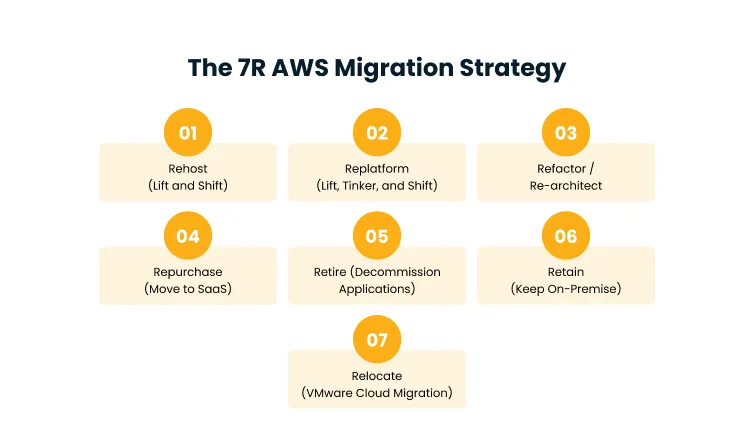
1. Rehost (Lift and Shift)
Rehosting moves an application to AWS without modifying its code, configuration, or architecture. The source environment is replicated in the cloud as closely as possible with the same OS, same application stack, and same data structures. Speed is the primary advantage.
Rehosting requires minimal technical planning and can be executed with tools like AWS Application Migration Service, which automates the replication process at scale.
Organizations typically choose this path when they need to exit a data center on a fixed timeline, reduce infrastructure costs quickly, or defer architectural decisions until after the initial move.
The trade-off is that rehosted applications don’t take full advantage of cloud-native features like auto-scaling, managed services, or serverless compute. Performance improvements are limited to what the underlying AWS infrastructure provides relative to the source environment.
Rehosting is a starting point, and most organizations that rehost eventually revisit those workloads for optimization once the migration pressure has passed.
2. Replatform (Lift, Tinker, and Shift)
Replatforming introduces targeted optimizations to an application during the migration window without a full redesign. The most common example is moving from a self-managed database to Amazon RDS.
The application code stays largely intact, but the database layer shifts to a managed service, eliminating the overhead of patching, backups, and failover management.
Other replatforming moves include containerizing workloads for deployment on Amazon ECS or EKS, or shifting batch processing to AWS Lambda, where workloads are bursty and infrequent.
The logic is to capture meaningful operational benefits, like lower maintenance burden, improved availability, and reduced cost, without incurring the time and risk of a full re-architecture.
Replatforming delivers more value than rehosting while introducing less disruption than refactoring, making it a practical middle path for workloads that are architecturally sound but operationally inefficient on-premise.
3. Refactor / Re-architect
Refactoring is the most ambitious migration path. Applications are redesigned from the inside out to exploit cloud-native capabilities, like event-driven architectures, containerization, microservices decomposition, serverless functions, and managed data services.
The goal is not just to move the application to AWS, but to transform it into something fundamentally different that’s more scalable, more observable, more elastic, and significantly cheaper to operate at scale.
Organizations pursue refactoring:
- When existing applications are blocking growth
- When monolithic architectures create deployment bottlenecks
- When scaling requires full server provisioning, or
- When technical debt has made the existing system fragile and expensive to maintain.
The upfront investment is substantial. Refactoring requires deep application expertise, longer migration timelines, and careful testing at every layer. The payoff is an application genuinely built for cloud scale.
4. Repurchase (Move to SaaS)
Repurchasing abandons the existing application entirely in favor of a commercially available SaaS solution that fulfills the same business function.
Common examples include:
- Replacing a self-hosted CRM with Salesforce
- Migrating from an on-premise HR system to Workday, or
- Shifting from a custom email infrastructure to Microsoft 365.
The migration effort here is less about technical transformation and more about data migration, user training, integration work, and change management. Repurchasing works best:
- When the legacy application provides no meaningful competitive differentiation
- When it exists only to perform a commodity function that a purpose-built SaaS product handles better, faster, and at lower total cost.
5. Retire (Decommission Applications)
Migration assessments routinely reveal applications that are running but no longer serving a genuine business purpose. These might be legacy reporting tools that have no data team queries, backup systems replaced by newer solutions, or applications maintained out of institutional inertia rather than active demand.
Retiring these workloads before migration simplifies the cloud environment, reduces licensing costs, and removes maintenance obligations.
The discovery phase of a migration project is often the first time an organization conducts a genuine audit of its application portfolio, and the results frequently reveal that a meaningful portion of the estate can be decommissioned without business consequence.
6. Retain (Keep On-Premise)
Some applications are not candidates for migration at any point in the near future. Compliance requirements may mandate that certain data remain in a specific geography or jurisdiction.
Low-latency dependencies on physical infrastructure, including manufacturing control systems, real-time trading platforms, or specialized hardware integrations, may make cloud migration technically impractical.
Organizations with recent on-premise investments may also retain workloads where the depreciation timeline doesn’t justify an early move. Retaining is a deliberate decision, not a default.
It should be documented with a clear rationale and reviewed periodically as cloud capabilities, compliance frameworks, and business priorities evolve.
7. Relocate (VMware Cloud Migration)
Relocating applies specifically to organizations running VMware environments on-premise. VMware Cloud on AWS allows those workloads to move to AWS infrastructure without converting the hypervisor or rewriting application configurations.
The VMware operating model, vSphere, vSAN, NSX, runs identically on AWS hardware, so migrations can happen without application-level changes or retraining infrastructure teams.
The operational model stays familiar while the underlying infrastructure transitions from capital expenditure to a cloud consumption model.
Relocating is particularly valuable for organizations with large VMware estates that need to exit data centers without disrupting the teams that manage those environments.
AWS Migration Strategy: Step-by-Step
Organizations that approach AWS migration without a structured methodology typically encounter the same failure patterns:
- Incomplete dependency mapping that causes post-migration outages
- Unvalidated architecture choices that create cost problems at scale, and
- Migrations are scoped as one-time projects rather than iterative processes with defined quality gates.
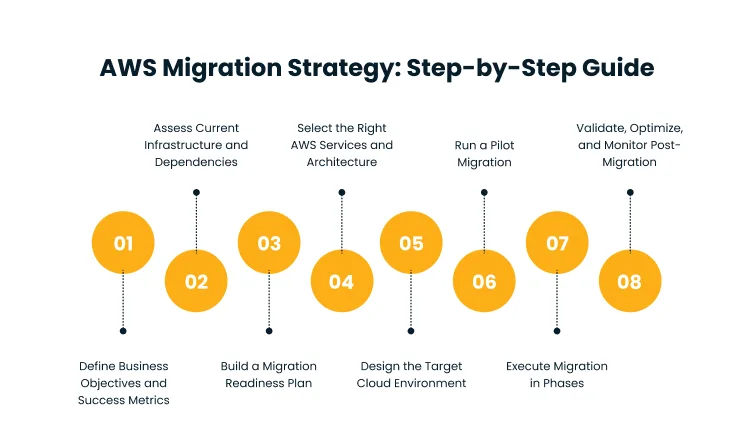
The eight steps below represent the operational backbone of a migration that moves deliberately, tests assumptions early, and builds confidence before committing large workloads to the cloud.
Step 1: Define Business Objectives and Success Metrics
Migration projects without explicit success criteria often tend to drift. The scope expands, timelines slip, and stakeholders lose confidence because there’s no shared definition of what “done” looks like.
Before assessing infrastructure or selecting AWS services, define the objectives that will make your migration worthwhile:
- Is the primary driver cost reduction?
- Application availability?
- The ability to scale without infrastructure lead times?
- Regulatory compliance?
Each goal changes which migration strategies make sense, which workloads to prioritize, and which metrics to track.
Success metrics should be specific and measurable, such as a 30% reduction in infrastructure spend, a mean time to recovery under four hours, or a deployment frequency that triples post-migration. Generic objectives produce generic migrations.
According to the 2022 Gartner Report on Enterprise IT Spending and Cloud Shift, more than half of enterprise IT spending in key market segments will shift to the cloud by 2025, up from 41% in 2022.
Organizations that don’t define what they’re optimizing for during that shift often find they’ve paid for the transition without capturing the value.
Step 2: Assess Current Infrastructure and Dependencies
Applications rarely exist in isolation. They connect to databases, authenticate against directory services, call internal APIs, and share file systems with adjacent systems.
Moving an application without mapping these connections precisely is one of the most reliable ways to cause a post-migration outage.
AWS Application Discovery Service automates the discovery of on-premise inventory and dependency relationships, building a structured picture of what connects to what and in which direction.
This step should also flag compliance constraints. Applications subject to data residency requirements, HIPAA, PCI DSS, or SOC 2 controls need architecture decisions made at this stage, rather than after deployment.
Cygnet.One’s Cloud Strategy and Design practice structures this phase around security, governance, and interoperability requirements from the outset, so compliance considerations don’t surface as blockers mid-migration.
Step 3: Build a Migration Readiness Plan
Migration readiness involves more than technical preparation. Organizations need to evaluate whether their cloud skills, operational processes, and governance structures can support a cloud environment at scale.
AWS offers a Migration Readiness Assessment that evaluates readiness across six dimensions, like business case, people, governance, platform, security, and operations.
Each dimension produces a readiness score and a set of remediation actions before migration proceeds.
The readiness plan should also include a realistic risk register for identifying which workloads carry the highest blast radius if something goes wrong during migration, and sequencing the migration timeline accordingly.
Cygnet.One’s AWS Modernization and Migration practice delivers this through the ORBIT framework, which begins with a structured infrastructure audit and builds a phased migration roadmap before a single workload moves.
With over 100 enterprise migrations delivered and CMMI Level 5 certified processes, the ORBIT methodology reduces execution risk by treating readiness as a prerequisite.
Step 4: Select the Right AWS Services and Architecture
AWS provides over 200 services. Selecting the right subset requires matching each service’s capabilities to the specific demands of the workload being migrated.
A stateless web tier maps naturally to Amazon EC2 Auto Scaling Groups or AWS Elastic Beanstalk. A relational database migrates cleanly to Amazon RDS using AWS Database Migration Service.
Event-driven workloads benefit from Amazon SQS, SNS, or EventBridge. Storage-heavy applications can leverage Amazon S3, EFS, or FSx, depending on access pattern and performance requirements.
The architecture selection should also factor in the target migration strategy. A rehost requires only compute and networking equivalents.
A refactor demands a full cloud-native design that may include Lambda, DynamoDB, API Gateway, and container orchestration on EKS or ECS. Choosing services before finalizing the strategy almost always produces an architecture that doesn’t fit the workload.
Step 5: Design the Target Cloud Environment
The target environment design translates the selected architecture into a deployable configuration. This includes defining VPC topology, subnet structure, routing tables, security groups, and IAM roles and policies.
It includes designing for high availability across multiple Availability Zones and planning disaster recovery posture using services like AWS Backup, Route 53 failover routing, and cross-region replication.
The design must also account for observability. CloudWatch dashboards, log aggregation, distributed tracing via AWS X-Ray, and alerting thresholds should be defined before the first workload is deployed, not retrofitted after an incident reveals a monitoring gap.
An environment without observability built in from the start is an environment where problems hide until they become outages.
Step 6: Run a Pilot Migration
Pilot migrations test the methodology before it’s applied to production-critical systems. Select a workload that is representative in terms of complexity but limited in blast radius, something where a failure is recoverable, and the cost of downtime is low.
Run the migration using the tooling and processes defined in earlier steps. Measure against the success metrics defined in Step 1.
The pilot often surfaces problems that didn’t appear in planning. Unexpected data volume, application behavior differences under latency variations, or IAM policy conflicts that weren’t visible in the dependency map.
These findings should feed directly back into the migration runbook before the full execution phase begins. A pilot that reveals nothing should be treated with the same suspicion as a test suite that never fails.
Step 7: Execute Migration in Phases
Phased migration sequences workloads by risk, dependency order, and business priority.
The first phase typically handles non-critical systems, like development environments, internal tools, and test infrastructure, where disruption has minimal customer impact.
Subsequent phases move progressively toward customer-facing and mission-critical systems as confidence in the process builds.
Each phase should have:
- A defined rollback plan and rollback trigger threshold
- A migration window with change freezes on systems being moved
- Parallel running of source and target systems until cutover validation is complete
- A post-phase retrospective before the next phase begins
Parallel running, keeping the source system live alongside the migrated target until validation is complete, reduces the risk of data loss or unacceptable downtime during cutover. Cygnet.One’s
ORBIT framework operationalizes this through controlled migration waves with embedded testing gates, a zero-downtime approach built around blue-green deployments that eliminates the binary risk of a hard cutover.
Step 8: Validate, Optimize, and Monitor Post-Migration
The migration project doesn’t close at cutover. Validation involves confirming that performance benchmarks from Step 1 are being met in the live environment, that dependencies are functioning correctly, and that security posture matches the design intent.
AWS Trusted Advisor and AWS Compute Optimizer analyze running environments and surface recommendations for right-sizing, cost reduction, and security improvements.
Ongoing monitoring through CloudWatch, AWS Cost Explorer, and Security Hub creates the operational visibility required to catch drift before it becomes an incident.
Post-migration optimization is iterative. Workloads that were rehosted as a first move are often candidates for replatforming or refactoring once the team has stabilized the environment and built cloud operational fluency.
Cygnet.One’s Cloud Migration and Modernization practice embeds FinOps and ongoing cost optimization from day one of the post-migration phase, treating optimization as a continuous discipline rather than a one-time cleanup.
How to Measure AWS Migration Success
Measuring migration success is not a one-time activity at project close because the metrics that matter shift across the migration lifecycle, discovery metrics during planning, execution metrics during migration, and operational metrics once workloads are live in production.
Organizations that define these measurement layers upfront are better positioned to defend migration investments to leadership, identify optimization opportunities quickly, and make data-informed decisions about which workloads to migrate next.
According to a 2022 McKinsey Study on Projecting the Global Value of Cloud, found that while cloud can generate approximately $3 trillion in EBITDA value by 2030, only 10% of companies have fully captured cloud’s potential value, with 40% seeing no material value at all.
The gap between adoption and value capture is largely a measurement problem because the organizations that don’t track the right metrics can’t see where value is leaking.
Key Metrics and KPIs
The most actionable migration metrics fall into three categories:
- Efficiency
- Reliability, and
- Financial.
Efficiency metrics include:
- Migration time per workload
- Percentage of planned migrations completed on schedule
- Rate of rollback events, where each rollback represents a dependency or architecture assumption that was incorrect
Reliability metrics cover:
- Application uptime during and after cutover
- Mean time to recovery for incidents in the migrated environment
- Error rate compared to the pre-migration baseline
Financial metrics track actual cost against the projected savings case, including monthly cloud spend, cost per workload on AWS versus on-premise equivalents, and Reserved Instance or Savings Plan coverage rate as a signal of cost commitment maturity.
Performance, Cost, and Scalability Benchmarks
Benchmarks created at migration time become the baseline against which all future optimization is measured. Performance benchmarks should capture application response time at defined load levels, database query execution times, and API latency at the 50th, 95th, and 99th percentiles.
Cost benchmarks compare the total cost of ownership for each migrated workload against its pre-migration infrastructure cost, adjusted for any operational labor savings.
Scalability benchmarks test whether the migrated environment handles traffic spikes that would have caused capacity problems on-premise and whether it scales back down when demand drops, a behavior that on-premise infrastructure cannot replicate.
That elasticity is one of the primary value drivers of cloud migration, and without a scalability benchmark established at migration time, its impact is invisible on any report that lands on a CIO’s desk.
Conclusion
Organizations that complete an AWS migration don’t automatically gain the full value of the cloud because the migration is just the transition.
The workloads that were rehosted for speed will need to be revisited for cost efficiency. The architecture designed for increased traffic load will need to evolve as usage patterns change.
The teams that manage on-premise infrastructure will need to develop new operational disciplines around cloud cost management, distributed systems observability, and continuous deployment.
A migration strategy is a starting point. The ongoing work of cloud optimization, including right-sizing, architectural evolution, FinOps discipline, and expanding into cloud-native services, is what turns the initial investment into compounding competitive value.
Organizations that treat migration as a project with a completion date tend to plateau, whereas those that treat it as a capability-building program keep improving.
If your organization is working through an AWS migration, whether you’re still in the assessment stage or navigating a multi-phase execution, Cygnet.One’s Cloud Engineering practice can help you build a strategy that fits your workload profile.
As an AWS Advanced Tier Partner with CMMI Level 5 processes and the ORBIT framework, we’ve delivered over 100 enterprise migrations.
Book a demo to see how that translates into measurable outcomes for your environment.
The 7Rs of AWS Migration are Rehost, Replatform, Refactor, Repurchase, Retire, Retain, and Relocate. Each represents a different migration approach, from moving workloads with no changes to fully redesigning applications for cloud-native architecture. The right choice depends on the workload’s complexity, compliance requirements, and the organization’s long-term cloud objectives.
Rehosting suits organizations under tight timelines. Replatforming delivers operational gains without full redesign. Refactoring maximizes cloud-native value but requires the highest investment. Most enterprise migrations use a combination of strategies applied to different workloads based on their architecture and business criticality.
Timeline depends on portfolio size, workload complexity, and the migration strategy applied. Simple rehosting migrations of a small estate can be completed in weeks. Multi-phase enterprise migrations that include refactoring typically run from six months to two years. A phased approach with a pilot migration helps organizations calibrate timelines accurately before committing the full portfolio.
Lift and shift, also called Rehost, moves applications to AWS without modifying code, architecture, or configuration. The source environment is replicated on AWS infrastructure as closely as possible. It is the fastest migration path but delivers limited performance improvement because applications don’t leverage cloud-native features like auto-scaling or managed services.
Risks are reduced through thorough dependency mapping, a structured readiness assessment, pilot migrations before full execution, phased rollout sequenced by blast radius, and parallel running of source and target systems until post-migration validation is complete. Defining explicit rollback triggers before each migration phase is equally important.
No. The Retain and Retire strategies exist precisely because not every application is a migration candidate. Applications with physical infrastructure dependencies, specific compliance constraints, or no remaining business purpose should either stay on-premises or be decommissioned. A thorough assessment phase determines which workloads belong in which category.
Author


Abhishek Nandan
AVP, Marketing
Abhishek Nandan is the AVP of Services Marketing at Cygnet.One, where he drives global marketing strategy and execution. With nearly a decade of experience across growth hacking, digital, and performance marketing, he has built high-impact teams, delivered measurable pipeline growth, and strengthened partner ecosystems. Abhishek is known for his data-driven approach, deep expertise in marketing automation, and passion for mentoring the next generation of marketers.