




































Introduction
AWS adoption becomes risky when teams start creating accounts, networks, permissions, and workloads faster than the foundation can govern them. What begins as cloud expansion often turns into fragmented access, inconsistent logging, overlapping networks, unclear ownership, and security controls that vary from one account to another.
This problem persists because AWS environments scale through distributed teams, not one central path. Platform teams need speed, security teams need visibility, finance needs cost ownership, and compliance teams need evidence, but none of that works well without a governed multi-account foundation.
The 2025 article by McKinsey on cloud operational excellence found that only 10% of cloud transformations achieve their full value, showing how weak operating models can limit cloud outcomes even after cloud adoption scales. AWS landing zone best practices help enterprises design that foundation before workloads scale.
This blog explains how to structure accounts and OUs, apply AWS Control Tower governance, centralize IAM and logging, design secure networking, automate account provisioning, and keep the landing zone ready for long-term growth. By the end, you will have a practical view of how to set up a secure, scalable multi-account AWS environment.
AWS Landing Zone Best Practices For A Secure Multi-Account AWS Environment
AWS landing zone best practices help enterprises build a secure, governed, and scalable AWS foundation before workload growth becomes difficult to control. A strong landing zone uses a multi-account structure, AWS Organizations, AWS Control Tower, centralized identity, guardrails, SCPs, logging, secure networking, and automated account provisioning.
The goal is not only to create AWS accounts. The goal is to give every workload the right account boundary, access model, security baseline, network pattern, logging setup, and governance control from the start.
A strong AWS landing zone usually includes:
- A management account with no workloads
- Separate security, log archive, network, shared services, production, non-production, and sandbox accounts
- AWS Organizations and OUs for governance
- AWS Control Tower for landing zone setup and controls
- IAM Identity Center for centralized access
- SCPs and guardrails for preventive and detective governance
- Centralized CloudTrail, AWS Config, GuardDuty, Security Hub, and log storage
- Secure VPC design, Transit Gateway, ingress controls, egress controls, and non-overlapping CIDRs
- Account Factory, Infrastructure-as-Code, tagging, and account baselines for automation
For enterprises, this foundation reduces fragmented AWS adoption. Teams can launch workloads faster without bypassing security, compliance, cost visibility, or architecture standards.
How To Structure AWS Accounts And Organizational Units?
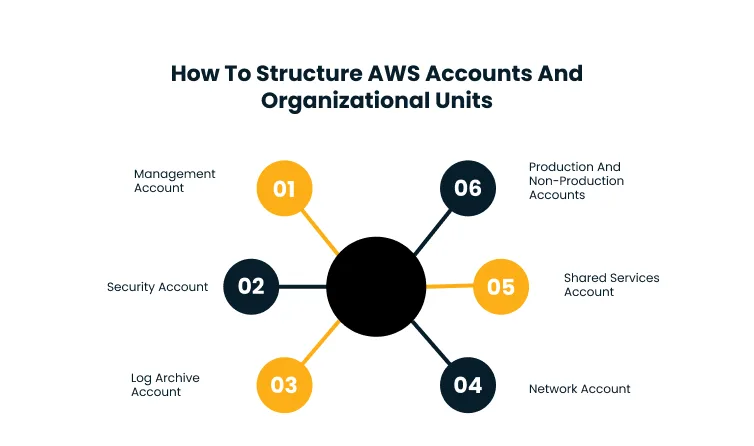
A strong AWS landing zone starts with account and OU design. AWS accounts should act as isolation boundaries for workloads, environments, security functions, shared services, and network services.
OUs should be designed around governance needs, not only department names. A practical enterprise model usually separates security, infrastructure, workloads, sandbox, production, and non-production environments.
A resilient multi-account AWS architecture helps teams define these boundaries clearly before workloads, access patterns, and shared services become difficult to reorganize.
Management Account
The management account should be used only for organization-level administration and billing. Workloads should not run here because this account controls the broader AWS organization. Keeping workloads out of the management account reduces operational risk. It also protects the account from unnecessary access, resource sprawl, and production dependencies.
Security Account
The security or audit account gives security teams centralized visibility across AWS accounts. It can support security monitoring, audit access, investigation workflows, and cross-account assurance.
This account should have carefully controlled access. Security teams need enough visibility to investigate risks, but the account should not become a general-purpose operations account.
Log Archive Account
The log archive account stores centralized logs from across the AWS environment. CloudTrail, AWS Config, VPC flow logs, and security findings should be retained in a protected location.
Access should be restricted to authorized security, audit, and compliance teams. Logs should also have retention, encryption, and protection rules that prevent accidental or unauthorized deletion.
Network Account
The network account can centralize shared network services such as Transit Gateway, inspection VPCs, firewall controls, hybrid connectivity, and egress management. This model reduces inconsistent networking across workload accounts. It also gives network and security teams better control over routing, traffic inspection, and connectivity patterns.
Shared Services Account
The shared services account hosts common enterprise services. These may include directory services, CI/CD tools, monitoring components, container registries, image repositories, or internal platform capabilities.
Shared services should be separated from workload accounts to avoid unclear ownership. This also makes it easier to standardize access, security, and support responsibilities.
Production And Non-Production Accounts
Production, staging, testing, development, and sandbox workloads should be separated into dedicated accounts or OUs. This improves isolation and limits the blast radius of failures or misconfigurations.
Different environments need different controls. Production accounts may need stricter access, logging, change management, and region controls than sandbox or development accounts.
How AWS Control Tower Strengthens Landing Zone Governance?
AWS Control Tower helps enterprises set up and govern a multi-account AWS environment using AWS Organizations, Account Factory, IAM Identity Center, and controls. It is useful when teams need a prescriptive landing zone foundation instead of building every governance layer manually.
Gartner’s 2025 report on cloud trends predicted that 25% of organizations would experience significant dissatisfaction with cloud adoption by 2028 due to unrealistic expectations, suboptimal implementation, or uncontrolled costs.
For AWS environments, this reinforces the need for landing zone governance before account usage, access, and workload deployment expand across teams.
Preventive Controls For Restricted Actions
Preventive controls block actions that should not be allowed. Examples include disabling required logging, changing protected configurations, or using restricted AWS regions. These controls help reduce governance drift. They also make policy enforcement less dependent on manual review after resources are already deployed.
Detective Controls For Continuous Visibility
Detective controls identify resources or configurations that do not meet policy expectations. They are useful for monitoring drift, compliance issues, and account behavior across the AWS organization.
Detective controls should have clear ownership. A control finding without an accountable remediation path only creates another dashboard.
SCPs At The Right OU Level
Service Control Policies define the maximum permissions available within accounts and OUs. They help enforce boundaries for services, regions, and actions that should remain restricted. SCPs should be applied carefully. Overly broad restrictions can slow valid engineering work, while weak policies leave the environment exposed.
Region Governance
Enterprises should define which AWS regions are approved for workload deployment. Region restrictions help manage data residency, compliance exposure, service availability, latency, and operational complexity.
Region governance should be part of the landing zone baseline. It becomes much harder to control once workloads are already spread across unapproved regions.
How To Manage IAM And Access Across Landing Zone Accounts?
Identity design is one of the most important AWS landing zone best practices. Enterprises should avoid creating separate IAM users in every AWS account because that creates access sprawl and weakens auditability.
A stronger approach is to centralize workforce access through IAM Identity Center and use role-based permissions across accounts. This gives teams consistent access patterns while keeping permissions aligned with job responsibilities.
Security by design in AWS modernization programs starts with this kind of identity foundation, where access, roles, and permissions are standardized before workloads scale.
IAM Identity Center For Centralized Access
IAM Identity Center helps users access multiple AWS accounts through a centralized access model. It reduces account-level user sprawl and makes access easier to review. Centralized access also improves onboarding and offboarding. When roles and permission sets are standardized, teams can grant access faster without creating unmanaged identities.
Role-Based Access For Teams And Functions
Permissions should be mapped to roles such as administrator, developer, security auditor, network operator, finance user, and read-only user. Each role should reflect the work users actually perform.
Role-based access also helps separate duties. A developer may need deployment access in non-production accounts but limited access in production accounts.
Least Privilege From The Start
Every AWS account should start with least-privilege access. Permissions should be reviewed regularly using access activity, CloudTrail records, and policy analysis.
Least privilege should apply to human users, applications, CI/CD systems, and automation workflows. Over-permissioned machine identities can create the same risk as over-permissioned users.
Periodic Access Reviews
Access reviews should be part of landing zone operations. Enterprises should regularly check who has access, what roles they use, and whether those permissions still match business needs. Review cadence should reflect account risk. Production, security, log archive, and network accounts usually need stricter review cycles than sandbox accounts.
How To Design Secure Networking For An AWS Landing Zone?
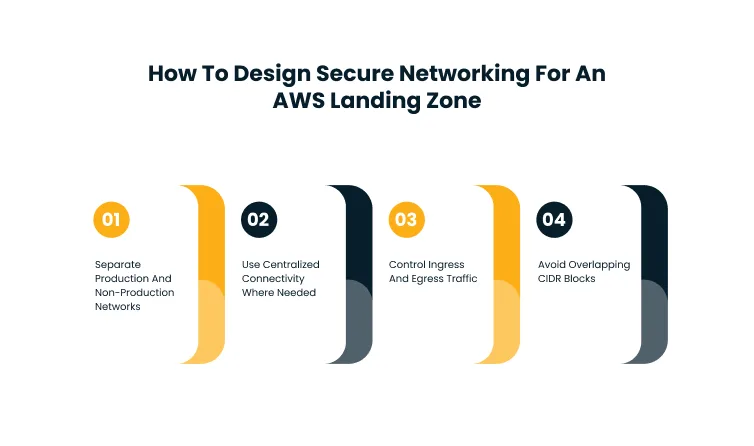
AWS landing zone network design should be planned before workload teams start creating VPCs. Without a clear network model, enterprises may face overlapping CIDRs, inconsistent routing, uncontrolled ingress and egress, and weak traffic inspection.
The network foundation should support workload isolation, shared connectivity, hybrid access, environment separation, and security inspection. It should also allow the landing zone to grow without forcing a major redesign later.
Cygnet.One’s modernization and migration service helps align AWS landing zone network design with workload movement, hybrid connectivity, and modernization requirements.
Separate Production And Non-Production Networks
Production and non-production workloads should use separate VPCs and accounts. Routing between them should be limited to approved use cases. This separation protects production environments from development changes. It also gives teams room to apply different monitoring, access, and inspection controls by environment.
Use Centralized Connectivity Where Needed
Transit Gateway can simplify cross-account and cross-VPC connectivity by acting as a central network hub. It is useful when enterprises manage many workload accounts and shared services.
Centralized connectivity should not mean unrestricted connectivity. Route tables, segmentation rules, and inspection paths should define which workloads can communicate.
Control Ingress And Egress Traffic
Inbound and outbound traffic should follow approved inspection paths. A dedicated network or security account can centralize firewalling, NAT, routing, and traffic inspection. This gives teams more consistent visibility into external traffic. It also reduces the risk of every workload account designing its own internet exposure model.
Avoid Overlapping CIDR Blocks
CIDR planning should happen early. Overlapping address ranges can create long-term connectivity problems across VPCs, accounts, regions, and hybrid environments.
CIDR conflicts often surface late during integration, migration, or shared services access. Early planning prevents expensive redesign later.
How To Centralize Logging And Security Visibility?
Centralized logging is mandatory for a scalable AWS landing zone. Security, audit, and operations teams need visibility across accounts, regions, users, workloads, network activity, and configuration changes. The landing zone should make logging part of the baseline, not an afterthought.
This helps teams detect incidents, investigate activity, support compliance reporting, and maintain accountability across the AWS environment. Cygnet.One’s modernization and migration service helps build centralized logging and security visibility into the AWS foundation before migration and modernization scales across accounts.
Organization-Wide CloudTrail
CloudTrail should capture account activity across the AWS organization. It gives teams a reliable record of user actions, API calls, administrative activity, and configuration changes. CloudTrail logs should be stored centrally and protected from deletion. Access to these logs should follow the separation of duties.
AWS Config For Configuration Visibility
AWS Config helps track resource configurations and changes over time. It also supports detective controls for compliance and governance monitoring. Config data becomes more valuable when findings are mapped to ownership. Teams need clear responsibility for resolving noncompliant resources.
Centralized Security Findings
Security findings from services such as GuardDuty, Security Hub, Inspector, and Macie should be centralized for better investigation and response. Centralized findings help teams detect patterns across accounts. Without this view, security issues can remain isolated in workload accounts until they become incidents.
Protected Log Storage
Logs should be protected from deletion, unauthorized modification, and accidental changes. Retention policies, encryption, restricted access, and separation of duties are important here. Protected log storage supports audit readiness and incident response. It also prevents investigation gaps when teams need historical evidence.
How To Automate Account Provisioning And Landing Zone Operations?
AWS landing zones need automation because manual account setup creates inconsistency. Every new account should follow the same baseline for access, logging, guardrails, networking, tagging, and security services.
Gartner predicted in 2024 that by 2026, 80% of large software engineering organizations would establish platform engineering teams, up from 45% in 2022. This supports the move toward reusable account baselines, self-service account provisioning, and governed platform patterns in AWS landing zone operations.
Account Factory For Standardized Account Creation
AWS Control Tower Account Factory helps provision new accounts with predefined baselines. This reduces manual setup effort and improves consistency across workload teams.
Account creation should include ownership, environment classification, access patterns, logging, tagging, and security controls. Without these baselines, new accounts can become unmanaged quickly.
Infrastructure-As-Code For Repeatability
Landing zone components should be managed with Infrastructure-as-Code where possible. This improves version control, repeatability, review, and rollback. IaC is especially useful for account baselines, policy updates, network configuration, and security services.
It also helps teams track governance changes over time. For teams using Terraform, Account Factory for Terraform can help standardize account provisioning and customization while preserving AWS Control Tower governance.
Tagging For Cost And Ownership
Tags should support cost allocation, ownership, environment classification, compliance, automation, and reporting. Consistent tagging is easier to enforce when it is part of account provisioning.
Tagging should not depend on manual discipline alone. Mandatory tags, validation checks, and account baseline templates improve coverage.
Account Lifecycle Management
Landing zone operations should include account ownership reviews, unused account cleanup, access reviews, and decommissioning processes. This helps prevent stale accounts from becoming security or cost risks.
Account lifecycle management also supports auditability. Teams need to know why an account exists, who owns it, and whether it still serves an active business purpose.
Landing Zone Update Planning
Landing zones need regular updates as AWS services, controls, workloads, and compliance needs change. Updates should be tested before broad rollout to avoid disrupting active workloads.
A non-production landing zone or controlled test path can reduce update risk. This is especially important when controls or policies affect multiple OUs.
Common AWS Landing Zone Mistakes To Avoid
AWS landing zones become difficult to manage when they are designed only for the first few workloads. Enterprises should plan for account growth, governance, audit needs, network expansion, and long-term operations from the beginning.
Evaluating AWS Landing Zone vs Control Tower early helps teams avoid treating the setup as a tool decision instead of an architecture, governance, and operating model decision.
The most serious mistakes usually come from weak account structure, poor IAM practices, missing centralized logs, unmanaged networks, and manual account provisioning. These issues become harder to fix once many teams depend on the environment.
Running Workloads In The Management Account
The management account should be reserved for organization-level administration and billing. Running workloads here increases risk and makes governance harder. This mistake also complicates access control. More users and services need access to an account that should remain tightly protected.
Using A Flat Account Model
A flat account model may look simple at first, but it becomes difficult to govern as workloads grow. Enterprises need account separation by workload, environment, compliance needs, and ownership. Flat structures also make policy enforcement harder. Different workloads often need different guardrails, access rules, and logging requirements.
Creating IAM Users In Every Account
Account-level IAM users create access sprawl. Centralized access through IAM Identity Center and role-based permissions is easier to manage, audit, and secure. Local IAM users also increase offboarding risk. A user removed from one account may still retain access elsewhere if identity is not centralized.
Skipping Centralized Logging
Without centralized logs, incident response and compliance reporting become fragmented. Logging should be enabled across accounts from the start. Teams should also protect log storage. Logging is only useful when records are complete, retained, encrypted, and accessible to the right teams.
Designing Networking After Workload Migration
Network design should not be postponed until workload teams start deploying applications. CIDR planning, segmentation, routing, inspection, and connectivity should be part of the landing zone design.
Late network redesign creates migration delays and integration risk. It can also force teams to rebuild VPCs or connectivity paths after production workloads are active.
How To Keep An AWS Landing Zone Ready For Growth?
A landing zone should not remain static after the first setup. As accounts, workloads, teams, regions, and compliance needs grow, governance controls must evolve with the environment. Ongoing readiness depends on regular reviews.
Teams should evaluate OU structure, access patterns, account ownership, logging coverage, network design, cost controls, and control effectiveness. Cygnet.One’s modernization and migration service helps keep AWS landing zone foundations aligned with workload movement, modernization priorities, and long-term cloud operating needs.
A practical review cadence should include:
- Quarterly access reviews for privileged roles
- Regular account ownership validation
- Periodic SCP and control effectiveness reviews
- Logging and monitoring coverage checks
- Cost allocation and tagging quality reviews
- Network route, CIDR, and connectivity reviews
- Landing zone update testing
- OU structure review as teams and workloads grow
The purpose is not to keep changing the landing zone. The purpose is to keep the foundation aligned with how the enterprise actually uses AWS.
How Cygnet.One Supports AWS Landing Zone Design And Implementation?
Cygnet.One supports AWS landing zone design and implementation by helping enterprises turn account structure, governance, security, networking, and automation decisions into a practical AWS foundation. The focus is on creating a landing zone that teams can operate, scale, and audit without rebuilding controls for every workload.
Landing Zone Assessment And Architecture
Cygnet.One helps assess existing AWS accounts, access patterns, network design, workload requirements, and governance gaps before the landing zone model is finalized. This helps define the right account structure, OU design, shared services model, and control baseline for secure multi-account AWS adoption.
AWS Control Tower, Governance, And Security Setup
Cygnet.One supports AWS Control Tower setup, AWS Organizations design, IAM Identity Center, SCPs, guardrails, centralized logging, and security visibility. This helps enterprises apply consistent governance across accounts while reducing manual control management across workload teams.
Automation, Networking, And Ongoing Optimization
Cygnet.One helps automate account provisioning, define account baselines, standardize tagging, design secure networking, and plan landing zone updates. This keeps the AWS landing zone maintainable as accounts, teams, workloads, regions, and compliance requirements grow.
Conclusion
An AWS landing zone only delivers long-term value when it gives every new workload a secure path to scale, not just a place to start.
The next step is to decide how that foundation should support your actual migration priorities, account model, security expectations, networking needs, and operating cadence. A strong landing zone should reduce future rework by making governance, access, logging, and account baselines part of the cloud foundation before workload adoption expands.
A structured migration and modernization approach helps align AWS landing zone design with workload movement, secure account setup, network readiness, and long-term operational control.
The goal is to build an AWS foundation that supports migration, modernization, and enterprise-scale cloud adoption without creating governance gaps later. Book a demo with Cygnet.One to design an AWS landing zone approach that prepares your cloud environment for secure, scalable workload growth.
FAQs
AWS landing zone best practices include using a multi-account structure, AWS Control Tower, AWS Organizations, IAM Identity Center, centralized logging, guardrails, secure networking, and automated account provisioning. These practices help enterprises create a governed AWS foundation before workloads scale across teams and environments.
An AWS landing zone usually includes a management account, log archive account, security or audit account, network account, shared services account, production accounts, non-production accounts, and sandbox accounts. Each account separates responsibilities, improves governance, and reduces risk across the AWS environment.
AWS Control Tower is suitable for enterprises that need a governed, prescriptive multi-account setup with built-in controls and Account Factory. A custom landing zone may fit organizations with complex compliance, networking, operating model, or integration requirements that exceed standard Control Tower patterns.
IAM should be managed through centralized access, role-based permissions, and least privilege across AWS landing zone accounts. IAM Identity Center helps reduce account-level IAM users, simplify access reviews, and improve auditability across production, non-production, security, and shared services accounts.
AWS landing zone networking should use separate VPCs, non-overlapping CIDRs, controlled ingress and egress, centralized connectivity where needed, and clear production and non-production segmentation. This reduces routing conflicts, limits exposure, and supports secure connectivity across accounts, regions, and hybrid environments.
Centralized logging gives security, operations, and audit teams visibility across AWS accounts, users, workloads, configuration changes, and network activity. It supports incident investigation, compliance reporting, governance monitoring, and accountability when AWS environments scale beyond a few accounts.
Author


Yogita Jain
Content Lead
Yogita Jain leads with storytelling and Insightful content that connects with the audiences. She’s the voice behind the brand’s digital presence, translating complex tech like cloud modernization and enterprise AI into narratives that spark interest and drive action. With a diverse of experience across IT and digital transformation, Yogita blends strategic thinking with editorial craft, shaping content that’s sharp, relevant, and grounded in real business outcomes. At Cygnet, she’s not just building content pipelines; she’s building conversations that matter to clients, partners, and decision-makers alike.