






























The day your nightly batch misses its window is the day everyone suddenly cares where the data really comes from.
Legacy batch jobs still run a huge part of enterprise operations. They also hide risk. A batch can look “healthy” right up until the moment it becomes the bottleneck for orders, fraud checks, inventory, pricing, or customer notifications.
If you are trying to move faster with cloud-native application development, batch can quietly block you.
This blog breaks down what changes when you move from legacy batch processing to event-driven flows. It keeps the focus practical. You will see how an event-driven architecture AWS approach works, which AWS services fit where, and how to migrate without a big-bang rewrite.
Problems with batch systems people stop noticing (until it hurts)
Batch pipelines were built for a world where delays were acceptable and compute was expensive. Many teams still accept batch pain as “normal”:
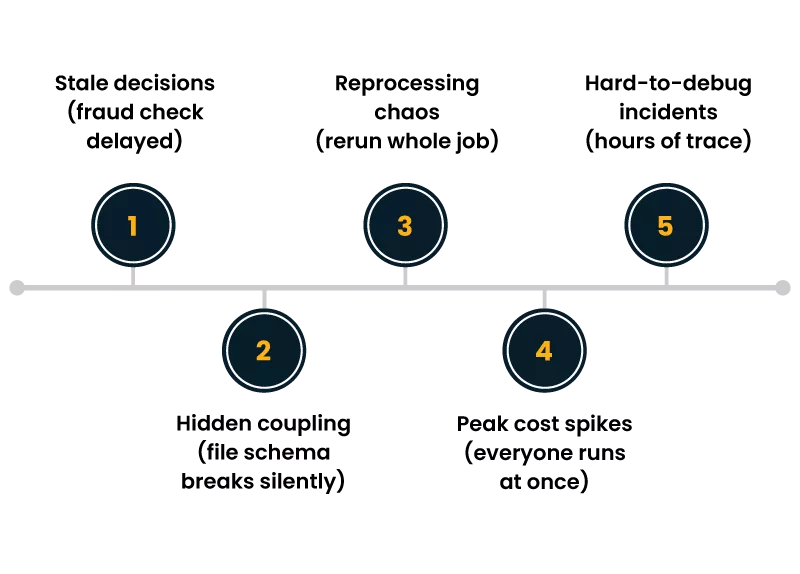
- Stale decisions- A fraud rule runs at 2 AM. A suspicious transaction happens at 2:05 AM.
- Hidden coupling- One job writes a file. Another job assumes a column order. A third job breaks silently.
- Reprocessing chaos- A partial failure often means rerunning the whole job, not just the affected records.
- Peak-time cost spikes- Everyone schedules work for the same window. You pay for the rush.
- Hard-to-debug incidents- When data is wrong, you have to trace through hours of steps and logs.
In legacy batch processing, a “unit of work” is usually a file, a partition, or a table snapshot. That choice shapes everything: scheduling, retries, monitoring, and even how teams communicate. It also makes true real-time systems hard, because the pipeline is designed around time windows, not business moments.
Here is the usual picture:
Users/Apps -> DB updates all day
|
v
Nightly batch (ETL)
|
v
Reports / downstream systems
The core issue is not that batch is “bad.” It is that batch assumes the world can wait.
Event-driven fundamentals that matter in the real world
An event is a record that something meaningful happened. “OrderPlaced.” “PaymentAuthorized.” “ItemBackInStock.” It is not “daily_orders.csv.”
An event-driven architecture AWS setup is built around publishing these events as they occur, then letting multiple consumers react independently.
What changes conceptually:
- Time is no longer the trigger
The trigger is the business action itself.
- You design for partial failure from day one
Consumers fail. Retries happen. Duplicate delivery can occur. That is normal.
- You stop thinking in pipelines and start thinking in products of data
Events are durable facts that many teams can use.
- You get closer to true operational behavior
This is why teams chasing real-time systems adopt events. It is a better fit for businesses to operate.
The three rules to keep you out of trouble
- Make events domain-first- Name them after business outcomes, not technical steps.
- Assume duplicates- Consumers must be idempotent. Store a processed event key where needed.
- Version carefully- Add fields, do not break fields. Use schema registry patterns when possible.
A good event-driven architecture AWS design also makes one thing explicit: you are trading “one big batch failure” for “many small, visible processing outcomes.” That is usually a win.
AWS services that fit event-driven patterns
There is no single “best” stack. Pick based on latency needs, throughput, ordering requirements, and how many consumers you expect.
AWS EventBridge as the event router
AWS EventBridge is a strong default for event distribution across services and accounts. It gives you rules-based routing, filtering, and multiple targets without writing custom fan-out code. It shines when you have many consumers, and each consumer wants only a subset of events.
Common use cases for AWS EventBridge:
- Route “OrderPlaced” to billing, fulfillment, and notifications.
- Send events to Step Functions for orchestration.
- Forward partner or SaaS events into your environment.
- Build cross-account event sharing with clear boundaries.
In an event-driven architecture AWS approach, AWS EventBridge often becomes the “switchboard” that keeps teams from hardwiring service-to-service calls.
Other core building blocks (and when to use them)
- Amazon SQS- Great for decoupling and buffering work. Use it when you need simple queue semantics.
- Amazon SNS- Simple pub/sub, often paired with SQS for fan-out.
- Amazon Kinesis- Use when you need stream processing and very high throughput with ordered shards.
- AWS Lambda- Fast to connect events to logic. Good for many reaction-style workloads.
- AWS Step Functions- Use when you need orchestration with clear state, retries, and branching.
A practical rule: start with AWS EventBridge for routing and filtering, then choose SQS, Lambda, or Step Functions per consumer based on work type.
A clear comparison: batch vs events
Here is a more accurate picture of what teams aim for when they want real-time systems:
Batch model:
System A -> write DB -> (wait) -> batch job -> System B
Event model:
System A -> publish event -> router -> Consumer B
-> router -> Consumer C
-> router -> Consumer D
Notice the second model is not just “faster.” It is also less coupled. Consumers can be added, removed, or changed without modifying the producer, especially when AWS EventBridge rules handle routing.
This is the main reason an event-driven architecture AWS model becomes a long-term foundation, not just a performance tweak.
Migration patterns that work when you cannot stop the business
Most teams cannot replace legacy batch processing overnight. The migration is usually a staged refactor, with coexistence for a period. Here are patterns that hold up in production.
1) Strangler pattern for batch jobs
Keep the batch running but start moving individual outcomes to event-driven consumers.
- Identify one batch of output that causes pain (late inventory, late fraud flags).
- Publish events for that domain as they happen.
- Build a consumer that produces the same output as the batch, but sooner.
- Compare results for a while.
- Turn off that section of the batch when confidence is high.
This pattern reduces risk and makes progress visible.
2) Change Data Capture as a bridge
If the system cannot emit events yet, capture changes from the database and publish derived events. This is a common bridge away from legacy batch processing. The key is to map low-level DB changes into business events, not to expose raw table updates forever.
3) Dual write, but only with guardrails
Sometimes the application can publish an event and also write to the database. Dual write can work, but it needs discipline:
- Persist the event reliably (outbox pattern is common).
- Ensure consumers can handle duplicates.
- Monitor drift between the event stream and stored state.
This is where an event-driven architecture AWS setup benefits from managed routing and retry behavior around AWS EventBridge targets.
4) Event-carried state transfer for specific use cases
For some flows, consumers need enough context to act without calling the producer. That reduces runtime dependencies. It can help when building real-time systems where latency and failure of isolation matter.
Do not overdo it. Keep events “thin” unless the use case truly needs more context.
A migration playbook you can run in weeks, not quarters
Use this sequence to avoid false starts:
- Pick one business moment
Example: “PaymentAuthorized.”
- Define the event contract
Fields, identifiers, timestamps, and a version marker.
- Publish to an event bus
Use AWS EventBridge as the backbone for routing.
- Build one consumer with clear value
Example: notify fulfillment, update a dashboard, or create a ticket.
- Add observability early
Track lag, failures, retries, and end-to-end time.
- Decompose the batch job
Remove only the parts you replaced. Keep the rest until the next event is ready.
Repeat. This is how legacy batch processing gets retired without drama.
Business benefits that show up beyond “faster”
Speed matters, but it is not the only win. Teams that adopt an event-driven architecture AWS model usually report benefits in four areas:
- Operational clarity- You see what happened, when it happened, and what reacted to it.
- Better customer moments- Alerts, status updates, and decisions arrive while they still matter. This is the heart of real-time systems.
- Safer change- Add a new consumer without rewriting the producer. AWS EventBridge routing rules help keep changes isolated.
- Lower incident blast radius: A failing consumer does not need to take down the whole workflow.
Even when you keep some batch jobs, events often become the “front edge” that delivers the newest data quickly, while batch continues for deep backfills and reconciliation.
Common design mistakes and how to avoid them
- Using events as remote procedure calls
If your consumer requires the producer to be up for every step, you did not really decouple.
- Publishing technical events
“RowInserted” is not a business event. It leads to brittle consumers.
- Ignoring idempotency
Duplicate delivery happens. Plan for it.
- No clear ownership
Each event type needs an owner, a contract, and a change process.
An event-driven architecture AWS build is not “set and forget.” Treat your event bus like a product. Manage it with standards.
A simple reference design you can copy
[Producers]
Checkout Service
Payments Service
Inventory Service
|
v
Event Bus (AWS EventBridge)
|
+–> SQS -> Lambda (notifications)
|
+–> Step Functions (order orchestration)
|
+–> Kinesis (analytics stream)
|
+–> S3 (audit archive)
This is a practical starting point. AWS EventBridge keeps routing flexible. Consumers can be swapped as needs change, and you can still support real-time systems where they matter most.
Wrap-up
Batch is not the enemy. But legacy batch processing becomes expensive when the business needs timely decisions, fast customer updates, and clean system boundaries. Events meet that need because they map directly to business moments.
If you want a reliable path forward, start with one event, route it through AWS EventBridge, build one consumer with measurable value, and retire only the exact portion of the batch you replaced. Repeat until the batch window stops being a daily risk.
That is how an event-driven architecture AWS approach earns trust inside the org, not through hype, but through steady outcomes.
Author


Yogita Jain
Content Lead
Yogita Jain leads with storytelling and Insightful content that connects with the audiences. She’s the voice behind the brand’s digital presence, translating complex tech like cloud modernization and enterprise AI into narratives that spark interest and drive action. With a diverse of experience across IT and digital transformation, Yogita blends strategic thinking with editorial craft, shaping content that’s sharp, relevant, and grounded in real business outcomes. At Cygnet, she’s not just building content pipelines; she’s building conversations that matter to clients, partners, and decision-makers alike.