



































An AWS bill can keep charging for a decision everyone forgot.
A test instance survives after a project closes. An EBS volume remains after its EC2 instance disappears. A security group still allows traffic for an application that no longer exists. None of these resources look serious alone. Together, they create an operating problem across cost, security, ownership, and governance — the same dimensions that cloud operations and optimization programmes are structured to address as a continuous practice rather than a periodic purge.
AWS now gives teams better ways to spot part of this problem. Cost Optimization Hub consolidates more than 18 types of cost recommendations, including idle resource detection. In June 2026, AWS also described an idle EC2 criterion that includes peak CPU below 5% and network I/O under 5 MB per day over a 14-day lookback period.
The harder part begins after detection. AWS environment cleanup is rarely a deletion exercise. It is a decision process: identify what appears unnecessary, prove whether anything still depends on it, find an accountable owner, remove access or infrastructure safely, and make recurrence harder.
That distinction separates periodic housekeeping from a working cloud resource cleanup practice — and it is the same thinking behind how enterprises approach cloud cost optimization when they move beyond one-time savings into sustained spend discipline.
Why AWS Environments Accumulate Unused Resources
Cloud environments collect residue because provisioning is easy while retirement often lacks a clear trigger. Temporary infrastructure survives testing, migration components remain as fallback, snapshots outlive recovery plans, and project accounts persist after work ends.
The issue is broader than unused AWS resources. A resource can still be technically active while having no current business purpose. A load balancer may receive almost no traffic but remain attached to a forgotten test service. An IAM role may still work even though the application that required it was retired.
A better cleanup question is: “What current business or technical purpose justifies keeping this resource?”
This question exposes resources utilization reports alone can miss.
Start with Stale Accounts Before Individual Resources
Large AWS estates often contain member accounts created for projects, sandboxes, acquisitions, pilots, or workloads that are no longer active. Looking only inside active accounts can leave an entire category of waste untouched.
AWS environment cleanup should begin with an account inventory. Each account needs a known purpose, accountable owner, lifecycle state, and expected workload. An account with no clear owner deserves investigation even when its monthly cost is low.
The account review should answer:
- Is the account tied to an active application, team, legal requirement, or recovery need?
- Are production data, backups, encryption keys, DNS records, or shared services still present?
- Does another account depend on networking, identity, logging, or data held there?
- Is retention required before closure?
This is where unowned cloud assets become especially risky. Closing an account without dependency checks can disrupt shared services. Keeping it indefinitely leaves an unmanaged boundary that may still contain credentials, data, or permissive policies.
Account retirement needs evidence, not assumption. That evidence should feed the same cloud resource cleanup queue used for individual resources.
Find Idle Compute Without Treating “Idle” as “Delete”
Idle compute is usually the first place cost reviews look. Cost Optimization Hub can consolidate recommendations across accounts and Regions, including idle resource deletion and rightsizing opportunities — a process that connects naturally to workload optimization for EC2 and S3 as teams move from detection to action.
Those findings should begin the investigation, not end it.
A development instance with near-zero CPU may be disposable. The same utilization pattern could describe a standby server, scheduled batch host, or infrastructure retained for recovery. Cleanup therefore needs operational context besides utilization.
| Signal | What it may indicate | Check before action |
| Very low compute use | Idle or oversized instance | Schedule, recovery role, dependencies |
| No recent connections | Retired workload | DNS, load balancer, application references |
| Persistent monthly cost | Forgotten infrastructure | Owner, project status, business purpose |
| Old creation date | Legacy component | Replacement status, rollback requirement |
Cloud resource cleanup becomes safer when “candidate” and “approved for removal” are separate states. That distinction keeps optimization data from turning into accidental outages.
Orphaned Storage Needs a Data Decision
Storage is harder to judge than compute because inactivity says little about importance.
An unattached EBS volume may be leftover infrastructure, or it may hold data needed for recovery. Old snapshots may exist because nobody owns retention decisions. S3 buckets can appear quiet while supporting audit, legal, archival, or infrequent operational requirements.
Unused AWS resources should therefore be classified by recoverability and retention before deletion.
For orphaned storage, the review should capture owner, last known workload, retention requirement, encryption dependency, restore value, and deletion approval. If ownership is unclear, escalation should go to the service accountable for the original workload.
Cost pressure should not dictate deletion speed here. Data may not be recoverable once retention windows and backups are gone.
Old Security Groups Can Outlive the Workloads They Protected
Security groups often accumulate through application changes, temporary troubleshooting, copied environments, and retired integrations. The risk is not limited to unused groups. Old rules inside an active group can also preserve access paths that no longer have a valid reason to exist.
AWS documents a specific stale-rule condition for security groups that reference a deleted security group in a peered or shared VPC. Those stale rules can be removed like other security-group rules.
A broader review should inspect:
- Security groups with no attached network interfaces
- Rules tied to retired applications or old partner connections
- Broad CIDR ranges added during troubleshooting
- Duplicate groups created for temporary testing
- References whose original dependency no longer exists
AWS environment cleanup should treat network policy as part of resource retirement. Deleting compute while leaving its access rules behind removes the workload but keeps part of its trust model alive.
Access Drift Requires a Separate Review
Infrastructure retirement does not automatically retire identity permissions.
Roles remain. Access keys survive. User passwords stay enabled. Policies keep permissions that once supported a project but no longer match current duties. This is why a stale IAM access review belongs beside infrastructure cleanup rather than inside a separate annual exercise.
IAM Access Analyzer can generate unused-access findings for roles, access keys, passwords, and permissions based on a defined usage window. AWS also recommends deactivating or deleting unused access keys when such findings are confirmed.
The review should distinguish dormant identity from dormant permission. An active role may still carry services or actions that have gone unused. Removing those permissions can reduce exposure without deleting the role.
A second stale IAM access review after major application retirement can reveal identity residue once infrastructure dependencies are gone.
Weak Tagging Turns Cleanup into Investigation Work
Poor tagging makes almost every cleanup decision slower.
When resources lack owner, application, environment, cost center, or lifecycle metadata, engineering teams must reconstruct context from names, logs, tickets, repositories, and institutional memory. That increases the effort behind deletion review and encourages uncertain resources to remain untouched.
AWS Config includes a managed required-tags rule that checks resources for specified tags, with support for checking up to six tags. That capability can support AWS tagging cleanup, but presence alone is not enough. A tag reading Owner=CloudTeam may technically satisfy policy while providing little accountability.
Useful AWS tagging cleanup should test tag quality as well as tag existence.
At minimum, metadata should answer four questions: who owns the resource, what service it supports, which environment it belongs to, and when its purpose should be reviewed.
This is also how unowned cloud assets become measurable. “Unknown owner” should be a reportable state with an escalation path, not a blank field that survives indefinitely.
Build Cleanup Around Evidence, Quarantine, and Approval
A mature cloud resource cleanup process needs more than a monthly deletion list. It needs a controlled path from suspicion to removal.
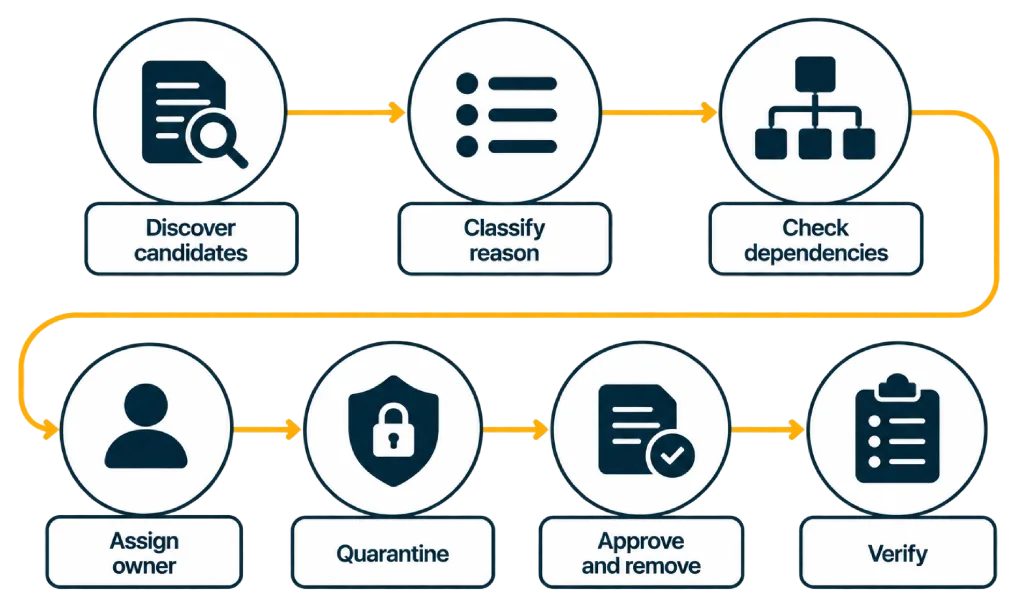
A practical sequence looks like this:
- Discover candidates
Combine cost findings, inventory, configuration data, identity findings, tagging gaps, and low-activity signals.
- Classify the reason
Mark the resource as idle, unowned, duplicated, obsolete, risky, or pending validation.
- Check dependencies
Review network references, automation, DNS, backups, policies, application calls, and recovery requirements.
- Assign an owner
Route the candidate to the service, application, platform, security, or business owner responsible for the decision.
- Quarantine where possible
Stop, detach, disable, or restrict before permanent deletion when rollback value justifies it.
- Approve and remove
Record the decision, execute during an appropriate change window, and preserve required evidence.
- Verify afterward
Confirm that monitoring, applications, billing, access paths, and dependent services remain healthy.
The quarantine step creates a buffer between “probably unused” and “irreversibly deleted.” It can also expose hidden dependencies during a controlled inactive period, before permanent removal.
Give the Cleanup Queue an Ownership Model
Cleanup work stalls when findings belong to “the cloud team” in general.
A cloud hygiene program works better when ownership follows the type of decision involved.
| Cleanup area | Primary decision owner | Supporting function |
| Idle compute | Application or service owner | Cloud operations, FinOps |
| Orphaned storage | Data or application owner | Security, compliance |
| Network rules | Network or platform owner | Security |
| IAM access | Identity or security owner | Application owner |
| Missing ownership tags | Resource-owning team | Cloud governance |
| Retired accounts | Account or platform owner | Security, finance, compliance |
The process should define what happens when nobody responds. Without escalation, “owner unknown” becomes permanent status.
A useful cloud resource cleanup workflow moves findings through fixed states: detected, assigned, validated, quarantined, removed, or exception approved. Exceptions should carry an owner and review date.
Prevent the Next Cleanup Backlog
The strongest AWS environment cleanup process removes the conditions that created the backlog.
Temporary infrastructure should receive expiry metadata when created. Sandbox accounts should have review dates. Infrastructure-as-code pipelines should apply mandatory ownership tags. Offboarding workflows should include access and resource ownership checks. Application retirement should trigger storage, identity, networking, monitoring, backup, and account reviews as one connected activity.
These controls reduce later investigation and make cloud resource cleanup part of the resource lifecycle.
AWS environment cleanup becomes more sustainable when creation and retirement share the same ownership rules. A resource that enters an account with no owner, purpose, or review date has already created future cleanup debt.
The operational target is simple: no resource should remain in AWS merely because deletion feels riskier than understanding why it exists.
Make Cleanup Part of AWS Operations
Cloud clutter rarely comes from one bad provisioning decision. It builds through unfinished retirement work, unclear ownership, weak metadata, access drift, and resources kept because nobody has enough evidence to remove them.
AWS environment cleanup works best when cost, security, identity, data retention, and ownership are reviewed together. This approach catches resources simple utilization reports miss and reduces the chance of deleting something still needed.
A disciplined cloud hygiene program should leave three things behind after each cleanup cycle: fewer unnecessary resources, clearer ownership, and better controls for what gets created next — outcomes that AWS managed services engagements formalize as standing operating standards rather than one-time cleanup exercises.
When those controls are in place, cloud resource cleanup becomes a routine operating discipline rather than an occasional purge.
Author


Yogita Jain
Content Lead
Yogita Jain leads with storytelling and Insightful content that connects with the audiences. She’s the voice behind the brand’s digital presence, translating complex tech like cloud modernization and enterprise AI into narratives that spark interest and drive action. With a diverse of experience across IT and digital transformation, Yogita blends strategic thinking with editorial craft, shaping content that’s sharp, relevant, and grounded in real business outcomes. At Cygnet, she’s not just building content pipelines; she’s building conversations that matter to clients, partners, and decision-makers alike.