




































Your first clue that something went wrong with a cloud migration is usually not a broken dashboard. It is a grumpy business user asking why the “faster new system” feels slower and costs more.
This is exactly where an AWS Well-Architected Review earns its keep, especially for teams that previously followed a cloud migration roadmap but still face post-migration surprises.
Most teams treat it as a theoretical architecture check. In reality, it is one of the most practical tools you can use to spot and fix migration gaps that slip through project plans, cutover rehearsals, and go-live checklists.
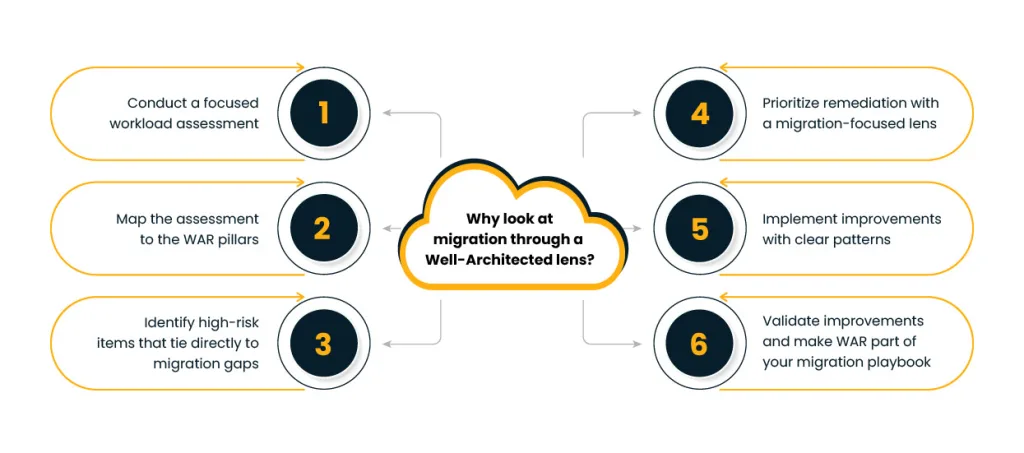
In this blog, we will walk through how to use an AWS Well-Architected Review as a post-migration health check for critical workloads. We will follow a simple flow:
- Conduct workload assessment
- Map to WAR pillars
- Identify high-risk items
- Prioritize remediation
- Implement improvements
- Validate improvements
Along the way, we will connect this to concrete issues, such as noisy neighbor problems, surprising data-transfer bills, and creeping latency, and relate them to AWS best practices rather than vague theory.
Why look at migration through a Well-Architected lens?
If you moved an application to AWS and did not use the Well-Architected Framework during design, you are not alone. Timelines are tight, legacy constraints are painful, and teams often focus on “just getting it running.”
The result is familiar:
- Overprovisioned servers copied from the data center
- Shared databases carrying too many concerns
- Monitoring switched on, but with no clear SLOs or alert thresholds
- Security controls that exist in pieces, but not as an end-to-end story
A structured AWS Well-Architected Review gives you a way to step back and ask — a reflection similar to lessons from the AWS migration success path, “Does this workload now behave the way the business expects?” instead of “Did we move everything we said we would?” That is the essence of Why do WAR reviews matter? for migration programs.
The official Framework is built on six pillars: operational excellence, security, reliability, performance efficiency, cost optimization, and sustainability. When you align your workload against these pillars, you are lining it up against proven AWS best practices that thousands of other teams already use in production.
Step 1: Conduct a focused workload assessment
Before jumping into the questionnaire, treat the workload like a patient in triage.
Start with three short conversations:
- Business owner – What has changed since migration: response time, incident frequency, customer feedback, licensing cost, release cadence?
- Product/engineering team – Where do they see friction: deployments, rollbacks, database performance, integration with other systems?
- Operations/SRE – What are the noisy tickets: CPU bursts, failed backups, access issues, on-call fatigue?
Turn this into a one-page “migration health summary”:
- Workload purpose and criticality
- Peak usage pattern and key user journeys
- Known incidents since cutover
- Top three worries from each stakeholder group
This is your starting point for the AWS Well-Architected Review. It also sets the context for answering the more detailed questions in the tool with real stories instead of guesses.
Here you already start to see common AWS WAR findings in migration scenarios:
- Lift-and-shift instances that are constantly underused or occasionally overwhelmed — one of the most common issues identified in patterns for successful AWS migration
- No clear backup and restore test since moving to managed databases
- Security groups copied from on-prem without proper least-privilege thinking
- Logs scattered across services with no central view
Step 2: Map the assessment to the WAR pillars
Next, take the “health summary” and map it to the six pillars. Think of this as translating complaints into architectural symptoms.
A practical way to do this:
- Operational excellence – Are runbooks current? Are deployments automated? Do you have any post-incident reviews?
- Security – Are identities centralized? Are secrets stored properly? Are network paths and data at rest protected?
- Reliability – How does the workload behave when something fails: a zone outage, an AZ failure, a dependency timeout?
- Performance efficiency – Are you choosing the right instance of families, storage classes, and caching strategies?
- Cost optimization – Do you know the top three cost drivers and why they look that way?
- Sustainability – Are you minimizing waste by reducing idle resources and right-sizing capacity?
Now, run a targeted AWS Well-Architected Review for this workload, not for your entire estate. Use the output to connect the dots between real symptoms and the underlying AWS best practices.
For example:
- Persistent latency spikes might map to questions in the performance pillar about selecting the right compute and database options.
- Constant “too expensive” comments might map to cost optimization questions around rightsizing, storage tiers, or data transfer paths.
This is the stage where many of the common AWS WAR findings become visible in a structured way instead of random complaints.
Step 3: Identify high-risk items that tie directly to migration gaps
The Well-Architected Tool categorizes some questions as high risk. Instead of treating them as generic technical debt, look at them through the migration lens.
Typical examples:
- Single AZ deployments carried over from data center habits
- Manual change management, where engineers SSH into instances for hot fixes
- No clear RPO/RTO, so backup and recovery are “best effort” only
- Shared accounts where multiple workloads mix production with nonproduction
Here is the question Why do WAR reviews matter? for migration becomes very concrete. Each high-risk item is not just a configuration issue. It is a clue that your migration may have moved the workload but not modernized the way it is run.
Your action list should focus on:
- Reducing the chance of serious failure (reliability and security)
- Bringing costs back in line with business value
- Making future changes safer and less manual
Documents which high-risk items have a direct customer or business impact today. This will drive prioritization in the next step and keep the AWS Well-Architected Review grounded in real outcomes.
Step 4: Prioritize remediation with a migration-focused lens
You cannot fix everything in one sprint, so you need a simple scheme for ordering work — a principle shared across any well-designed cloud strategy roadmap. A good approach is to weigh each item on three axes:
- User impact (how visible is this when it goes wrong)
- Cost impact (how large is the monthly or annual impact)
- Effort (how long will it realistically take to remediate)
From here, you can build a remediation roadmap that also answers how to fix migration issues in a way leadership understands. Instead of saying, “We have 18 high-risk items,” you say:
- “These three changes cut mean time to recover by half.”
- “These two changes reduce unplanned downtime during peak usage.”
- “These four changes address the worst performance and cost issues in WAR for this workload.”
Make the roadmap visible to both engineering and business stakeholders. Treat it as part of the migration program, not a side project. This alignment with AWS best practices helps position the work as essential hygiene rather than “nice to have” tuning.
Step 5: Implement improvements with clear patterns
This is where the theory becomes very concrete. A few common patterns that show how to fix migration issues using insights from an AWS Well-Architected Review:
- Right-size and redesign compute
- Move from a single large instance to multiple smaller instances behind a managed load balancer.
- Use autoscaling groups with sensible minimum and maximum values instead of static sizing.
- Introduce caching where appropriate to reduce pressure on databases and downstream services.
2.Harden reliability and recovery
- Shift from single AZ to multi-AZ deployments for databases and key services.
- Automate backups and rehearse restore procedures so that RPO/RTO targets are proven, not assumed.
- Reduce dependence on manual runbooks by codifying operations as pipelines or scripts.
3. Strengthen security posture
- Centralize IAM, clean up long-lived credentials, and adopt least-privilege roles.
- Move secrets out of configuration files into managed services.
- Use security services to add continuous checks instead of one-time audits.
4. Tackle performance and cost issues in WAR findings head on
- Replace “lifted” storage choices with tiers that fit access patterns.
- Use monitoring and cost tools to identify underused resources and noisy services.
- Adjust instance families, commit where usage is predictable, and clean up orphan resources.
Each of these changes takes a finding from the AWS Well-Architected Review and ties it back to specific AWS best practices, which is how you prevent the same issues from returning to the next project.
Step 6: Validate improvements and make WAR part of your migration playbook
Once remediation work is complete, you are not done. Validation is where the business feels the benefit.
Practical validation steps:
- Re-run the AWS Well-Architected Review for the same workload and compare high-risk items before and after.
- Review key metrics: error rates, response times, bill variance, incident frequency, and recovery times.
- Capture anecdotal feedback from users and on-call engineers. Are pages less frequent? Are complaints fewer?
This is also the right time to socialize learnings as patterns:
- Which missteps kept showing up as common AWS WAR findings across workloads?
- Which fixes gave the best outcome for effort?
- Where did the migration approach itself need to change, not just the configuration?
By now, the answer to “Why do WAR reviews matter?” It should be clear to everyone involved. They are not a one-time audit. They are a steady way to connect real-world behavior of migrated workloads back to AWS best practices, so you improve both current systems and the next migration you plan.
Diagram idea: A loop that starts at “New migration,” flows through “Initial go-live,” then “Targeted WAR,” “Focused remediation,” and “Measured improvement,” and finally feeds into “Patterns for future migrations.” It is a continuous feedback loop for your cloud journey.
Making WAR your unfair advantage in the AWS ecosystem
Used well, an AWS Well-Architected Review is more than a compliance checklist. It becomes a structured conversation between business expectations and technical reality, grounded in real incidents and bills instead of abstract principles.
For organizations that are serious about their presence in the AWS ecosystem, the unique advantage is this:
- Treat every major migration as incomplete until it has passed through at least one post-migration WAR.
- Capture the patterns you discover and add them to your migration templates, IaC modules, and runbooks.
- Revisit high-value workloads on a regular cadence, using updated guidance from the Well-Architected Framework to refine your approach over time.
By doing this, you build a library of “what actually worked here,” not just “what the documentation says.” That is what turns the AWS Well-Architected Review into a practical instrument for continuous improvement, and it is how your migration program moves from one-off projects to a repeatable, trusted practice built on AWS best practices.
Author


Yogita Jain
Content Lead
Yogita Jain leads with storytelling and Insightful content that connects with the audiences. She’s the voice behind the brand’s digital presence, translating complex tech like cloud modernization and enterprise AI into narratives that spark interest and drive action. With a diverse of experience across IT and digital transformation, Yogita blends strategic thinking with editorial craft, shaping content that’s sharp, relevant, and grounded in real business outcomes. At Cygnet, she’s not just building content pipelines; she’s building conversations that matter to clients, partners, and decision-makers alike.