































If you have more than a handful of AWS accounts, you already know the problem. Governance starts strong, then slowly breaks down as new teams ask for exceptions. What begins as a clean multi-account strategy on AWS turns into manual reviews and patchwork controls. AWS Control Tower addresses this by enforcing consistency at the account level, not through process documents.
That tension is exactly why AWS Control Tower exists. It gives you a repeatable way to set up accounts with consistent guardrails, shared logging, and standard baselines, without turning the platform team into a bottleneck. AWS positions it as a single place to set up and govern a multi-account environment with rules for security, operations, and compliance.
This blog breaks the topic into five parts: growth challenges, Control Tower capabilities, security guardrails, Account Factory, and field-tested best practices. You will also see simple diagrams to make the moving pieces easier to picture.
Why multi-account growth breaks teams?
A multi-account strategy is easy to agree with and hard to execute. At first, everyone shares a few accounts. Then the org adds more apps, more teams, more regions, more vendors, and more environments. The account count climbs and three problems show up fast:
A. Inconsistent foundations
One account has CloudTrail configured “the old way.” Another sends logs to the wrong place. A third has open security group rules that nobody remembers approving. Those gaps are how audit findings happen.
B. Identity and access sprawl
When teams create IAM roles ad hoc, you lose consistency. The platform team spends time reviewing patterns that should have been standard.
C. Governance becomes reactive
Without clear AWS governance, you end up with policy after incidents. That leads to exception handling as the default operating model.
The fix is not “more process.” The fix is a reliable baseline that creates safe defaults every time, plus visibility when someone drifts away from those defaults.
What does AWS Control Tower actually do?
AWS Control Tower is not just a wizard. It is an orchestration layer that sets up a governed multi-account environment using AWS Organizations and a defined landing zone. AWS describes its landing zone as a well-architected, multi-account environment based on security and compliance best practices.
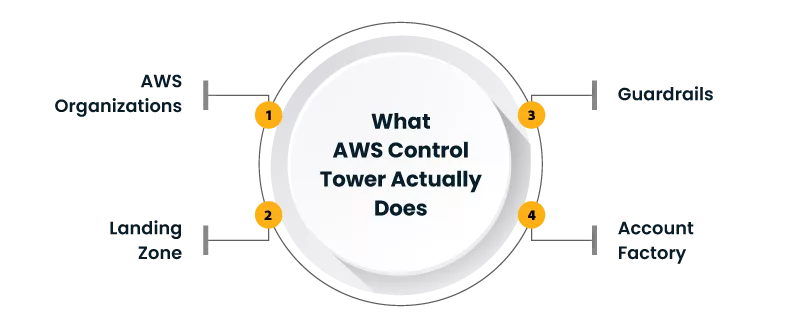
Here is the practical view of what AWS Control Tower gives you:
- A landing zone with foundational accounts and OUs
- A catalog of controls (guardrails) you can apply to OUs
- A dashboard to see compliance posture
- Account provisioning through Account Factory
- Events you can use for automation and evidence trails
A lot of blogs stop here. The real value comes when you treat the setup like a product. Meaning: you define patterns once, then reuse them as your org grows.
Landing zone architecture, explained like a platform blueprint
Most teams hear “landing zone” and think “networking.” It is broader than that. Landing zone architecture is the blueprint for how accounts, identity, logging, and guardrails come together.
AWS Prescriptive Guidance frames landing zone design around account structure plus networking, logging, and authentication choices.
Here is a simplified picture:
+—————————–+
| Management |
| (governance + setup) |
+————–+————–+
|
v
+—————–+—————–+
| AWS Organizations (OUs) |
+——–+—————+———–+
| |
v v
+———-+—+ +—–+———–+
| Security OU | | Workloads OU |
| (shared accts) | (apps/teams) |
+———-+—+ +—–+———–+
|
v
+————–+—————-+
| Central logging + audit trail |
+——————————–+
A good landing zone architecture does two things at the same time:
- It protects the org by default
- It gives teams a fast path to get a clean account that is ready for work
This is where AWS governance stops being a set of slide decks and starts being a working system.
Guardrails: the security mechanics that keep you sane
The term “guardrail” can sound fuzzy. In AWS Control Tower, controls are very specific and are applied to OUs. The controls are documented in the Control Catalog.
Two useful mental models:
- Preventive controls: stop a risky action before it happens (often implemented with policies)
- Detective controls: allow actions but flag issues for follow-up
You also need to plan for drift. AWS documents drift detection and examples of changes that can break landing zone assumptions, including deleting required OUs or roles.
AWS also documents drift monitoring for preventive controls and notifications (including SNS and active scans) for certain setups.
Guardrail flow in plain terms
Request in a workload account
|
v
Is there a preventive control for this OU?
| |
Yes No
| |
Block + log Allow action
| |
v v
Evidence trail Detective controls evaluate
|
v
Findings for remediation
This is the part that accelerates security. You move from “review every account” to “trust the baseline, verify the drift.”
And that makes your multi-account strategy workable at higher account counts.
Account Factory: your account vending machine, but with standards
Most platform teams feel pain in account provisioning first. Tickets like:
- “Need a new dev account”
- “Need a new business unit OU”
- “Need a clean account for vendor access”
AWS Control Tower addresses this with Account Factory, which supports provisioning and managing accounts in the landing zone, including enrollment, OU placement, and updates.
Think of Account Factory as a controlled template flow:
- You define what “good” looks like (baseline, OU, shared services expectations)
- Teams request accounts through a standard path
- The created account arrives with the expected baseline
A practical Account Factory pattern that works
Use a small set of account types. Too many templates becomes a new kind of sprawl.
- Sandbox: limited access, short-lived resources, strict cost boundaries
- Dev/Test: broader service access, still controlled
- Prod: strict controls, strong logging, least privilege by default
- Shared services: only for platform-managed components
This keeps AWS governance simple enough that teams follow it, instead of working around it.
Best practices that are not obvious until you run it
Below is a playbook that avoids the most common operational traps. It is written for teams that already know AWS basics and want repeatable outcomes.
1) Design OUs around policy boundaries, not org charts
A classic mistake is mapping OUs to departments. Departments change. Security boundaries change less often.
Good OU split signals include:
- Prod vs non-prod
- Regulated workloads vs general workloads
- Internet-facing vs internal-only services
This makes your multi-account strategy resilient.
2) Treat landing zone changes like production changes
Changes to landing zone architecture should go through review, testing, and a defined rollout path. If you let ad hoc edits happen, drift will become your full-time job. AWS explicitly calls out drift conditions that can block actions until remediated.
Suggested practice
- Maintain a written “landing zone contract”
- Track which controls apply to which OUs and why
- Review exceptions monthly, not yearly
3) Use lifecycle events for automation and audit evidence
AWS Control Tower emits lifecycle events delivered via CloudTrail and EventBridge, which you can use to trigger workflows and keep an evidence trail.
Examples:
- When a new account is created, auto-create baseline repositories, tags, and budget alarms
- When a control is enabled, auto-run validation checks and notify owners
This turns governance into a system that runs itself.
4) Plan for centralized logging from day one
Central logging is where many teams trip. The point is not only “logs exist.” The point is “logs are protected and reviewable.”
AWS guidance on multi-account environments highlights central management concepts in AWS Organizations and the use of policies across accounts and OUs.
5) Make guardrails readable to engineers
If guardrails feel like surprises, engineers will resent them. Document them like product constraints:
- What does this control prevent or detect?
- Why does it exist?
- What is the approved alternative pattern?
This improves adoption and reduces exception requests, which strengthens AWS governance over time.
6) Keep “break glass” access, but make it measurable
You will need emergency access. Define it with:
- Time-bound approvals
- Strong logging
- Mandatory retrospective review
Your landing zone architecture should assume emergencies happen, without making emergencies the normal path.
Putting it together: a simple operating model
If you want one clean way to run this, use a three-layer model:
- Foundation layer: AWS Control Tower landing zone, shared accounts, core controls
- Workload layer: app accounts, OU-based guardrails, standard networking patterns
- Delivery layer: pipelines, golden paths, and automation triggered by events
This keeps the platform team focused on improving the system, not doing repetitive account work.
It also gives you a credible, repeatable multi-account strategy that new teams can join without custom onboarding.
FAQs
Is AWS Control Tower only for new organizations?
No. AWS states it can be used for new or existing organizations.
What happens if someone changes things outside the Control Tower console?
That can create a drift. AWS documents drift detection, examples of major drift, and remediation impacts.
How do I know what controls exist?
Use the Control Catalog. AWS documents the controls reference by control entries and groupings.
Closing thought
If your cloud program is growing, speed and safety will always feel like they compete. AWS Control Tower reduces that tension by making “secure by default” repeatable, visible, and enforceable across accounts. The win is not just faster account creation. The win is confidence that your AWS governance and landing zone architecture hold up as the account count grows, without turning every new account into a custom project.
Author


Yogita Jain
Content Lead
Yogita Jain leads with storytelling and Insightful content that connects with the audiences. She’s the voice behind the brand’s digital presence, translating complex tech like cloud modernization and enterprise AI into narratives that spark interest and drive action. With a diverse of experience across IT and digital transformation, Yogita blends strategic thinking with editorial craft, shaping content that’s sharp, relevant, and grounded in real business outcomes. At Cygnet, she’s not just building content pipelines; she’s building conversations that matter to clients, partners, and decision-makers alike.