



































The most dangerous email in 2026 may carry no malware, contain no obvious spelling error, and arrive from a legitimate account. It may be a short request from a known supplier asking finance to replace bank details before an urgent payment.
That shift changes the security question. The inbox is no longer only a communication channel. It is where employees approve payments, reset passwords, open shared files, accept meeting invitations, and act on instructions from people with authority. Attackers understand that each message can transfer money, credentials, access, or trust.
The numbers show the pressure building.
- Microsoft recorded about 10.7 million business email compromise attempts during the first quarter of 2026.
- APWG separately counted 971,181 phishing attacks in the same quarter, a 13.8% rise from the previous quarter.
For security leaders, email security threats now require a wider view than message filtering, similar to how cloud security architecture connects identity, applications, users, and threat response. Effective enterprise email protection must examine identity, sender behavior, business context, authentication, user action, and the controls surrounding high-risk requests, supported by Email security solutions built for advanced threat detection and response.
The 2026 Email Threat Landscape Is Built Around Trust Abuse
Earlier email attacks often depended on malicious attachments, crude impersonation, or links to visibly suspicious websites. Those methods remain active, but attackers now spend more effort making a message fit the recipient’s normal work.
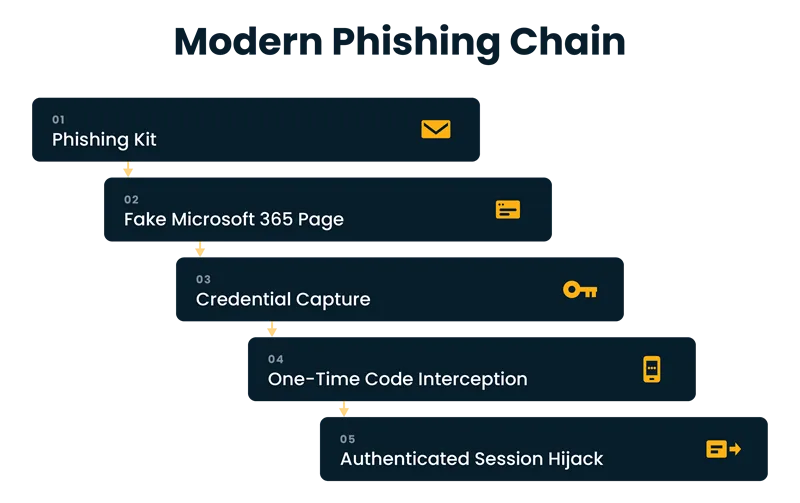
A phishing kit can copy a Microsoft 365 sign-in page, collect credentials, intercept a one-time code, and hand the criminal an authenticated session. A compromised supplier mailbox can produce a convincing invoice request inside an existing thread. QR codes can move the victim from a monitored corporate device to a personal phone, where security controls may be weaker. CAPTCHA pages and trusted hosting services can hide the final credential-harvesting page from automated inspection.
Microsoft’s Q1 2026 research identified credential phishing, QR-code phishing, CAPTCHA-gated campaigns, device-code phishing, and continued business email compromise activity. Its disruption of the Tycoon2FA phishing service reduced related email volume by 15% for the rest of March, yet the operators quickly changed hosting and domain patterns.
This is the defining pattern behind current email security threats: attackers change infrastructure quickly while keeping the human request familiar. The message still asks someone to review a document, confirm a payment, sign in, call a number, or respond to an executive.
Threats Enterprises Should Track Closely
| Threat pattern | What makes it effective | Likely business impact |
| Supplier account takeover | Uses a real mailbox and prior conversation history | Payment diversion and contract fraud |
| QR-code phishing | Moves the user away from desktop inspection | Credential theft and session hijacking |
| Executive impersonation | Uses urgency, hierarchy, and confidential language | Unauthorized transfers or data disclosure |
| OAuth consent abuse | Requests permission through a legitimate cloud workflow | Persistent mailbox and file access |
| Callback phishing | Replaces suspicious links with a phone number | Remote access installation or financial fraud |
| Thread hijacking | Inserts malicious instructions into a trusted exchange | Higher click and response rates |
A stronger taxonomy classifies email security threats by the business action they attempt to trigger. A useful planning assumption is that polished language no longer signals legitimacy. Generative AI can help criminals produce clean copy, adjust tone by role, and create many plausible variations. The harder problem is contextual truth: whether this sender usually makes this request, the timing makes sense, and the requested action follows policy.
Phishing and Spoofing Now Imitate Business Processes
The strongest phishing message resembles a routine task. It arrives near payroll, renewal, tax, procurement, or quarter-end activity. It names a real project. It may refer to colleagues, vendors, or documents gathered from public sources or earlier mailbox access.
This is why phishing attack prevention cannot depend on employees spotting poor grammar or unusual formatting. Training still matters, but the lesson must shift from “find the fake” to “verify the action.” A well-written message can still be fraudulent. A real mailbox can still be hostile.
Spoofing creates a related problem. The visible display name may match a trusted executive while the sending domain differs by one character. In other cases, criminals use an exact domain that lacks properly enforced email authentication. SPF identifies approved sending sources, DKIM signs messages, and DMARC tells receiving systems how to handle messages that fail alignment checks. Microsoft states that SPF alone is insufficient and recommends SPF, DKIM, and DMARC together.
Authentication also requires operational discipline. Enterprises often have dozens of systems sending mail on their behalf, including CRM platforms, payroll tools, marketing systems, ticketing products, and regional applications. An aggressive DMARC policy applied before these senders are mapped can block legitimate mail. A permanent monitoring-only policy leaves the domain open to abuse.
Enterprise email protection should therefore treat DMARC as a managed control. Teams need sender inventories, ownership records, exception review, report analysis, and a planned move toward quarantine or rejection. Parked domains and unused subdomains also need protection because attackers actively search for neglected identities.
What Enterprise Email Security Architecture Must Cover
A secure email gateway remains useful for reputation checks, attachment analysis, URL inspection, anti-spam controls, and policy enforcement, but enterprises should also follow cloud-native security best practices for broader protection. It should sit inside a broader architecture rather than carry the full burden.
Enterprise email protection also needs ownership across security, messaging, identity, fraud, finance, and legal teams. Modern enterprise email protection needs several connected layers:
Domain authentication
Configure SPF, DKIM, and DMARC across active, parked, and delegated domains. Review third-party senders and forwarding behavior.
Identity security
Require phishing-resistant multifactor authentication for privileged and high-risk users. CISA and NIST both recommend phishing-resistant methods because SMS codes and some one-time passwords can still be captured by phishing sites.
Behavior analytics
Detect unusual sign-ins, new inbox rules, suspicious forwarding, abnormal message volume, impossible travel, and atypical access to sensitive threads.
Content and link analysis
Inspect attachments, rewritten URLs, QR images, HTML files, and cloud-sharing invitations. Detection should continue after delivery because a harmless page can later be changed.
Business-process controls
Add independent verification for bank-detail changes, payment requests, payroll updates, gift-card purchases, and sensitive data release.
Response integration
Connect email alerts with identity, endpoint, SIEM, and incident-response workflows so analysts can revoke sessions, remove messages, disable rules, and search related activity quickly.
The architecture should answer four questions for any suspicious message: Is the sender technically authenticated? Is the account behaving normally? Does the request fit the business relationship? Is the requested action permitted without secondary approval?
That final question is often missed. Some email security threats succeed because the message looks credible. Others succeed because the business process allows one person to approve an irreversible action from an email alone.
Protection Strategies That Reduce Exposure Before the Click
This makes email security threats a control-design issue as much as a detection problem. Security awareness programs often focus on click rates. That metric is useful, though incomplete. Enterprises should also measure reporting speed, repeat behavior, credential entry, session revocation time, mailbox-rule detection, and the time required to remove a confirmed campaign.
A practical phishing attack prevention program should include the following actions:
- Give employees a one-click reporting option and send immediate feedback.
- Run simulations based on real workflows such as invoices, document sharing, HR notices, and executive requests.
- Train finance, HR, legal, procurement, and executive assistants with scenarios tied to their authority.
- Require out-of-band confirmation for changes involving money, credentials, or confidential records.
- Remove standing mailbox permissions that are no longer required.
- Restrict automatic external forwarding and alert on newly created inbox rules.
- Protect help-desk password resets with identity proofing that resists social engineering.
Another secure email gateway capability to assess is post-delivery response. When one user reports a message, the security team should be able to find similar copies, inspect who clicked, identify exposed accounts, and remove the campaign across mailboxes. A gateway that only blocks messages at arrival misses delayed weaponization and compromised-account activity.
The same principle applies to enterprise email protection metrics. “Messages blocked” is an activity count. Better indicators show whether the company can stop a fraudulent instruction from becoming a business event. Track unauthorized payment attempts prevented, malicious mailbox rules removed, compromised sessions revoked, domains moved to DMARC enforcement, and high-risk actions verified through another channel.
Make Email Security a Business Control in 2026
The central lesson for 2026 is simple: email risk is created where identity, communication, and authority meet. Filtering remains necessary, but a clean inbox does not prove a safe process.
Enterprises should map email security threats to the decisions employees make after reading a message. That means protecting domains, strengthening sign-in controls, inspecting content, detecting account misuse, and placing verification around high-impact requests.
A mature enterprise email protection program measures the distance between a suspicious message and a prevented business loss. Strong enterprise email protection does more than identify suspicious mail. It limits what a convincing message can cause. When payment changes require confirmation, privileged access uses phishing-resistant authentication, and mailbox anomalies trigger fast response, the attacker has fewer paths from message to loss.
The goal is to make trust measurable, revocable, and difficult to exploit.
Author


Yogita Jain
Content Lead
Yogita Jain leads with storytelling and Insightful content that connects with the audiences. She’s the voice behind the brand’s digital presence, translating complex tech like cloud modernization and enterprise AI into narratives that spark interest and drive action. With a diverse of experience across IT and digital transformation, Yogita blends strategic thinking with editorial craft, shaping content that’s sharp, relevant, and grounded in real business outcomes. At Cygnet, she’s not just building content pipelines; she’s building conversations that matter to clients, partners, and decision-makers alike.