



































Introduction
Every large enterprise in India already has an ERP. It contains the invoice data, the GSTIN of every buyer, the HSN codes for every product, the delivery addresses, and the consignment values. Every dispatch creates a delivery order in the ERP or TMS. When the ERP raises a sales order and the warehouse confirms a dispatch, all the data needed to generate an e-way bill already exists – recorded, validated, and ready.
Yet in many organizations, generating the e-way bill still requires someone to open the government portal, log in, and manually re-enter data that the ERP already holds. The result is transcription errors, delays in dispatch documentation, occasional missed e-way bills for consignments that move before the compliance team gets to them, and a compliance team that spends hours on data entry instead of exception management.
API integration between the ERP or TMS and the e-way bill system eliminates this entirely. The ERP raises an invoice or a delivery order. The integration layer reads the relevant data, builds the e-way bill request, submits it to the NIC portal through the GST Suvidha Provider (GSP) API layer, receives the EWB number and validity details, and writes them back to the ERP record – all in real time, before the truck leaves the bay. The compliance team’s role shifts from data entry to exceptional review.
This blog explains how ERP and TMS integration works for e-way bills, how the GSP API architecture operates, how different ERP systems connect through different technical approaches, what the integration handles beyond simple generation, and how the platform manages the complete compliance lifecycle – from generation through transit updates to reconciliation – within the enterprise’s existing technology stack.
The Integration Architecture – How ERPs Connect to the EWB System
The e-way bill system is operated by NIC (National Informatics Centre) under GSTN’s oversight. Businesses do not connect directly to NIC’s APIs. They connect through a GST Suvidha Provider – a GSTN-authorized intermediary that acts as the secure communication gateway between business systems and the government portal. The GSP layer handles authentication, encryption, request routing, failover, and response mapping, so the ERP does not need to manage any of these complexities directly.
The Three-Layer Model
The integration operates across three layers. The ERP or TMS forms the source layer – it holds the business data (invoices, delivery orders, customer masters, product masters). The GSP middleware forms the integration layer – it translates ERP data into the JSON format required by NIC, manages API authentication including OTP-based session tokens, and handles communication with both the e-way bill system and, where applicable, the IRP for simultaneous e-invoice and e-way bill generation. The NIC e-way bill portal forms the government layer – it validates the submitted data, generates the EWB number, and returns the response.
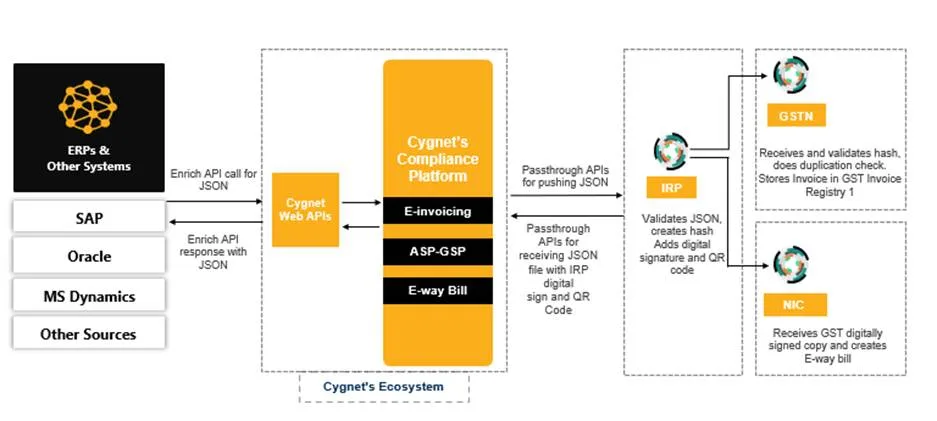
GSP Authorization and API Credentials
GSTN authorizes a limited set of GSPs to operate production of API access to the e-way bill and e-invoice systems. Each GSP holds a GSTN-issued API key that identifies it as an authorized intermediary. Businesses register with a GSP and obtain their own API credentials – a combination of their GSTIN, a client ID, a client secret, and a session token generated through an OTP-authenticated handshake.
The authentication sequence for each API session requires an OTP sent to the mobile number registered with the GSTIN on the portal. This OTP-based session establishment is a GSTN security requirement and is mandatory for all API access regardless of integration channel. The GSP middleware manages the session lifecycle – obtaining the token, refreshing it before expiry, and handling token failures without interrupting the business’s generation workflow. From the ERP’s perspective, the API call simply returns the EWB number; the authentication complexity is invisible.
The Dual-Portal Failover Architecture
Since July 2025, NIC operates two parallel e-way bill portals – the primary at ewaybillgst.gov.in and the secondary at ewaybill2.gst.gov.in. The two portals synchronize data within seconds. The GSP middleware is configured to route requests to the primary portal by default and to automatically fail over to the secondary if the primary is unresponsive. This failover is invisible to the ERP integration. The ERP submits a generation request and receives a response; whether that response came from Portal 1 or Portal 2 is handled entirely by the middleware layer.
How Different ERP Systems Connect
There is no single technical approach for integrating every ERP with the e-way bill system. ERPs differ in their architecture, their ability to host add-ons, and the degree to which they support outbound API calls. The integration approach is chosen based on the ERP’s capabilities and the enterprise’s IT infrastructure.
SAP – ABAP-Based Direct Integration
SAP, the dominant ERP in large Indian manufacturing and FMCG enterprises, supports two integration approaches. The first is RPA (Robotic Process Automation) based integration – a UI automation layer that interacts with the SAP interface to extract invoice data and feed it to the GSP middleware. RPA-based integration can be set up in a few hours without SAP ABAP development. It does not require SAP licensing changes or core customization, making it the fastest path to integration for SAP environments where ABAP development cycles are long.
The second and more robust approach is ABAP direct integration – a custom SAP enhancement that embeds the e-way bill API call directly into the billing document posting or delivery confirmation process in SAP. When a billing document is posted in SAP (SD module), the ABAP code triggers the API call to the GSP, receives the EWB number, and writes it back to the billing document’s custom field. The delivery note printed from SAP automatically carries the EWB number without any separate step outside the ERP. ABAP integration is more complex to build but produces a fully embedded compliance workflow with no dual-system dependency.
For SAP S/4HANA environments, the GSP middleware exposes a REST API that the SAP output management or BTP (Business Technology Platform) layer can call natively, without a separate ABAP development. This cloud-to-cloud integration route is increasingly common in S/4HANA Public Cloud deployments where custom ABAP is not permitted.
Oracle – ERP Cloud and Oracle NetSuite
Oracle ERP Cloud and Oracle NetSuite both support outbound REST API calls from their business process workflows. For Oracle ERP Cloud, the integration is typically implemented through Oracle Integration Cloud (OIC) – Oracle’s middleware platform that orchestrates the data transformation from Oracle’s invoice format to the NIC JSON schema, manages the GSP API call, and writes the EWB number back to the source transaction. Oracle NetSuite implementations use Suite Script (Oracle’s JavaScript-based customization framework) to trigger the GSP API call from the invoice or sales order record and update the custom field with the returned EWB number.
Both Oracle platforms support webhook or trigger-based event notification, meaning the e-way bill generation request fires automatically when the relevant business event occurs – an invoice is approved, a delivery order is confirmed, or a shipment is dispatched – without requiring any manual action from the user.
Tally – Connector-Based Integration
Tally Prime (and its predecessor Tally ERP 9) is the most widely used accounting and ERP software among Indian SMEs and mid-sized manufacturers. Tally does not natively support outbound REST API calls, but it exposes its data through ODBC (Open Database Connectivity) and through Tally’s own XML-based TCP (Tally Developer Program) API. The integration with the e-way bill system is implemented through a Tally Connector – a dedicated software component that reads invoice and delivery data from Tally through the TCP API, builds the NIC-compliant JSON payload, calls the GSP API, and writes the EWB number back to the Tally voucher through the same TCP interface.
Tally Connector installation typically takes under 30 minutes and requires no changes to the Tally installation or data files. The connector runs as a background service, polling Tally for new invoice events and processing them automatically. For businesses using Tally Prime, the connector can surface the EWB number directly in the invoice print format without any additional configuration.
Microsoft Dynamics 365 and Business Central
Microsoft Dynamics 365 Finance and Supply Chain Management supports Power Automate integration flows that can call external REST APIs from business process triggers. The standard approach is to configure a Power Automate flow that triggers on invoice posting or sales order confirmation, reads the relevant fields from Dynamics, calls the GSP API through an HTTP connector, and updates the Dynamics record with the returned EWB number.
For Dynamics 365 Business Central (the SME-focused version), the integration uses AL language extensions that add the API call to the posting routine.
Zoho, Busy, and Other Mid-Market ERPs
For mid-market ERPs like Zoho Books, Busy, and MARG that serve a large segment of Indian SMEs, the integration route depends on whether the ERP provides an outbound webhook or API notification capability. Zoho Books supports outbound webhooks on invoice creation events that can be caught by the GSP middleware’s webhook listener, triggering the e-way bill generation automatically.
Busy and MARG implementations typically use the Excel template or SFTP-based integration route – the ERP exports invoice data to a structured file, the middleware picks up the file, processes it, generates the EWB numbers, and writes them back to the ERP through its import facility.
Custom ERP and Homegrown Billing Systems
Many large Indian manufacturers and distributors operate homegrown billing and inventory management systems built on SQL Server, Oracle Database, or open-source stacks. These systems typically expose their data through direct database access or a simple export function.
The GSP middleware connects to the database through a read-only integration user, monitors for new invoice records flagged as ready for dispatch, extracts the required fields, builds the JSON payload, and returns the EWB number to the source table through a write-back operation. This database-to-API approach works with any system that can store data in a relational database, regardless of technology stack.
Transport Management System Integration
Where a TMS is involved alongside or instead of an ERP, the integration architecture shifts to accommodate the TMS’s data model. A TMS typically holds the transport data that populates Part B of the e-way bill – vehicle assignment, transporter details, route planning, distance estimates – while the ERP holds the commercial data that populates Part A.
The ERP-TMS-EWB Data Flow
In an enterprise with both an ERP and a TMS, the complete e-way bill data set comes from two systems. Part A fields (GSTIN, invoice details, HSN codes, consignment value, delivery address) originate in the ERP. Part B fields (vehicle number, transporter GSTIN or ID, transport mode, distance) originate in the TMS when a shipment is planned, and a vehicle is assigned.
The integration layer handles this split-source scenario by maintaining a pending e-way bill record that is partially filled from the ERP data and waits for the TMS to contribute to the Part B data. When the TMS confirms a vehicle assignment against a shipment, the integration layer detects the event, combines the ERP’s Part A data with the TMS’s Part B data, and submits the complete e-way bill generation request. The EWB number is then written back to both systems – to the ERP’s billing document and to the TMS’s shipment record.
Real-Time vs. Scheduled TMS Integration
TMS vehicle assignments can be confirmed in two patterns. A real-time assignment happens when a vehicle is allocated at the point of booking – common in organized logistics where carrier selection is automated based on route and capacity. Scheduled assignment happens when vehicle planning runs on a batch cycle – common in fleet-operated logistics where vehicles are allocated the evening before a morning dispatch.
The integration layer supports both patterns. For real-time TMS events, the middleware operates in event-driven mode – listening to TMS webhook events and processing them immediately when vehicle assignments are confirmed. For batch TMS updates, the middleware operates on a scheduled poll – checking for new or updated vehicle assignments at configured intervals (typically every 15 minutes for active dispatch windows) and processing them in micro-batches.
Third-Party Logistics Provider Integration
Many businesses outsource transportation to third-party logistics (3PL) providers who operate their own TMS platforms. In this model, the 3PL’s TMS holds vehicle and transporter data that the enterprise’s ERP needs to complete Part B. The integration handles this through a carrier API – the 3PL exposes their vehicle assignment data through an API that the middleware polls or subscribes to.
When the 3PL confirms a vehicle for a specific shipment, the data flows into the middleware, completes the EWB record, and triggers generation. The enterprise’s ERP receives the EWB number without any direct dependency on the 3PL’s internal systems.
What the Integration Automates Beyond Generation
Real-time e-way bill generation from ERP data is the core integration capability, but it is not the only one. A fully integrated EWB compliance layer handles the complete lifecycle of every e-way bill from the moment an invoice is posted to the moment the consignment is delivered, and the compliance record is archived.
E-Invoice and E-Way Bill Simultaneous Generation
For businesses within the e-invoicing mandate (aggregate annual turnover above Rs. 5 crore). The ERP integration triggers both IRN generation and e-way bill generation in a single API call. When the ERP raises a B2B sales invoice, the integration layer submits the invoice payload to the IRP (through the GSP’s IRP API) along with the transport details.
The IRP returns the IRN, the signed e-invoice, and the QR code. Simultaneously, it passes the data to the e-way bill system and returns the EWB number. The ERP receives all three outputs – IRN, QR code, and EWB number – from a single submission and updates the billing document accordingly. The printed invoice carries the IRN and QR code; the delivery note carries the EWB number.
Consolidated E-Way Bill Generation from TMS Load Plans
When the TMS confirms a vehicle’s full load plan – multiple consignments with individual EWBs assigned to the same vehicle – the integration layer automatically generates a consolidated e-way bill (Form EWB-02) for that vehicle. The TMS load plan contains the vehicle number and the list of individual EWB numbers to be consolidated. The integration builds the consolidation request, submits it to the portal, and returns the consolidated EWB number to the TMS dispatch record. The driver receives a single consolidated document covering all consignments for the entire journey.
Validity Monitoring and Extension Workflows
Once EWBs are generated, the integration layer maintains a live register of validity status for all active bills. As validity expiry approaches – typically monitored at 24-hour and 6-hour thresholds – the system raises alerts in the TMS and ERP simultaneously, ensuring both the logistics team (who need to contact the driver) and the compliance team (who manage the portal extension) receive the alert through their respective systems.
Where the TMS records a vehicle delay that makes extension necessary, the integration layer can be configured to auto-initiate the extension request with the delay reason and updated location data, subject to compliance team confirmation.
EWB Cancellation Triggered by ERP Credit Notes and Order Cancellations
When a sales order is cancelled in the ERP before dispatching, or when a credit note is issued against an invoice whose goods have not yet moved, the corresponding e-way bill must be cancelled within 24 hours of generation. The integration layer monitors ERP order cancellation and credit note events and automatically initiates the EWB cancellation request for e-way bills that are within their cancellation window and have not been verified in transit. Cancelled EWBs are flagged in the ERP’s billing document with the cancellation timestamp, and the dispatch record in the TMS is updated accordingly.
EWB Number Write-Back to ERP Masters
Every EWB number generated through the API integration is written back to the source ERP record in real time. For SAP, the EWB number is stored in a custom field on the billing document and referenced in the delivery note printout. For Tally, the EWB number is stored in the voucher’s additional details and printed on the invoice.
For Oracle, the EWB number updates the shipment record in the order management module. This write-back means the ERP is always the single source of truth for every dispatch – invoice, EWB number, IRN (where applicable), and transport details are all linked in the same record and available for reconciliation and audit without requiring any cross-system lookup.
Data Transformation and Field Mapping
One of the integration layer’s most important functions is translating ERP data into the exact format required by NIC’s API schema. ERP data models and NIC’s JSON schema rarely align perfectly. GST compliance field names, HSN digit requirements, GSTIN formats, and PIN code structures must be mapped from ERP naming conventions and data types to the API’s required schema.
The Field Mapping Configuration
Every ERP integration begins with a field mapping exercise. The integration layer’s configuration interface maps each NIC-required field to the corresponding field in the ERP’s data model. Some mappings are direct: the ERP’s invoice number maps to the NIC schema’s document number. Others require transformation: an ERP that stores the supplier’s address as a single text field must be parsed to extract the PIN code for the NIC schemas from the Pin code field. Others require lookup: an ERP that stores the customer’s name must be cross-referenced with the customer master to retrieve the GSTIN for the recipient Gstin field.
The mapping configuration is maintained in the integration layer console and can be modified by technical administrators without changing any ERP code. When the ERP introduces a new field or changes its data model (as happens with ERP upgrades), the mapping is updated in the integration layer without requiring changes to the ERP itself.
HSN Digit Depth Enforcement
NIC requires HSN codes at the correct digit depth based on the business’s aggregate annual turnover. Businesses below Rs. 5 crores use 4-digit HSN codes. Businesses above Rs. 5 crores use 6-digit codes. Exports always use 8-digit codes. The ERP may store HSN codes at a different depth than what NIC requires – a product master built before the mandatory HSN expansion may carry 4-digit codes for a business that now exceeds the Rs. 5 crore thresholds. The integration layer enforces digit depth rules at the transformation stage, flagging records where the ERP’s HSN code does not meet the required depth and prompting the master data team to update the product master before the affected records can be processed.
GSTIN Validation at Field Mapping Time
All GSTINs in the API payload – supplier, recipient, transporter – must be active at the time of submission. The integration layer validates each GSTIN against the GSTN live database at the field mapping stage before building the JSON payload. Invalid or inactive GSTINs are flagged immediately, and the generation request is held until the data is corrected. This pre-submission GSTIN check prevents portal rejections that would otherwise need to be investigated after the submission fails.
End-to-End Monitoring and Compliance Reconciliation
Integration is not complete at the point of generation. A compliance automation layer must also monitor the state of every e-way bill it has generated, track transit events, and reconcile EWB data against GST return data to ensure the complete picture is coherent.
Real-Time EWB Register in the ERP
The integration layer maintains a mirror of the EWB register within the ERP’s data model. Every EWB generated through the API is stored in the ERP with its EWB number, generation timestamp, validity expiry, linked invoice number, linked delivery order, and status (active, cancelled, expired, extended). This ERP-side EWB register is the basis for all management reporting – daily dispatch compliance reports, validity expiry dashboards, and the transit event log.
Because the EWB register lives in the ERP, it is accessible through the ERP’s standard reporting tools. Finance and compliance teams do not need separate logins to the compliance platform to monitor e-way bill status. The data they need is in the same ERP they use for all other business reporting.
EWB-GSTR-1 Reconciliation Within the ERP
The integration layer populates both the EWB register and the GSTR-1 outward supply data from the same ERP transaction records.This co-origination means the reconciliation between EWB data and GSTR-1 data is inherently clean – they derive from the same source. Discrepancies that would arise in a manual environment (where EWB data and GSTR-1 data come from different inputs by different people) are eliminated.
The integration layer’s reconciliation module validates this alignment before every GSTR-1 filing: every billing document with an EWB above the threshold should appear as an outward supply in GSTR-1; every outward supply above the EWB threshold should have a linked EWB. Gaps are flagged in the ERP for review. Clean reconciliation means the business approaches every GSTR-1 filing with confidence that the e-way bill data and the return data are consistent.
API Response Logging and Error Management
Every API call to the NIC portal returns a response – either a successful EWB number or an error code. The integration layer logs every request, every response, and every error code with full payload details. This log is the audit trail for the integration and the starting point for troubleshooting any generation failure.
Error codes from NIC’s API are structured and documented. Error 820 means the document date is older than 180 days. Error 4043 means the same restriction applies to e-invoice API generation. GSTIN block errors, Vahan validation failures, PIN code distance errors – each has a specific code. The integration layer translates these technical codes into plain-language descriptions for the ERP’s user interface, so the dispatch team knows exactly why a generation failed and what to do to fix it, without needing to look up NIC’s API documentation.
FAQs
Yes. The integration supports both cloud and on-premises deployment modes. For on-premises ERPs with restricted outbound internet access, the middleware can be deployed within the enterprise network perimeter as an on-premises component. It makes outbound API calls only to the authorized GSP endpoint (which is on the GSTN-approved whitelist) and does not require any inbound connections from outside the network. This on-premises middleware approach is used for SAP and Oracle implementations in manufacturing organizations with strict firewall policies.
Implementation timelines vary by ERP and integration approach. A Tally connector integration typically goes live in under one working day. An RPA-based SAP integration can be live within two to three days. An ABAP direct integration for SAP or an OIC flow for Oracle ERP Cloud typically takes two to four weeks, depending on the testing requirements and change management process within the enterprise’s IT team. The integration layer field mapping and configuration can be set up in parallel with the ERP-side development, so the overall project does not run sequentially.
The integration layer maintains a queue for requests that cannot be submitted due to portal unavailability. When the portal is temporarily down, generation requests are queued in the middleware. As soon as the portal comes back online – or if the primary portal is down and the secondary portal at ewaybill2.gst.gov.in is available – the queued requests are processed in order. For urgent dispatches where goods cannot wait for the portal to recover, the fallback is to generate the e-way bill through the mobile app or SMS method and then record the generated EWB number in the ERP manually to maintain the register.
Yes. E-way bills can be generated by the supplier, the recipient, or the transporter. For inward supply e-way bills – where the buying business is responsible for generating the bill, as happens when purchasing from unregistered suppliers or in certain import scenarios – the integration triggers generation from the ERP’s purchase order or goods receipt event rather than from the sales invoice event. The field mapping identifies inward transactions from the ERP’s transaction type flag and routes them to the appropriate NIC API with the correct ‘inward’ transaction sub-type.
Yes. The NIC API supports all transaction sub-types including job work, job returns, sales returns, line sales (transfers between units of the same organization), and CKD/SKD (completely or semi-knocked down goods). The ERP integration maps the relevant ERP transaction types – inter-plant transfer orders, job work delivery challans, sales return orders – to the correct NIC transaction sub-types and generates the e-way bill with the appropriate document type (delivery challan or invoice) and sub-type classification.
The integration layer maintains a GSTIN profile for every registered location of the business. Each GSTIN has its own API credentials, registered mobile number for OTP authentication, and associated address details. When an ERP transaction originates from a specific location, the integration identifies the supplying GSTIN from the ERP’s plant or branch assignment, uses the corresponding API credentials for that GSTIN, and ensures the correct state code and address details are included in the request. EWB numbers generated by each GSTIN are stored in the ERP against the relevant location records.
Yes. The integration layer maintains a complete, tamper-proof log of every API request, every API response, and every error encountered. The log captures the request payload, the NIC response (EWB number or error code), the timestamp, and the linked ERP document reference. This log is available to the compliance team and to auditors as evidence that e-way bills were generated with correct data at the time of dispatch. The log is also the starting point for troubleshooting any generation failure, providing the exact NIC error code and the specific data fields that caused the rejection.