

































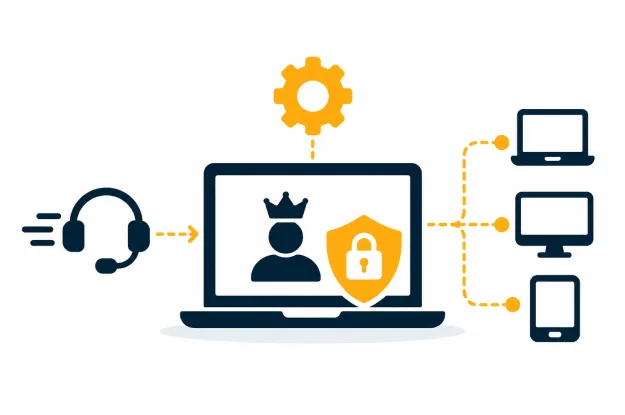
A support ticket closes, but the administrator permission used to resolve it can remain on the laptop. The next unfamiliar installer or script encounters authority it no longer needs. This is how temporary support decisions become standing security exposure.
Microsoft’s 2026 Digital Defense Report found that 52.2% of intrusions involving valid accounts also involved follow-on credential theft. The figure concerns credential theft rather than local administrator abuse, yet illustrates the danger of retaining unnecessary permissions. A compromised workstation is harder to contain when its user can change security settings or install services.
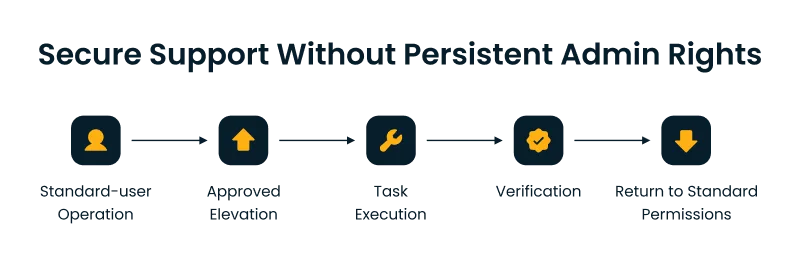
The practical goal of endpoint privilege management is to give approved work a reliable route to administrative permissions while keeping routine activity under standard accounts, supported by cybersecurity services. Effective local admin rights management therefore depends as much on the support process as on endpoint settings. The test is straightforward: can a legitimate task finish without leaving behind unnecessary access?
Why Standing Local Administrator Rights Create Security and Support Risk
Local administrator membership grants broad control over a Windows device. Users can install software, modify system settings, manage services, and change access permissions. That authority may help resolve an urgent ticket, but it also increases what malicious code can do within the local system. User Account Control prompts alone do not remove this exposure when the account already belongs to the Administrators group.
The risks are especially pronounced on shared workstations, engineering laptops, and devices running legacy applications. A developer needed a diagnostic driver; an analyst installed a reporting add-in; a field technician updated a device utility. Months later, the permission still exists.
To remove local administrator rights enterprise-wide, the starting point should be an inventory of actual group membership, including local accounts, domain groups, device-management assignments, and accounts introduced during provisioning. Each entry needs an owner, business purpose, and review decision.
Good local admin rights management also distinguishes device administration from access to business applications, reinforcing the importance of IT access reviews for managing excessive permissions. Removing workstation administrator permissions will not correct excessive privileges inside an ERP system or a cloud console. Those require separate identity reviews; combining the work obscures ownership.
Classify Privilege Requests by User Role and Application
A standard-user policy fails quickly when every blocked operation becomes a service desk ticket. Teams need to understand the work that currently depends on administrator rights before changing memberships. This calls for a short discovery period using endpoint activity, software deployment history, and support records, supported by infrastructure management services.
For least privilege access on Windows endpoints, classify requests by both the person performing the task and the executable requesting permission. The same installer can require different treatment on a kiosk and a developer workstation.
| Request scenario | Preferred handling | Review focus |
| Approved business application update | Managed deployment or narrowly matched execution rule | Publisher, version, approved source |
| Developer diagnostic utility | User-confirmed, application-specific permission | Project need, executable identity, child processes |
| Unfamiliar installer or driver | Support review before execution | Trust, source, device compatibility |
| Security agent repair | Authorized support procedure | Tamper controls, device health, verification |
| Emergency workstation recovery | Controlled recovery account or approved break-glass path | Incident record, authentication, post-use review |
This classification prevents a common mistake: treating an application name as sufficient proof of trust. Signed software can contain broad administrative functions. Rules should consider the exact executable, publisher certificate, command-line arguments, and subprocess behavior where the chosen platform supports those checks.
Use local admin rights management to retire recurring exceptions systematically. If an application repeatedly requires administrator access for ordinary work, investigate whether the requirement comes from outdated write permissions, poor packaging, or a misconfigured update mechanism. Fixing the dependency may eliminate the permission request altogether.
Build Just-in-Time Privilege Rules Around Actual Work
A useful approval policy answers four questions: who needs permission, which file or task is allowed, on which device, and under what conditions. Role-based access alone misses differences in application risk.
Just-in-time elevation for support teams works best when each request is attached to a specific task and has an accountable decision maker. Frequently used, well-tested tools can follow predefined rules. Rare or sensitive operations should go through support review. Unknown executables should remain blocked until reviewed, while explicitly prohibited actions should be denied.
A practical endpoint privilege management policy can distinguish three paths:
- Preapproved execution: A known, validated application receives narrowly defined administrative permissions without queueing another ticket.
- User confirmation: An approved user initiates the action and records a reason or completes an authentication step where supported.
- Support approval: A reviewer checks executable identity, business context, device condition, and the requested action before authorizing it.
A business deadline should influence response priority, not override software trust checks. For uncertain requests, support teams can use controlled remote sessions or managed deployment instead of granting broader permissions.
For local admin rights management, avoid policies that make an entire user session administrative merely because one installation needs additional permission. Process-specific authorization reduces the scope of the exception, though the approved process itself can still carry significant authority.
Assess Microsoft Intune and Other Privilege Control Options
Microsoft Intune endpoint privilege management supports standard-user operation with rules for authorized file execution. Depending on the rule, actions can be automatic, user-confirmed, support-approved, or denied. Microsoft also documents controls for child processes and file identification using hashes or signing information. Licensing and supported-device prerequisites must be checked before selecting them.
There is an important design detail behind these features. A broad publisher rule can authorize more software than intended if one certificate signs many utilities. A strict hash rule offers tighter identification but needs maintenance when a trusted application updates. Neither choice is automatically right for every software family.
Support-approved requests have a further constraint. Microsoft documents a 24-hour approval period for a particular user’s file on the requesting device. That window cannot currently be shortened or canceled early through the support-approval feature. Approval may also take time to reach the endpoint, so a same-minute service commitment cannot be assumed. These limits matter for high-risk installers and urgent repairs.
Organizations evaluating just-in-time elevation for support teams should test the entire request path rather than compare policy screens. Key questions include:
- Can approval rights be separated from policy-authoring rights?
- Can the product distinguish an approved installer from the tools it launches?
- What happens when the device has intermittent connectivity?
- Can the team find the request, decision, file identity, and final execution result during an investigation?
Microsoft Intune endpoint privilege management can feed these checks through its request workflow and reporting, but the operating model still requires defined reviewers, escalation coverage, and documented exceptions.
Keep Installers and Emergency IT Support Working
Installers are where least-privilege designs often reveal their weakest assumptions. An installation package might start a separate setup program, register a service, update a driver, or write to protected directories. A successful initial permission prompt does not establish that the full installation will complete.
Test approved packages end to end on representative devices. Verify the signed source, installation arguments, spawned processes, reboot behavior, and post-install functionality. If an installer fails, capture the exact blocked operation before granting broader access. This is especially important when deploying least privilege access on Windows endpoints across applications that were developed with administrator accounts in mind.
Use managed software distribution for repeatable installations whenever practical. Reserve user-initiated administrative execution for tasks that genuinely need it.
Emergency support needs its own path. A broken VPN client, damaged security agent, or workstation unable to contact the management service may make ordinary approval unavailable. Define when authorized technicians can use a dedicated recovery account, how the account is secured, and how device-specific credentials are rotated or retired afterward. Windows LAPS can help administer unique local recovery passwords; it does not replace process-level privilege controls.
A sound local admin rights management process records the incident, who authorized recovery, the device involved, and the steps taken to return it to standard operation, aligning with GRC services for risk oversight and audit accountability. Recovery permissions need a closing action, not merely a closing ticket.
Measure Security Gains Without Hiding Support Friction
A report showing fewer users in the Administrators group is useful, but it cannot establish whether legitimate work is still getting done. Privilege reduction needs security and service measurements together. Start with a baseline from the discovery period, then review changes by application group and user role.
Useful measures include the share of managed devices with standing administrator membership, approved versus denied execution requests, median time to decision, successful completion after approval, and incidents traced to blocked or unsupported applications. Track emergency access separately. A sudden rise may indicate missing rules, unreliable deployment, or an outage in the approval channel.
Endpoint privilege audit logs should make it possible to connect the requesting user, endpoint, executable identity, rule or reviewer decision, and outcome. An approval record alone does not prove that a task ran successfully. Correlate it with endpoint events or support closure evidence where needed.
The most revealing metric is often repeat demand. An installer that appears in the approval queue every week may belong in managed distribution or a carefully limited policy. A frequently denied executable could indicate a legitimate compatibility problem or unwanted software activity. Reviewing the request context helps determine whether the issue requires a policy adjustment or a security investigation.
Local admin rights management should also measure exceptions that remain open after their business justification has expired. Recheck group memberships after device rebuilds, workforce moves, and policy changes. A device can return to an excessive state without anyone filing a new privilege request.
Connect Least Privilege to Managed Cybersecurity Operations
Privilege events are useful security signals when interpreted alongside endpoint detection, vulnerability findings, device compliance, and incident records. A trusted utility requesting permission on an expected device may be routine. The same utility appearing alongside suspicious script execution or a disabled protection service warrants closer inspection.
Feed endpoint privilege audit logs into a monitoring process with meaningful triage rules. Security analysts should know which denials require investigation, which approvals merit sampling, and when unexpected administrative activity should trigger containment. Keep a direct connection to IT support so analysts can distinguish authorized maintenance from suspicious execution.
This is where endpoint privilege management becomes part of managed cybersecurity rather than an isolated device policy. The security team maintains detection and exception oversight. Endpoint engineers maintain executable rules and software packaging. Service desk teams handle requests and communicate decisions. Defined handoffs stop rejected requests from being quietly resolved with unmanaged administrator credentials.
Organizations trying to remove local administrator rights enterprise-wide need this shared ownership before beginning widespread membership changes. Otherwise, the security policy may look stronger while support teams accumulate informal workarounds that nobody audits.
Make Least Privilege Sustainable Across the Endpoint Fleet
The strongest program makes approved work predictable. Routine applications install through managed channels, unusual requests reach qualified reviewers, and emergencies have controlled recovery options. Rules must also change when software or business requirements change.
The next step is a focused pilot using real support cases, representative device groups, and agreed measures for success, supported by IT operations health checks that identify support gaps and operational risks. Test the approval route before withdrawing standing permissions. Investigate failed tasks instead of granting broad exceptions to keep tickets moving.
Local admin rights management succeeds when help desk speed and access discipline reinforce each other. A mature endpoint privilege management program reduces persistent administrative authority while preserving the ability to repair devices, install approved software, and investigate incidents without unnecessary delay.
Author


Yogita Jain
Content Lead
Yogita Jain leads with storytelling and Insightful content that connects with the audiences. She’s the voice behind the brand’s digital presence, translating complex tech like cloud modernization and enterprise AI into narratives that spark interest and drive action. With a diverse of experience across IT and digital transformation, Yogita blends strategic thinking with editorial craft, shaping content that’s sharp, relevant, and grounded in real business outcomes. At Cygnet, she’s not just building content pipelines; she’s building conversations that matter to clients, partners, and decision-makers alike.