




















There is a moment every cloud team knows well. You open the monthly bill and feel a small jolt. Nothing broke. Traffic was normal. Yet spend ticked up again. The culprit is usually quiet and familiar: overprovisioning. Extra compute that sits idle. Storage that grows without a plan. You do not have to live with that drift. A practical path exists.
This article walks through a clear, hands-on approach that avoids waste while keeping performance steady. We follow four moves. Analyze current EC2 and S3 usage patterns. Identify where capacity exceeds demand. Apply optimization techniques that fit your workloads. Monitor and adjust over time. The outcome is lower cost, cleaner operations.
Primary focus: make AWS workload optimization part of normal engineering work. We will also touch on EC2 cost efficiency, S3 storage management, and the role of right-sizing for everyday decisions.
The flow at a glance
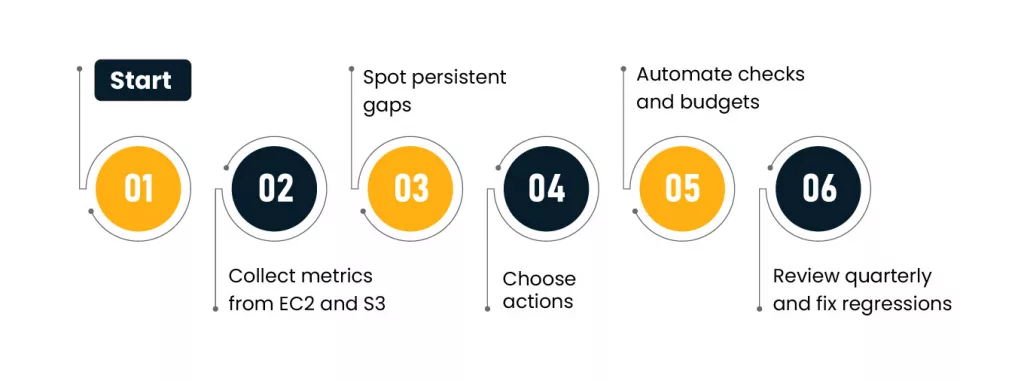
To make this real, tie every byte and vCPU to a service and a business owner.
Step 1: Analyze current EC2 and S3 usage patterns
You need the full picture before you touch anything. Pull metrics and metadata, then line them up with the workloads they support.
What to collect first?
| Signal | Where to get it | Why it matters |
| CPU and memory percent by instance | CloudWatch, agent metrics | Confirms instance size fit |
| Network and IOPS per instance | CloudWatch | Flags bursty traffic and EBS needs |
| Idle time by environment | Scheduler logs, tags | Finds dev and test sprawl |
| Auto Scaling actions | ASG history | Shows scale in and scale out balance |
| Object age and last access | S3 Storage Lens | Shows cold data candidates |
| Storage class mix by bucket | S3 Inventory | Reveals hot vs cold storage drift |
| Replication and versioning | Bucket config | Finds duplicated or stale copies |
Cross check the numbers with context
- Map instances to owners with mandatory tags.
- Separate production, staging, and experiment spaces.
- Attach cost to services, not just accounts.
A fast signal of waste is low median CPU paired with large instance families, which highlights the need for disciplined cloud operations to continuously monitor and optimize workloads. Another is buckets where 80 percent of objects have not been read in months.
Step 2: Identify overprovisioning
Now turn observation into findings. Compare what workloads need with what they consume.
Quick thresholds that reveal trouble
| Area | Symptom | Investigate |
| Compute | Median CPU under 20% for 14 days | Smaller instance type or fewer replicas |
| Compute | Memory under 35% with zero swap | Smaller RAM profile |
| Compute | ASG rarely scales in | Cooldown and policy settings |
| Storage | 70% of bytes are older than 90 days | Colder classes or archival |
| Storage | Many buckets with cross region copies | Failover intent and RTO needs |
| Storage | Object versions kept forever | Version expiration rules |
Where the gap is wide and steady, call it out. The fix belongs in a change plan, not a wish list. This is the moment where AWS workload optimization pays real dividends, since it turns numbers into concrete actions.
Step 3: Apply workload optimization techniques
Pick the smallest safe change first. Roll it out, measure, then continue. Below are the most reliable moves for compute and storage.
EC2 tactics
- Instance sizing that matches reality
Start with recommendations from optimizers, but verify against your own SLOs. Run a canary on a smaller type in one AZ. Watch p95 latency and error rates. If steady, proceed. This is effective right-sizing done with guardrails.
- Pricing model fit
For steady 24×7 services use Savings Plans or reserved capacity. For batch and stateless work consider Spot. Keep interruption tolerant jobs separate from stateful ones. That split keeps risk simple while improving EC2 cost efficiency.
- Scheduling for non production
Turn off dev and staging at night and on weekends. A simple calendar can trim a third of monthly hours for these accounts.
- Auto Scaling discipline
Shorten scale in cooldown where safe. Use step policies that remove more than one instance when traffic falls. Add predictive scaling for known peaks.
- Image and process hygiene
Keep AMIs slim. Remove background agents that consume CPU. Align JVM or runtime flags with the new instance size. Small details restore headroom after a downsize.
Decision matrix for sizing
| Current symptom | Candidate action | Check before rollout |
| CPU 10–25% and memory 20–40% | One size down | Load test and p95 latency |
| CPU 20–40% and high I/O wait | Move to storage optimized | EBS throughput graphs |
| CPU spiky with low average | Enable burstable or adjust scaling | Throttling and cooldown |
| Memory steady at 30% with low swap | One size down RAM profile | GC pauses or OOM history |
These steps keep performance intact while cutting idle capacity. The result is predictable savings that hold up under audits and peak weeks.
S3 tactics
- Tier data by access pattern
Use Intelligent Tiering for datasets with unknown or mixed access. Move known cold content to Glacier Instant Retrieval or lower cost archives. Do not forget retrieval fees in your math.
- Lifecycle rules that age with data
Logs flow to Standard for seven days, then Standard IA for thirty, then archive. Expire raw debug dumps after ninety days unless a ticket references them.
- Reduce duplication with clear sources of truth
Pick a single bucket as the home for each dataset. Publish read only paths for consumers. This trims copies across teams and regions and improves S3 storage management.
- Compression and compact formats
Parquet, ORC, and gzip reduce bytes at rest and bytes scanned. Align file sizes with typical query engines to avoid tiny object storms.
Lifecycle sketch
| Data type | Day 0–7 | Day 8–30 | Day 31–90 | After 90 |
| App logs | S3 Standard | Standard IA | Glacier Instant Retrieval | Expire |
| Analytics snapshots | Standard | Intelligent Tiering | Glacier Flexible Retrieval | Keep 1 year |
| Media backups | Standard | Standard IA | Glacier Deep Archive | Keep 7 years |
Step 4: Monitor and adjust over time
Savings fade if no one watches. Build a steady rhythm and stick to it.
Governance rhythm
| Cadence | What to review | Who attends |
| Weekly | Cost anomalies and sudden growth | FinOps lead, service owners |
| Monthly | Underused instances and bucket growth | Platform team, SRE |
| Quarterly | Renewals, commitments, and design changes | Finance, engineering leaders |
Keep the loop simple.
Automate reports from Budgets and Cost Explorer. Alert on idle compute and runaway buckets. Re run sizing checks after major releases. That keeps sizing discipline a habit, not a one-time event. Done well, this is durable AWS workload optimization rather than a single cleanup sprint.
A short field story
A media service ran transcoding on large compute nodes all month. Jobs landed in bursts after content drops. Average CPU sat at 18 percent. S3 held three copies of source files across two regions.
The team made three changes. First, they split the queue into urgent and bulk. Urgent stayed on on demand. Bulk moved to Spot with graceful interruption handling. Second, they sized the workers down two steps after a one week canary. Third, they moved cold content to Glacier and cleared duplicate buckets. Results in two months: compute spend down 42 percent with steady throughput. Storage spend down 36 percent with faster listings thanks to fewer objects.
The pattern was simple. Measure. Trim. Measure again. That is AWS workload optimization in practice.
Pitfalls to avoid
- Cutting instance size without observing tail latency.
- Moving data to a cold class without modeling retrievals.
- Mixing Spot with stateful nodes in the same Auto Scaling group.
- Letting tags decay. Owners vanish. So does accountability.
- Running pilots that never reach production. Savings stay on the table.
How to start this week?
- Pick one high cost service and one large bucket.
- Label owners and success metrics.
- For compute, trial one size down on one replica. Watch user facing metrics.
- For storage, add one lifecycle rule with a safe initial move.
- Write down what worked and what did not. Repeat next week.
Starter checklist
| Area | Action | Owner | Due |
| Compute | Tag ASGs with service names and owners | Platform | Friday |
| Compute | Canary one size down in staging | SRE | Next sprint |
| Storage | Enable Storage Lens and Inventory | Storage admin | Friday |
| Storage | Add lifecycle rule for logs | Data team | Next sprint |
Closing thoughts
Cloud cost control is not a special project. It is a habit. Look at the same few signals each week. Make one small change. Hold the gains. Over time the curve bends the right way. Teams get the capacity they need. Finance gets fewer surprises. And engineers spend time on features instead of cleaning up unused capacity.
Treat the steps in this guide as a playbook you can run across services. Start where the numbers are obvious and the risk is low. Keep notes. Share results. As the wins stack up you will see budget room return and stress fall. That is the quiet power of AWS workload optimization at scale.
Author


Yogita Jain
Content Lead
Yogita Jain leads with storytelling and Insightful content that connects with the audiences. She’s the voice behind the brand’s digital presence, translating complex tech like cloud modernization and enterprise AI into narratives that spark interest and drive action. With a diverse of experience across IT and digital transformation, Yogita blends strategic thinking with editorial craft, shaping content that’s sharp, relevant, and grounded in real business outcomes. At Cygnet, she’s not just building content pipelines; she’s building conversations that matter to clients, partners, and decision-makers alike.