































Enterprises rely on applications that process events in real time, support continuous updates, and manage large amounts of structured and unstructured data. These environments need systems that adapt quickly to new signals and deliver accurate responses without delays.
This need has increased interest in AI/ML integration in cloud native development, where intelligent models support decisions, automate workflows, and guide application behavior. The cloud-native structure helps teams run models through scalable services, automated pipelines, and flexible compute environments.
This blog explains how AI and machine learning fit into cloud-native systems, how data moves through these pipelines, and what deployment patterns work for enterprise workloads.
Why are AI/ML capabilities becoming essential in cloud-native applications?
AI and machine learning support decisions that depend on accurate processing of operational signals, user activity, and internal processes. Enterprise workloads evolve quickly, and these systems need reliable insights that guide actions across the application.
Some reasons this shift matters:
- Applications receive continuous input from users, devices, and operational systems.
- Many decisions need structured intelligence instead of manual review.
- Systems grow in size, which increases the need for automated analysis.
AI features also influence cloud native product development by supporting new user experiences and internal automation, especially when aligned with structured Cloud-Native Development Services that streamline model integration.
These capabilities handle tasks such as routing, predictions, pattern detection, and operational assistance. As applications scale, AI pipelines help maintain stability and accurate responses.
What does AI/ML integration look like in a cloud-native environment?
AI and machine learning run inside cloud-native environments as dedicated components. Each model sits inside a controlled execution layer and connects to other parts of the system in predictable ways.
Typical elements inside a cloud-native AI workflow include:
- A service that handles predictions
- A pipeline that prepares data
- A storage layer for model artifacts
- A scheduler that manages processing tasks
These components function inside cloud native microservices, which manage scoring tasks, inference logic, or classification work. Microservices help teams maintain modular execution and predictable scaling.
Teams that adopt cloud native development services receive support with orchestration design, data pipelines, and model packaging — capabilities often delivered through enterprise-grade Cloud Engineering Services. This structure gives enterprises clear workflows for training, validation, and deployment.
How do enterprises prepare data for AI/ML in cloud-native systems?
AI workloads depend on organized and validated data. Cloud-native environments help teams move data from source systems into model-ready formats.
Data preparation activities:
- Ingesting signals from internal systems, APIs, and event streams
- Creating feature values that models need
- Validating data accuracy and consistency
- Tracking version history for datasets
Common storage approaches:
- Object storage for large datasets and training files
- Message streams for continuous updates
- Distributed caches for fast retrieval during inference
These structures support AI/ML integration in cloud native development and can be strengthened further through robust Data Analytics & AI Services that streamline ingestion, validation, and feature engineering.
What model deployment patterns work best in cloud-native environments?
Cloud-native systems support several deployment patterns for AI and machine learning models. Each pattern requires clear data flow, predictable scaling, and stable access rules.
Online inference
Applications send live requests to a model service. The service returns predictions with low latency. This pattern helps operational systems that run decision logic with immediate outcomes. Some teams use cloud native deployment automation — a core capability of Cloud Migration & Modernization Services — to release updated versions of these services without interrupting workflow timelines.
Batch inference
Systems process large volumes of input at scheduled intervals. Predictions feed into reports, dashboards, or enrichment pipelines. This pattern helps teams that need periodic insights rather than immediate results.
Model-as-a-service
Teams wrap model execution inside an independent service. Other services call this endpoint as needed. This pattern helps large systems maintain clear boundaries between model logic and application logic.
Edge or near-edge inference
Some applications run models close to where events originate. This pattern helps systems that need stable performance even when network latency increases.
Deployment methods and their use case at a glance
| Deployment Method | When It Is Used | Example Use Case |
| Online inference | Low-latency decisions | Recommendation response |
| Batch inference | Scheduled processing | Fraud scoring batches |
| Model-as-a-service | Shared model logic | Central scoring service |
| Edge inference | Localized execution | Device-level analysis |
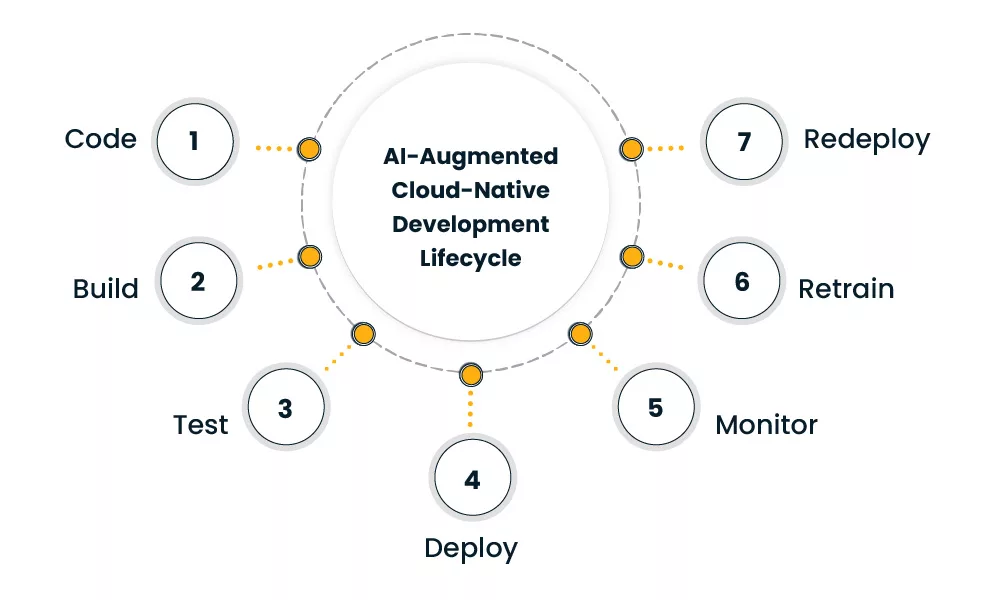
Teams often create deployment workflows that support model testing, gradual rollout, and safe version control. These workflows rely on cloud native deployment automation to manage model lifecycle steps with predictable checks. This integration helps enterprises manage AI workloads inside broader application pipelines.
What runtime and operational tools support AI/ML workflows in cloud-native systems?
AI and machine learning models need constant oversight, and cloud-native environments help teams watch how these models behave as they run across different services.
- Observability tools track performance, model accuracy, and prediction consistency.
- Model drift detection tools help teams understand when models produce results that differ from expected behavior.
- Version trackers help record which models run in each environment.
- Resource governance tools help distribute compute workloads so model activities remain stable during peak traffic.
Since AI services often need high compute power, workload managers assign CPU or GPU capacity when required. These tools also help organizations practice cloud native cost optimization, especially when models run continuously.
Some teams automate scale-down steps to avoid idle resources, which is another area where Cloud Operations & Optimization Services support cost control and stable model operations.
These operational layers work alongside cloud native microservices that handle model requests. This helps maintain predictable routes for inference, logging, and alerting throughout the system.
What does data-driven innovation look like in real enterprise scenarios?
Data-driven innovation appears in several daily workflows. For example, customer-facing systems use AI to provide relevant suggestions, organize product feeds, and support search results. Operational systems use AI to adjust routing decisions, detect emerging risks, or highlight unusual events. Product teams use analytics to understand behavior patterns and release stable improvements.
Some companies use machine learning to guide resource planning or match internal requests with capacity. Others use AI to enrich data and strengthen decision processes inside their cloud native product development initiatives. Infrastructure teams use AI tools to understand usage patterns inside clusters and plan future workloads.
These examples show how AI/ML integration in cloud native development supports enterprise needs. Each system uses data in different ways, but all rely on structured workflows that help applications respond to new information with accuracy.
How do cloud native development services help enterprises adopt AI/ML?
Enterprises often need guidance when integrating AI into cloud-native systems. Coordinating data pipelines, model environments, and access rules requires structured planning.
Here is what cloud native development services support:
- Designing AI-ready infrastructure
- Configuring model environments
- Preparing data workflows
- Creating version control steps for models
- Integrating observability for prediction behavior
These steps help enterprises build long-term AI capabilities. Many teams rely on these services to align technical foundations with the broader goals of AI/ML integration in cloud native development.
Summary for Decision Makers!
AI and machine learning play a noteworthy role in modern cloud-native environments, and enterprises use these capabilities to guide decisions, automate operations, and shape product features that react to new data. Cloud-native systems support these needs by helping teams run models with clarity, predictable scaling, and consistent release of workflows. This structure also gives organizations a steady way to manage data pipelines, deploy models, track behavior, and maintain reliable processes. Over time, AI/ML integration in cloud native development fits naturally into daily engineering routines and supports continuous growth and innovation.
Frequently Asked Questions
Yes. Teams often use dedicated services to maintain clear boundaries and predictable behavior.
Yes. Teams create independent data flows that prepare features and store model-ready inputs.
Version trackers record every update and link it to the deployment history.
No. Some workloads use scheduled or batch processing depending on business needs.
AI workloads often increase compute usage, so teams adjust scaling rules to meet demand.
Author


Yogita Jain
Content Lead
Yogita Jain leads with storytelling and Insightful content that connects with the audiences. She’s the voice behind the brand’s digital presence, translating complex tech like cloud modernization and enterprise AI into narratives that spark interest and drive action. With a diverse of experience across IT and digital transformation, Yogita blends strategic thinking with editorial craft, shaping content that’s sharp, relevant, and grounded in real business outcomes. At Cygnet, she’s not just building content pipelines; she’s building conversations that matter to clients, partners, and decision-makers alike.
